Loading
Form preview
  • US Legal Forms
  • Form Library
  • More Forms
  • More Multi-State Forms
  • Usps Forms Glossary 2013

Get Usps Forms Glossary 2013

How it works

  1. Open form

    Open form follow the instructions

  2. Easily sign form

    Easily sign the form with your finger

  3. Share form

    Send filled & signed form or save

How to fill out the USPS Forms Glossary online

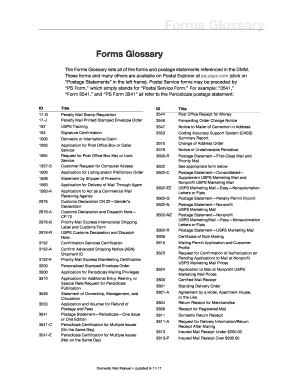
The USPS Forms Glossary provides a comprehensive list of forms and postage statements regularly referenced in the Domestic Mail Manual (DMM). This guide will help users effectively navigate and fill out these forms online with clear instructions tailored to their needs.

Follow the steps to successfully complete the USPS Forms Glossary online.

  1. Press the ‘Get Form’ button to access the form you need, which will open in the editor for your convenience.
  2. Review the list of forms available in the USPS Forms Glossary. Identify the specific form you need based on your mailing or postage requirements.
  3. Carefully fill in all required fields on the form. Ensure that you provide accurate and complete information where necessary.
  4. If applicable, reference the specific instructions for completing each section of the form to avoid any errors.
  5. Once you have filled out the form, take the time to review your entries for accuracy and completeness.
  6. After reviewing, you can save your changes, download the completed form, print it out, or share it as needed.

Start filling out your USPS forms online today for efficient document management!

Get form

Experience a faster way to fill out and sign forms on the web. Access the most extensive library of templates available.

Related content

Forms Glossary | Postal Explorer - USPS
The Forms Glossary lists all of the forms and postage statements referenced in the DMM...
Learn more
Glossary of Postal Terms and Abbreviations
postage—Payment for delivery service that is affixed or imprinted to a mailpiece...
Learn more
Data Collection User's Guide for In-Office Cost...
Oct 1, 2004 — USPS Forms (Q22A2.Cr) Screen ... These chapters are followed by...
Learn more

Related links form

Coventry Reconsideration Form 2014 PRIOR AUTHORIZATION FORM- - Coventry Health Care Ordination ManualDownload PDF - Myrtle Baptist Church Separation Of Dyes By Paper Chromatography - Austin Peay State ... - Apsu

Questions & Answers

Get answers to your most pressing questions about US Legal Forms API.

Contact support

Claiming a lost package with USPS is straightforward. You must fill out the USPS claim form, providing all relevant details including your contact information and tracking number. Additionally, make sure to check the USPS Forms Glossary for any requirements or documents you may need to include, which can help streamline your claim process.

To complete USPS form 1583, begin by providing your name, address, and phone number, along with the name and address of your private mailbox service. You will also need to sign the form in front of a notary. The USPS Forms Glossary offers clear definitions and instructions that can assist you in ensuring all necessary parts of the form are completed correctly.

Filling out a USPS claim form involves entering your personal contact details, the tracking number of the package, and a description of the issue, such as loss or damage. Make sure to provide any relevant receipts and other supporting documents. The USPS Forms Glossary is a valuable resource that can help you understand the form's requirements and improve your chances of a smooth process.

To fill out the USPS claim form, start by providing your contact information and details about the package. You will need to include tracking numbers and specify whether the package was lost, damaged, or missing contents. Refer to the USPS Forms Glossary for guidance on the necessary fields and any required documentation for a successful claim.

Filling out a US customs declaration form requires you to declare the contents of your package accurately. Include details such as item descriptions, values, and reasons for shipping. Refer to the USPS Forms Glossary for clear explanations of any terms or rules that might be confusing. Leveraging this glossary will help ensure your declaration is precise, reducing the chances of delays during customs clearance.

To fill out a USPS customs form correctly, list the items in your package, stating their value and purpose. Be clear and specific to ensure your package meets customs regulations. The USPS Forms Glossary can assist you with definitions of terms and requirements, making the completion of the form less daunting. This step is vital to ensure that your shipment reaches its international destination without delay.

When filling out a postal customs form, start by detailing the items you are shipping, including their value and purpose. It’s crucial to be honest and precise to avoid issues with customs clearance. The USPS Forms Glossary is an excellent resource to clarify any terms you may not understand. This will help you navigate the customs requirements confidently.

Submitting USPS form 3533, which is used for requesting a refund on undeliverable mail, requires you to follow specific instructions. You can submit this form online or at your local post office, ensuring all information is accurate. Make use of the USPS Forms Glossary to navigate terminology and submission guidelines easily. This approach streamlines your submission process and enhances your chances of a quick resolution.

To file USPS form 3526, also known as the International Mail Receiving Permit Application, you can do so directly at your local post office. Ensure that you’ve completed the form fully, as incomplete forms may delay processing. If you need assistance, the USPS Forms Glossary provides valuable information regarding submission procedures. Using the glossary ensures that you follow all necessary steps without missing any details.

Filling in a customs form requires you to provide accurate information about the contents of your package. Begin by clearly describing what you are sending, including quantity and value. Be sure to reference the USPS Forms Glossary for specific terms related to customs requirements. Using this glossary simplifies the process, ensuring you complete the form correctly and efficiently.

Get This Form Now!

Use professional pre-built templates to fill in and sign documents online faster. Get access to thousands of forms.
If you believe that this page should be taken down, please follow our DMCA take down processhere.

Industry-leading security and compliance

US Legal Forms protects your data by complying with industry-specific security standards.
  • In businnes since 1997
    25+ years providing professional legal documents.
  • Accredited business
    Guarantees that a business meets BBB accreditation standards in the US and Canada.
  • Secured by Braintree
    Validated Level 1 PCI DSS compliant payment gateway that accepts most major credit and debit card brands from across the globe.
Get USPS Forms Glossary
  • Adoption
  • Bankruptcy
  • Contractors
  • Divorce
  • Home Sales
  • Employment
  • Identity Theft
  • Incorporation
  • Landlord Tenant
  • Living Trust
  • Name Change
  • Personal Planning
  • Small Business
  • Wills & Estates
  • Packages A-Z
  • Affidavits
  • Bankruptcy
  • Bill of Sale
  • Corporate - LLC
  • Divorce
  • Employment
  • Identity Theft
  • Internet Technology
  • Landlord Tenant
  • Living Wills
  • Name Change
  • Power of Attorney
  • Real Estate
  • Small Estates
  • Wills
  • All Forms
  • Forms A-Z
  • Form Library
  • Legal Hub
  • About Us
  • Help Portal
  • Legal Resources
  • Blog
  • Affiliates
  • Contact Us
  • Delete My Account
  • Site Map
  • Industries
  • Forms in Spanish
  • Localized Forms
  • State-specific Forms
  • Forms Kit
  • Real Estate Handbook
  • All Guides
  • Notarize
  • Incorporation services
  • For Consumers
  • For Small Business
  • For Attorneys
  • USLegal
  • FormsPass
  • pdfFiller
  • signNow
  • altaFlow
  • DocHub
  • Instapage
Form Packages
  • Adoption
  • Bankruptcy
  • Contractors
  • Divorce
  • Home Sales
  • Employment
  • Identity Theft
  • Incorporation
  • Landlord Tenant
  • Living Trust
  • Name Change
  • Personal Planning
  • Small Business
  • Wills & Estates
  • Packages A-Z
Form Categories
  • Affidavits
  • Bankruptcy
  • Bill of Sale
  • Corporate - LLC
  • Divorce
  • Employment
  • Identity Theft
  • Internet Technology
  • Landlord Tenant
  • Living Wills
  • Name Change
  • Power of Attorney
  • Real Estate
  • Small Estates
  • Wills
  • All Forms
  • Forms A-Z
  • Form Library
Customer Service
  • Legal Hub
  • About Us
  • Help Portal
  • Legal Resources
  • Blog
  • Affiliates
  • Contact Us
  • Delete My Account
  • Site Map
  • Industries
  • Forms in Spanish
  • Localized Forms
  • State-specific Forms
  • Forms Kit
Legal Guides
  • Real Estate Handbook
  • All Guides
Prepared for you
  • Notarize
  • Incorporation services
Our Customers
  • For Consumers
  • For Small Business
  • For Attorneys
Our Sites
  • USLegal
  • FormsPass
  • pdfFiller
  • signNow
  • altaFlow
  • DocHub
  • Instapage
Social Media
Call us now toll free:
+1 833 426 79 33
As seen in:
© Copyright 1999-2026 airSlate Legal Forms, Inc. 3720 Flowood Dr, Flowood, Mississippi 39232
  • Your Privacy Choices
  • Terms of Service
  • Privacy Notice
  • Content Takedown Policy
  • Bug Bounty Program
USPS Forms Glossary
This form is available in several versions.
Select the version you need from the drop-down list below.
2022 USPS Forms Glossary
Select form
  • 2022 USPS Forms Glossary
  • 2013 USPS Forms Glossary
Select form