
Open form follow the instructions

Easily sign the form with your finger

Send filled & signed form or save
How to fill out the Vtr 270 online
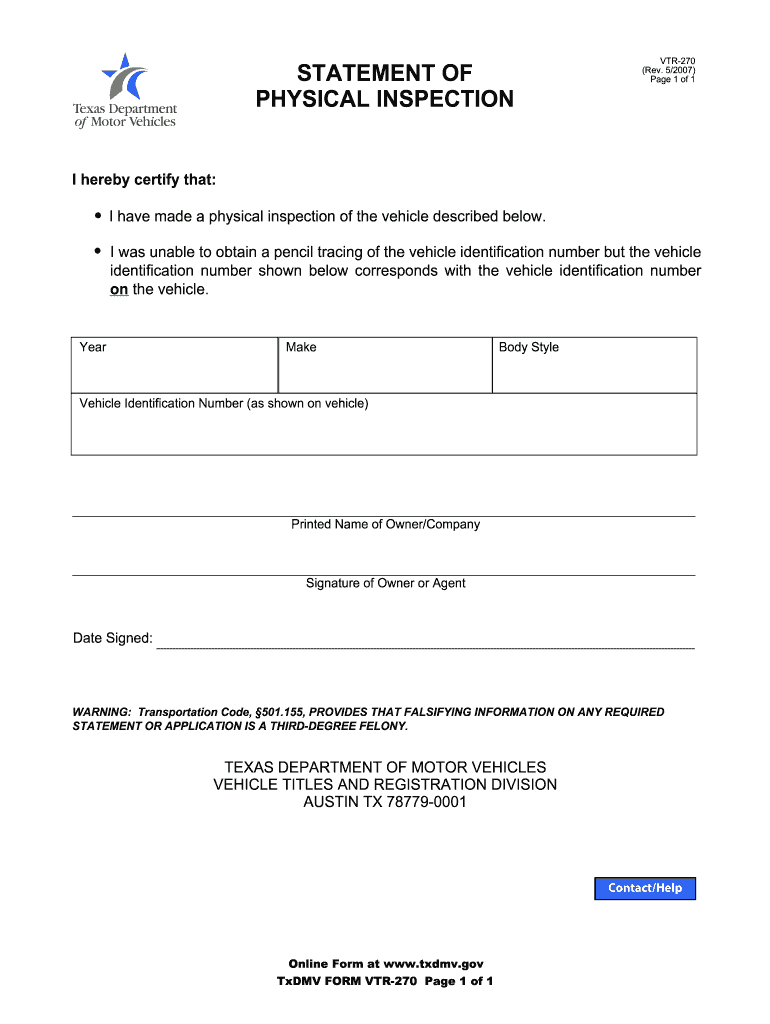
The Vtr 270 form, known as the statement of physical inspection, is essential for certifying the inspection of a vehicle. This guide provides clear and supportive instructions to help users fill out the form accurately and efficiently online.
Follow the steps to complete the Vtr 270 form online.
- Click ‘Get Form’ button to obtain the form and open it in the editor.
- Enter the year of the vehicle in the designated field, ensuring that the information is accurate to avoid any discrepancies.
- Next, specify the make of the vehicle. This is the manufacturer name and should match the documentation for the vehicle.
- Input the body style of the vehicle, such as sedan, coupe, or SUV, in the provided section.
- Locate the field for the vehicle identification number (VIN), and enter the VIN exactly as it appears on the vehicle.
- Below the VIN field, you will find a section for the printed name of the owner or company. Ensure that this is filled out clearly.
- The owner or agent must sign in the designated signature area to validate the inspection.
- Finally, enter the date the form is signed, ensuring it reflects the correct date.
- After completing all fields, you can save any changes made, download the filled form, print it for your records, or share it as needed.
Start filling out your Vtr 270 form online now to ensure a smooth submission.
Experience a faster way to fill out and sign forms on the web. Access the most extensive library of templates available.
Related content
Information. This form may be used by a Texas resident in lieu of a Vehicle Inspection...
VTR-270 (Fig. 11), must be submitted. * Valid proof of financial responsibility, covering...
When you use a digital video camera recorder, set its POWER switch to VCR/VTR. (1) Select...
Get answers to your most pressing questions about US Legal Forms API.
How to read a Texas vehicle registration sticker?
Reading a Texas vehicle registration sticker is straightforward. The sticker displays the expiration date, which indicates when you need to renew your registration. It's important to keep the information current, especially when filling out the VTR 270 form for title changes or registrations.
How to read a Texas certificate of title?
The Texas certificate of title provides vital information about your vehicle, including the VIN, registration date, and owner details. Begin by checking the VIN for accuracy, as it plays a major role in any transfers, including completing the VTR 270. This document is critical for verifying ownership.
How to read a Texas vehicle title?
Reading a Texas vehicle title involves several key sections. Locate the VIN, which uniquely identifies your vehicle, and then find the registered owner’s name. Understanding how to read this document helps you ensure that all information matches when dealing with the VTR 270 or any vehicle title transactions.
How to fill out a Texas title transfer form?
To fill out a Texas title transfer form, you need to gather essential information, such as the VIN, seller’s name, buyer’s name, and odometer reading. Ensure you follow each section accurately, as mistakes may delay your application. Once completed, you can submit the VTR 270 along with any required fees to your local county tax office.
What is a VTR 270 in Texas?
The VTR 270 is a Texas title application form used for vehicle transfers. This form is essential when you buy or sell a vehicle, as it helps document the change of ownership. Completing the VTR 270 correctly ensures that you meet state requirements for registering your vehicle.
How do I read my car title?
To read your car title, start by locating the section that displays the vehicle identification number (VIN), which is crucial for identification. Next, check the name of the registered owner and the make and model of the vehicle. Understanding how to read your title is vital when completing the VTR 270 form for vehicle transactions in Texas.
How do I get a VIN in Texas?
To obtain a VIN in Texas, you must register your vehicle through the Texas Department of Motor Vehicles. You'll typically need the proper documentation, like proof of ownership and the completed VTR 270 certification form. If you’re unsure about the documents needed or the process, our platform is available to provide guidance and access to the necessary forms.
What does VIN certification waived mean on a Texas title?
When a Texas title states that VIN certification is waived, it means that the vehicle does not require a VIN inspection for registration or titling. This situation can arise for various reasons, including the age of the vehicle. Understanding the implications of this waiver can save time during the registration process. Utilizing our services can clarify any questions you might have about the VTR 270 and VIN certification.
What is a Texas power of attorney form VTR 271 or VTR 271 A?
The Texas power of attorney forms VTR 271 and VTR 271 A are legal documents that grant authority to another person to act on your behalf regarding vehicle transactions. These may include signing documents for title transfers and registrations. If you need assistance with these forms or the VTR 270, our user-friendly platform simplifies the process of preparing and submitting your necessary paperwork.
Is Texas going to have no car inspection in 2025?
Currently, there are discussions about potential changes to the vehicle inspection requirements in Texas, but no definitive decision has been made regarding 2025. It's important to keep checking official sources for updates. Should any changes become official, having the VTR 270 certification form ready will be beneficial for vehicle registration and compliance.
Use professional pre-built templates to fill in and sign documents online faster. Get access to thousands of forms.
If you believe that this page should be taken down, please follow our DMCA take down process here.