Loading
Form preview
  • US Legal Forms
  • Form Library
  • More Forms
  • More Multi-State Forms
  • Philips Zoom Rebate 2020

Get Philips Zoom Rebate 2020-2026

How it works

  1. Open form

    Open form follow the instructions

  2. Easily sign form

    Easily sign the form with your finger

  3. Share form

    Send filled & signed form or save

How to fill out the Philips Zoom Rebate online

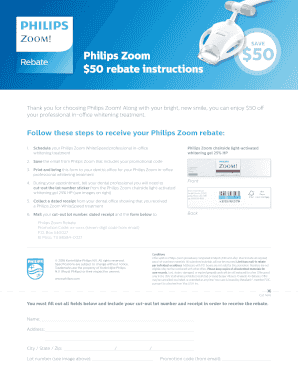
The Philips Zoom Rebate offers users a chance to receive $50 off their professional in-office whitening treatment. This guide provides a step-by-step process to effectively complete the rebate form online and submit it for your discount.

Follow the steps to successfully fill out the Philips Zoom Rebate form online.

  1. Click ‘Get Form’ button to obtain the Philips Zoom Rebate form and open it in your preferred editor.
  2. Fill in your name in the designated field on the form.
  3. Provide your complete address, including street name, apartment number (if applicable), city, state, and zip code.
  4. Locate and enter the lot number from the Philips Zoom whitening gel packaging in the appropriate field.
  5. Input your promotional code, which can be found in the confirmation email from Philips Zoom.
  6. Ensure you have included your cut-out lot number sticker and a dated receipt from your dental office indicating the completion of your Philips Zoom WhiteSpeed treatment.
  7. Review all filled-out fields to ensure accuracy before proceeding.
  8. Once you have verified all information, you can save changes, download or print the completed form, and share it as needed.

Complete your Philips Zoom Rebate form online today to enjoy your discount!

Get form

Experience a faster way to fill out and sign forms on the web. Access the most extensive library of templates available.
Get form

Related content

4829 Buncombe Mission Hospital 943349 Exemption...
Jul 8, 2025 — Therefore, you may proceed to acquire without a certificate of need the...
Learn more
Mft Zoom Lens
zoom, compact zoom lens, mft telephoto zoom, interchangeable zoom lens, mft lens ... Wide...
Learn more
6. TVs (276-337)
Incorporating an 8” flat panel LCD TV with built-in slot-loading DVD player, built-in...
Learn more

Related links form

Fidelis Rewards Novu Com Intake 2005 Authorization Form.doc. Disclosure Authorization Form Authorization Form-Excellus B-1565.doc Appeal.doc. ORDER FORM FOR 253.D0C - People Rit

Questions & Answers

Get answers to your most pressing questions about US Legal Forms API.

Contact support

Typically, you should leave the 16% teeth whitening solution on for about 30 minutes to an hour. This can vary based on your personal comfort level and the guidance of your dentist. Always monitor how your teeth respond to the treatment and adjust the timing if needed. While you're at it, check for possible Philips Zoom Rebate options to reduce your overall whitening costs.

For optimal results, you can use Philips Zoom Nite White 16 about once a week if you have a baseline of sensitivity. However, always consult with your dentist for personalized advice. Consistency is key for maintaining your whitening results. Remember to keep an eye out for any Philips Zoom Rebate promotions that may help you save on future applications.

You should leave Philips Zoom 16% on your teeth for about 30 to 60 minutes, depending on your individual sensitivity and the recommendation of your dental professional. It's crucial to follow their guidelines, as they can provide the best advice based on your dental health. After the treatment, be sure to look out for any sensitivity and adjust future sessions accordingly. Don't forget to check for any Philips Zoom Rebate opportunities available for your whitening treatment!

Yes, Philips Zoom 14% is considered safe for most users when used as directed. The formula undergoes thorough testing to ensure that it is both effective and gentle on your enamel. If you have concerns about sensitivity or specific dental issues, consult your dentist, who can help you utilize the Philips Zoom Rebate to lower your investment in this treatment.

Philips Zoom Day White 14% is a professional teeth whitening product designed to effectively lighten teeth and enhance smiles. This product comes with a convenient at-home use option, allowing you to achieve your desired results in the comfort of your home. With the Philips Zoom Rebate, you can enjoy significant savings while experiencing the benefits of this powerful whitening solution.

When using a Philips Zoom pen for touch-ups, apply a thin layer to your teeth and leave it on for about 15 to 30 minutes. This allows the whitening formula to penetrate effectively, brightening your smile. It is perfect for maintaining your results over time. Before purchasing, check for any available Philips Zoom rebate to enhance your savings on this convenient product.

Generally, you can whiten your teeth with Philips Zoom every few months, depending on your individual needs. Some people might choose to touch up their whitening every six months, while others may require less frequent treatments. Listening to your dental professional's advice is crucial for maintaining optimal results. Consider leveraging Philips Zoom rebate offers for periodic touch-ups.

To use Philips Zoom Whitening 14%, begin by applying the whitening gel to your trays as instructed. Then, wear the trays for the recommended duration, usually around 30 to 60 minutes per session. Regular use will lead to progressively whiter teeth, but be cautious of sensitivity. Utilizing the Philips Zoom rebate can help make this investment more affordable.

Philips Zoom whitening is considered worth it by many due to its effectiveness and quick results. Patients often see significant brightness improvements after just one session, which boosts confidence and enhances smiles. The investment often pays off compared to over-the-counter products that may offer less impressive results. Don’t forget to check for Philips Zoom rebate promotions to maximize your savings.

After completing a Zoom whitening session, you should wait at least 30 minutes before brushing your teeth. This waiting period allows the whitening agents to settle effectively. It is vital to use a soft-bristled toothbrush and a fluoride toothpaste post-treatment to fortify your enamel. Make sure to take full advantage of any Philips Zoom rebate offers to save on aftercare products.

Get This Form Now!

Use professional pre-built templates to fill in and sign documents online faster. Get access to thousands of forms.
Get form
If you believe that this page should be taken down, please follow our DMCA take down processhere.
Get Philips Zoom Rebate
Get form
  • Adoption
  • Bankruptcy
  • Contractors
  • Divorce
  • Home Sales
  • Employment
  • Identity Theft
  • Incorporation
  • Landlord Tenant
  • Living Trust
  • Name Change
  • Personal Planning
  • Small Business
  • Wills & Estates
  • Packages A-Z
  • Affidavits
  • Bankruptcy
  • Bill of Sale
  • Corporate - LLC
  • Divorce
  • Employment
  • Identity Theft
  • Internet Technology
  • Landlord Tenant
  • Living Wills
  • Name Change
  • Power of Attorney
  • Real Estate
  • Small Estates
  • Wills
  • All Forms
  • Forms A-Z
  • Form Library
  • Legal Hub
  • About Us
  • Help Portal
  • Legal Resources
  • Blog
  • Affiliates
  • Contact Us
  • Delete My Account
  • Site Map
  • Industries
  • Forms in Spanish
  • Localized Forms
  • State-specific Forms
  • Forms Kit
  • Real Estate Handbook
  • All Guides
  • Notarize
  • Incorporation services
  • For Consumers
  • For Small Business
  • For Attorneys
  • USLegal
  • FormsPass
  • pdfFiller
  • signNow
  • altaFlow
  • DocHub
  • Instapage
Form Packages
  • Adoption
  • Bankruptcy
  • Contractors
  • Divorce
  • Home Sales
  • Employment
  • Identity Theft
  • Incorporation
  • Landlord Tenant
  • Living Trust
  • Name Change
  • Personal Planning
  • Small Business
  • Wills & Estates
  • Packages A-Z
Form Categories
  • Affidavits
  • Bankruptcy
  • Bill of Sale
  • Corporate - LLC
  • Divorce
  • Employment
  • Identity Theft
  • Internet Technology
  • Landlord Tenant
  • Living Wills
  • Name Change
  • Power of Attorney
  • Real Estate
  • Small Estates
  • Wills
  • All Forms
  • Forms A-Z
  • Form Library
Customer Service
  • Legal Hub
  • About Us
  • Help Portal
  • Legal Resources
  • Blog
  • Affiliates
  • Contact Us
  • Delete My Account
  • Site Map
  • Industries
  • Forms in Spanish
  • Localized Forms
  • State-specific Forms
  • Forms Kit
Legal Guides
  • Real Estate Handbook
  • All Guides
Prepared for you
  • Notarize
  • Incorporation services
Our Customers
  • For Consumers
  • For Small Business
  • For Attorneys
Our Sites
  • USLegal
  • FormsPass
  • pdfFiller
  • signNow
  • altaFlow
  • DocHub
  • Instapage
Social Media
Call us now toll free:
+1 833 426 79 33
As seen in:
© Copyright 1999-2026 airSlate Legal Forms, Inc. 3720 Flowood Dr, Flowood, Mississippi 39232
  • Your Privacy Choices
  • Terms of Service
  • Privacy Notice
  • Content Takedown Policy
  • Bug Bounty Program