Loading
Get Incident Status Summary Ics 209 - Beriecountypagovb 2020-2025
How it works
-

Open form follow the instructions
-

Easily sign the form with your finger
-

Send filled & signed form or save
How to fill out the INCIDENT STATUS SUMMARY ICS 209 - Beriecountypagovb online
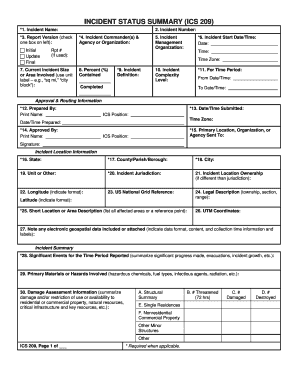
Filling out the INCIDENT STATUS SUMMARY (ICS 209) is crucial for reporting comprehensive information on significant incidents. This guide provides a clear step-by-step approach to navigate the online form, ensuring that users can complete it efficiently and accurately.
Follow the steps to effectively complete your ICS 209 form.
- Press the ‘Get Form’ button to access the ICS 209 form, ensuring you have it open in your preferred editing interface.
- Begin with Block 1 and enter the full name assigned to the incident. Check the spelling for accuracy and ensure it meets reporting criteria.
- In Block 2, input the appropriate incident number following the established guidelines. This number must be unique for the year and relevant to your jurisdiction.
- In Block 3, select the report version by checking the appropriate box: Initial, Update, or Final, depending on your submission context.
- Complete Block 4 by entering the names and agencies of the Incident Commander(s). If there are multiple commanders under a Unified Command, list all names accordingly.
- Proceed to Block 5, indicating the incident management organization responsible for managing the incident.
- Fill in Block 6 with the incident's start date and time, including the time zone; make certain to use the 24-hour format.
- In Block 7, describe the current incident size or area involved using appropriate units, and denote if figures are estimates.
- Complete Blocks 8 to 11, detailing the percent contained or completed, the incident definition, complexity level, and applicable time periods.
- Move to the Approval & Routing Information section. In Block 12, specify who prepared the form. Keep filling information in related blocks like the submission date and approvals.
- In the Incident Location Information section, enter relevant geographic data in Blocks 16-26, ensuring accuracy to support effective communication.
- Describe significant events in Block 28 and enter relevant information for additional summaries on materials, hazards, and damage assessments in subsequent blocks.
- Continue through the remaining blocks providing insight into responder and civilian status, current threats, resources needed, and strategic objectives.
- Review all completed sections for accuracy, ensuring every block that applies has been filled appropriately.
- Finally, save your changes, and consider downloading, printing, or sharing the completed form as necessary.
Start filling out the ICS 209 form online today and ensure your incident reporting is comprehensive and accurate.
The ICS 215A incident safety analysis aims to identify potential hazards and formulate strategies to mitigate risks during an incident. By using this analysis in planning meetings, teams can prioritize safety and ensure the well-being of all responders. This assessment is an essential part of creating a comprehensive incident management plan.
Industry-leading security and compliance
US Legal Forms protects your data by complying with industry-specific security standards.
-
In businnes since 199725+ years providing professional legal documents.
-
Accredited businessGuarantees that a business meets BBB accreditation standards in the US and Canada.
-
Secured by BraintreeValidated Level 1 PCI DSS compliant payment gateway that accepts most major credit and debit card brands from across the globe.