Loading
Open form follow the instructions
Easily sign the form with your finger
Send filled & signed form or save
How to fill out the Blood Pressure Log Online
Filling out the Blood Pressure Log Online is an important step in managing your health. This guide provides clear, step-by-step instructions to help you accurately document your blood pressure readings.
Follow the steps to complete your blood pressure log online.
- Click ‘Get Form’ button to obtain the form and open it in the editor.
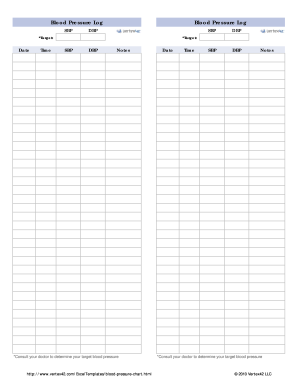
- Begin by entering the date for each blood pressure measurement. Use the format that is specified within the field to ensure consistency.
- Next, record the time of each measurement. This helps in tracking your blood pressure over different periods of the day.
- In the sections labeled SBP (systolic blood pressure) and DBP (diastolic blood pressure), input your corresponding readings. It is advisable to measure your blood pressure at the same time each day for accuracy.
- Identify your target blood pressure, consulting your healthcare provider if necessary. Record this in the designated 'Target' field.
- Utilize the 'Notes' section to add any additional comments or observations related to your readings, such as how you were feeling at the time or any relevant lifestyle changes.
- After completing all the necessary fields, review the information for accuracy and completeness.
- Finally, save your changes, and choose to download, print, or share the completed Blood Pressure Log Online as needed.
Start filling out your Blood Pressure Log Online today to take charge of your health.
Experience a faster way to fill out and sign forms on the web. Access the most extensive library of templates available.
Related content
Try these tips for keeping track of your blood pressure at home: • Always take your...
Please use this log to record the blood pressure and heart rate (pulse) readings you take...
Blood Pressure Record chart in the back of the manual, indicating the date and time of...
Get answers to your most pressing questions about US Legal Forms API.
How do I keep my blood pressure log?
Keeping your blood pressure log involves regular updates and consistent recording of your readings. You can choose digital tools or notebook methods to best fit your lifestyle. Using an online platform like US Legal Forms can make this task easier and more organized for your blood pressure log online.
How do you write a blood pressure chart?
To write a blood pressure chart, create columns for the necessary data—date, time, systolic, and diastolic measurements. You can utilize software or apps for a more visual representation. Having this chart as part of your blood pressure log online helps you see patterns and make informed health decisions.
How do I log my blood pressure?
Logging your blood pressure can be done consistently through a manual log or an online app. Capture your readings along with relevant details like date and time. Platforms like US Legal Forms offer easy solutions to maintain your blood pressure log online.
How do you write a blood pressure record?
To write a blood pressure record, note down the date, time, systolic and diastolic numbers accurately. It's important to maintain consistency in your entries for a better tracking experience. Utilize an online platform for a seamless blood pressure log online.
Is there an app that can track my blood pressure?
Yes, numerous apps are designed to track blood pressure, such as Heart Habit, BP Tracker, and Blood Pressure Diary. These applications allow you to input your readings regularly and view trends. Using one of these can enhance your blood pressure log online.
How to check BP history?
Checking your blood pressure history can be done through your digital log or app. If you have been using an online platform like US Legal Forms, you can easily access your past entries and trends. This historical data is vital for understanding your health over time.
Can I read my blood pressure on my phone?
You cannot directly read your blood pressure on your phone without an appropriate device. However, many health apps can display and track your readings once you enter them manually or sync them from a smart BP cuff. This ensures you have an organized blood pressure log online.
How can I check my BP on my phone?
To check your blood pressure on your phone, you will need a compatible monitoring device that pairs with a health app. Connect the device to your smartphone, and the app will display your readings. You can then save these results in your blood pressure log online for future reference.
What is the app that logs your blood pressure?
Several apps can log your blood pressure effectively, including MyBloodPressure, BP Monitor, and Blood Pressure Companion. These apps allow you to record and track your readings over time, making it a convenient blood pressure log online. Be sure to assess which one best meets your preferences.
How to make a chart to record blood pressure?
To make a chart for recording blood pressure, choose a clear layout that includes columns for date, time, systolic and diastolic readings. You can use tools like spreadsheets or templates offered by online resources such as US Legal Forms, making it easier to maintain your blood pressure log online.
Use professional pre-built templates to fill in and sign documents online faster. Get access to thousands of forms.
If you believe that this page should be taken down, please follow our DMCA take down process here.