Loading
Get Cologuard Order Form 2020-2026
How it works
-

Open form follow the instructions
-

Easily sign the form with your finger
-

Send filled & signed form or save
How to fill out the Cologuard Order Form online
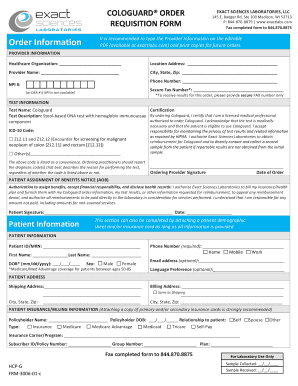
The Cologuard order form is essential for healthcare providers to request the Cologuard test for their patients. This guide provides detailed instructions to help users effortlessly complete the form online, ensuring all necessary information is submitted correctly.
Follow the steps to complete the Cologuard order form online:
- Use the ‘Get Form’ button to obtain the Cologuard order form and open it in the appropriate editor.
- Complete the required provider information section. Enter the healthcare organization's name, location address, provider's name, city, state, zip code, and the National Provider Identifier (NPI) or DEA number if NPI is not available. Include a secure fax number to ensure results are sent appropriately.
- Fill in the patient information section carefully. Record the patient ID or medical record number (MRN), the patient’s first and last name, date of birth in the format mm/dd/yyyy, and sex. It is important to note that you may attach a patient demographic sheet if necessary.
- Indicate the preferred method for follow-up contact with the patient by selecting either phone or email. Provide the patient’s phone number and, optionally, their email address.
- In the test information section, confirm that the test name is Cologuard and that the description matches the stool-based DNA test with hemoglobin immunoassay. Select the primary ICD-9 code for special screening and include a secondary code if applicable.
- In the certification section, ensure you certify that you are a licensed medical professional authorized to order Cologuard. Acknowledge the medical necessity of the test and your responsibility for privacy compliance per HIPAA. Provide your signature and the date of the order.
- Complete the patient address section, ensuring the shipping and billing addresses are filled out accurately. If the billing address is the same as the shipping address, indicate this.
- Fill in the patient insurance and billing information. Include the policyholder's name, date of birth, relationship to the patient, and type of insurance. It is important to attach a copy of the insurance card or provide detailed information.
- Review the patient assignment of benefits notice section. Obtain the patient's signature and date to authorize the lab to bill the insurance and furnish requested information.
- Once all sections are completed, save your changes. You may then download, print, or share the completed form as required.
Take the next step in providing quality care by completing the Cologuard order form online today.
To request your Cologuard results, contact the healthcare provider who prescribed the test. They have the ability to access your results and will discuss them with you during a follow-up appointment. Ensure you have your Cologuard order form handy, as it may help speed up the process.