Open form follow the instructions
Easily sign the form with your finger
Send filled & signed form or save
How to fill out the Credit Card Authorization Form Ontario online
Filling out the Credit Card Authorization Form Ontario online is an essential step for users needing to authorize payment transactions. This guide provides clear instructions on how to successfully complete each section of the form with accuracy and ease.
Follow the steps to complete the Credit Card Authorization Form Ontario online
- Click ‘Get Form’ button to obtain the form and open it in the editor.
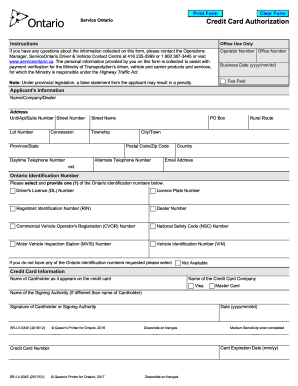
- Begin by providing the applicant's information, including the name of the individual or company, the operator number, office number, and address. Make sure to fill in the street number, name, city, postal code, and country accurately.
- Next, fill in your email address along with daytime and alternate phone numbers. This information is crucial for communication related to your authorization.
- You must provide one of the Ontario identification numbers listed, such as a driver's licence number or vehicle identification number. If you do not have these, check the 'Not Available / None of the above' box.
- In the credit card information section, indicate the name of the credit card company and print the cardholder's name as it appears on the card. Choose the type of credit card from Visa, Mastercard, or American Express.
- Provide the signing authority's name if it differs from the cardholder's, then sign and date the form. Ensure the signature is clear.
- Finally, review the completed form to ensure that all details are correct. You can then save changes, download, print, or share the form as needed.
Complete your Credit Card Authorization Form Ontario online today!
Experience a faster way to fill out and sign forms on the web. Access the most extensive library of templates available.
Related content
Credit Card Authorization - Provide all of the information below. Name (as it appears on...
... authorization from the cardholder permitting use of the account is required. Download...
To request service, contact MSA at 1-800-672-2222 or canada.cs@MSAsafety.com, provide...
Get answers to your most pressing questions about US Legal Forms API.
How do I get a 6-digit authorization code?
To get a 6-digit authorization code, you generally need to process a payment using your credit card through a secure payment system. Upon approval, a unique 6-digit code will be generated for that transaction. To assist in this process, using a Credit Card Authorization Form Ontario can ensure you have all necessary details recorded efficiently.
What is your authorization code?
An authorization code is a unique identifier assigned to a specific transaction. It confirms that the payment has been approved and provides a reference for both the merchant and the cardholder. When using a Credit Card Authorization Form Ontario, ensure to record the authorization code related to the transaction for accurate record-keeping.
How to get a credit card authorization code?
You can get a credit card authorization code by processing a payment through your payment gateway or processor. Once you enter the credit card details and the transaction is approved, the system will provide an authorization code. Using a Credit Card Authorization Form Ontario during this process can ensure you record all essential information for future reference.
How to take credit card authorization?
To take credit card authorization, you should first collect the payer's credit card information along with their consent. Then, submit this information through your payment processing platform. Completing a Credit Card Authorization Form Ontario can help you capture necessary data, ensuring both security and compliance throughout the authorization process.
How do I get my credit card authorization code?
To get your credit card authorization code, you must typically initiate a transaction with your card details. If the payment is approved, the authorization code will be generated automatically and displayed in your payment confirmation. Ensure to keep a Credit Card Authorization Form Ontario for your records; this can support your transaction details.
How can I get an authorization code?
To obtain an authorization code, you typically need to submit a transaction through your payment processor. After entering the necessary payment details, the system generates an authorization code if the transaction is approved. Using a Credit Card Authorization Form Ontario can streamline this process, ensuring you have proper documentation for reference.
What is the credit card transaction authorization process?
The credit card transaction authorization process involves verifying the cardholder's details to ensure they are legitimate. When you submit a Credit Card Authorization Form Ontario, the merchant will check your details with the credit card issuer. This process helps to prevent fraud and ensures the transaction is secure, benefiting both parties.
How do I fill out an authorization form?
To fill out an authorization form, start by providing your basic personal information, such as your name and contact details. Next, clearly specify the authorization permissions, along with any relevant information required for the particular transaction. Finally, review the form to confirm all details are accurate before signing it.
Is it safe to fill out a credit card authorization form?
Filling out a Credit Card Authorization Form Ontario is generally safe, especially when done through secure platforms. Always verify that the website or provider is reputable before entering your information. Using US Legal Forms can further ensure that you're following best practices for protecting your financial details.
How do I fill out a credit card authorization form?
Filling out a credit card authorization form involves entering your relevant details, including your name and billing information. Be sure to include the credit card number, expiration date, and signature as confirmation of your authorization. Following these steps helps ensure your transactions remain secure and properly authorized.
Use professional pre-built templates to fill in and sign documents online faster. Get access to thousands of forms.
If you believe that this page should be taken down, please follow our DMCA take down process here.