Get Green Dot Dispute 2020-2026
How it works
-

Open form follow the instructions
-

Easily sign the form with your finger
-

Send filled & signed form or save
How to fill out the Green Dot Dispute online
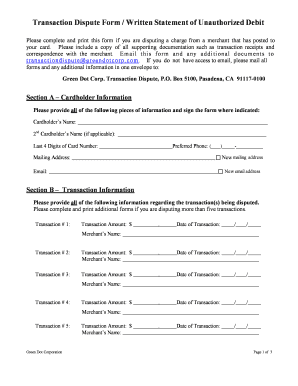
This guide provides clear instructions on how to fill out the Green Dot Dispute form online. Whether you are disputing an unauthorized charge or an error in a transaction, following this comprehensive guide will help ensure you complete the process correctly.
Follow the steps to complete the Green Dot Dispute form effectively.
- Click ‘Get Form’ button to obtain the form and open it in the editor. This action allows you to access the Green Dot Dispute form you need for your transaction dispute.
- In Section A, provide the requested cardholder information. Include your name, card number, daytime phone, and mailing address. If there is a second cardholder, include their name as well, and indicate if the address is new.
- Move to Section B to enter transaction information. List each disputed transaction by providing the transaction amount, date, and merchant's name. If you are disputing more than five transactions, complete additional forms as necessary.
- In Section C, indicate the dispute reason for each transaction. Reference the numbers from Section B and detail your claims. You may need to provide further information about unsuccessful contact with the merchant or the nature of the dispute.
- If you have a claim number from a previous phone submission, enter it in Section D. If you have not submitted any dispute over the phone, this section can be left blank.
- In Section E, sign the form where indicated. Ensure you date the signature accurately. If applicable, the second cardholder should also sign and date the form.
- After completing the form, save your changes. You can print or share the form as necessary. Ensure all supporting documents are included before submitting.
Complete your Green Dot Dispute form online and ensure your concerns are addressed.
Green Dot disputes generally take about 10 to 90 days to resolve, depending on the complexity of the case. After filing your Green Dot dispute, you should receive updates regarding its status. It's important to provide accurate information during the process to facilitate a quicker resolution. To simplify your dispute experience, consider exploring the resources available at US Legal Forms that provide guidance on these matters.