We use cookies to improve security, personalize the user experience, enhance our marketing activities (including cooperating with our marketing partners) and for other business use.
Click "here" to read our Cookie Policy. By clicking "Accept" you agree to the use of cookies. Read less
Read more
Accept
Loading
Form preview
  • US Legal Forms
  • Form Library
  • More Forms
  • More Multi-State Forms
  • Ergonomics Plus Rula Employee Assessment Worksheet 2013

Get Ergonomics Plus Rula Employee Assessment Worksheet 2013-2025

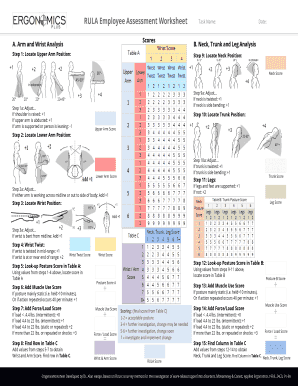
RULE Employee Assessment Worksheets Name:Scores. Arm and Wrist Analysis. Neck, Trunk and Leg AnalysisStep 1: Locate Upper Arm Position:+1Step 9: Locate Neck Position:+1+2+2Date:+2+3Neck Score+4 +3Step.

How it works

  1. Open form

    Open form follow the instructions

  2. Easily sign form

    Easily sign the form with your finger

  3. Share form

    Send filled & signed form or save

How to fill out the Ergonomics Plus RULA Employee Assessment Worksheet online

The Ergonomics Plus RULA Employee Assessment Worksheet is an important tool for evaluating ergonomic risk factors in the workplace. This guide provides clear, step-by-step instructions to help you complete the form accurately and effectively.

Follow the steps to fill out the Ergonomics Plus RULA Employee Assessment Worksheet online

  1. Use the ‘Get Form’ button to access the Ergonomics Plus RULA Employee Assessment Worksheet and open it in your editing tool.
  2. Begin with section A, which focuses on arm and wrist analysis. Specify the position of the upper arm, lower arm, and wrist according to given criteria, following the scoring instructions provided.
  3. For each position, apply adjustments as needed. For example, if the shoulder is raised, add the appropriate score. Be sure to accurately document each measurement.
  4. Move to section B, which covers neck, trunk, and leg analysis. Similar to section A, identify the positions and apply necessary adjustments to calculate scores accurately.
  5. Once all positions are assessed, look up your scores in Table A and Table B to determine posture scores for both arms and neck, trunk, and legs.
  6. Add the muscle use score based on whether the posture is static for an extended period or if actions are repeated frequently.
  7. Calculate the force/load score based on the weight handled, using the criteria listed in the worksheet.
  8. Finally, find the corresponding row and column in Table C to get the overall RULA score, which will help determine if ergonomic changes are necessary.
  9. Review all entries for accuracy and completeness before saving your changes, downloading, printing, or sharing the completed worksheet.

Complete your Ergonomics Plus RULA Employee Assessment Worksheet online today!

Get form

Experience a faster way to fill out and sign forms on the web. Access the most extensive library of templates available.
Get form

Related content

Improving Work Surroundings through Ergonomics
by AEAT WORK — Be sure to ask for support from ergonomics experts in the workplace...
Learn more
Rula Employee Assessment Worksheet
Ergonomics Plus resource A Step by Step Guide to the RULA Assessment Tool. A Step by Step...
Learn more

Related links form

NRCS West Virginia Pollinator Handbook - The Xerces Society - Xerces Voluntary And Informed Consent For Disclosure Of Health Care ... Learning Ally Application Musicares Bapplicationb For Hurricane Sandy Relief Fund - GRAMMYorg

Questions & Answers

Get answers to your most pressing questions about US Legal Forms API.

Contact support

Interpreting a RULA score involves understanding what levels indicate different degrees of risk. A higher score reflects greater postural strain and potential injury risk, while a lower score suggests safer work practices. The Ergonomics Plus RULA Employee Assessment Worksheet helps break down these scores, allowing you to make informed decisions on ergonomic improvements.

The ergonomic rating scale evaluates the risk associated with various work-related tasks. It ranks postures, repetitions, and loads to assign a score that reflects the urgency of ergonomic improvements. With the Ergonomics Plus RULA Employee Assessment Worksheet, your team can easily navigate this scale, helping to prioritize adjustments that promote health and productivity in the workplace.

The score on the RULA assessment is determined by analyzing the observed postures, forces, and types of tasks performed by employees. The Ergonomics Plus RULA Employee Assessment Worksheet provides a structured format to calculate this score systematically. Higher scores indicate a need for ergonomic interventions, while lower scores suggest a safer working environment.

A RULA score of 7 indicates a high level of risk for musculoskeletal disorders due to the assessed ergonomics. This score suggests that immediate action is necessary to reduce exposure to harmful postures or repetitive movements. Utilizing the Ergonomics Plus RULA Employee Assessment Worksheet will help you create a strategy to improve working conditions and lower the score over time.

To use the RULA assessment, first observe the employee performing their tasks, noting their posture and movements. You then record any discomfort or strain using the Ergonomics Plus RULA Employee Assessment Worksheet, which guides you through scoring based on the observed behaviors. This organized approach helps you clearly identify areas needing improvement and supports employee wellness.

Conducting an ergonomic assessment involves five key steps: identify the tasks being performed, observe employee postures and movements, use the Ergonomics Plus RULA Employee Assessment Worksheet to collect data, analyze the results, and recommend improvements. Each step builds on the previous one, ensuring a comprehensive evaluation of the work environment. By following these steps, you promote a safer and healthier workplace.

To use the RULA assessment, first gather information about the tasks being performed and the posture of employees. With the Ergonomics Plus RULA Employee Assessment Worksheet, record observations and scores based on the RULA methodology. This structured approach helps prioritize workplace improvements for better ergonomics and employee comfort.

Completing an ergonomic assessment involves evaluating job tasks to identify risk factors that may lead to injuries. Start by observing worker posture, movements, and types of tasks performed. Utilizing the Ergonomics Plus RULA Employee Assessment Worksheet simplifies this process, providing a clear format to document your findings and propose improvements.

RULA in ergonomics refers to a structured assessment tool aimed at identifying risks associated with upper body work tasks. It provides a scoring system to evaluate posture and force factors. Using the Ergonomics Plus RULA Employee Assessment Worksheet enables you to pinpoint problem areas and implement preventive measures.

RULA stands for Rapid Upper Limb Assessment. It is a systematic method for evaluating ergonomic risks related to upper body tasks. By incorporating the Ergonomics Plus RULA Employee Assessment Worksheet into your safety evaluations, you can respond quickly and effectively to ergonomic concerns.

Get This Form Now!

Use professional pre-built templates to fill in and sign documents online faster. Get access to thousands of forms.
Get form
If you believe that this page should be taken down, please follow our DMCA take down processhere.

Industry-leading security and compliance

US Legal Forms protects your data by complying with industry-specific security standards.
  • In businnes since 1997
    25+ years providing professional legal documents.
  • Accredited business
    Guarantees that a business meets BBB accreditation standards in the US and Canada.
  • Secured by Braintree
    Validated Level 1 PCI DSS compliant payment gateway that accepts most major credit and debit card brands from across the globe.
Get Ergonomics Plus RULA Employee Assessment Worksheet
Get form
Form Packages
Adoption
Bankruptcy
Contractors
Divorce
Home Sales
Employment
Identity Theft
Incorporation
Landlord Tenant
Living Trust
Name Change
Personal Planning
Small Business
Wills & Estates
Packages A-Z
Form Categories
Affidavits
Bankruptcy
Bill of Sale
Corporate - LLC
Divorce
Employment
Identity Theft
Internet Technology
Landlord Tenant
Living Wills
Name Change
Power of Attorney
Real Estate
Small Estates
Wills
All Forms
Forms A-Z
Form Library
Customer Service
Terms of Service
Privacy Notice
Legal Hub
Content Takedown Policy
Bug Bounty Program
About Us
Help Portal
Legal Resources
Blog
Affiliates
Contact Us
Delete My Account
Site Map
Industries
Forms in Spanish
Localized Forms
State-specific Forms
Forms Kit
Legal Guides
Real Estate Handbook
All Guides
Prepared for You
Notarize
Incorporation services
Our Customers
For Consumers
For Small Business
For Attorneys
Our Sites
US Legal Forms
USLegal
FormsPass
pdfFiller
signNow
airSlate WorkFlow
DocHub
Instapage
Social Media
Call us now toll free:
+1 833 426 79 33
As seen in:
  • USA Today logo picture
  • CBC News logo picture
  • LA Times logo picture
  • The Washington Post logo picture
  • AP logo picture
  • Forbes logo picture
© Copyright 1997-2025
airSlate Legal Forms, Inc.
3720 Flowood Dr, Flowood, Mississippi 39232
Form Packages
Adoption
Bankruptcy
Contractors
Divorce
Home Sales
Employment
Identity Theft
Incorporation
Landlord Tenant
Living Trust
Name Change
Personal Planning
Small Business
Wills & Estates
Packages A-Z
Form Categories
Affidavits
Bankruptcy
Bill of Sale
Corporate - LLC
Divorce
Employment
Identity Theft
Internet Technology
Landlord Tenant
Living Wills
Name Change
Power of Attorney
Real Estate
Small Estates
Wills
All Forms
Forms A-Z
Form Library
Customer Service
Terms of Service
Privacy Notice
Legal Hub
Content Takedown Policy
Bug Bounty Program
About Us
Help Portal
Legal Resources
Blog
Affiliates
Contact Us
Delete My Account
Site Map
Industries
Forms in Spanish
Localized Forms
State-specific Forms
Forms Kit
Legal Guides
Real Estate Handbook
All Guides
Prepared for You
Notarize
Incorporation services
Our Customers
For Consumers
For Small Business
For Attorneys
Our Sites
US Legal Forms
USLegal
FormsPass
pdfFiller
signNow
airSlate WorkFlow
DocHub
Instapage
Social Media
Call us now toll free:
+1 833 426 79 33
As seen in:
  • USA Today logo picture
  • CBC News logo picture
  • LA Times logo picture
  • The Washington Post logo picture
  • AP logo picture
  • Forbes logo picture
© Copyright 1997-2025
airSlate Legal Forms, Inc.
3720 Flowood Dr, Flowood, Mississippi 39232