Loading
Get Gde 79 Form 2020-2026
How it works
-

Open form follow the instructions
-

Easily sign the form with your finger
-

Send filled & signed form or save
How to fill out the Gde 79 Form online
The Gde 79 form, also known as the Notice of Vacancies, is essential for gathering information about vacant educator positions in schools. This guide provides clear, step-by-step instructions on how to complete the form online, ensuring that users can submit their information accurately and efficiently.
Follow the steps to complete the Gde 79 Form online:
- Click ‘Get Form’ button to obtain the form and open it in the editor.
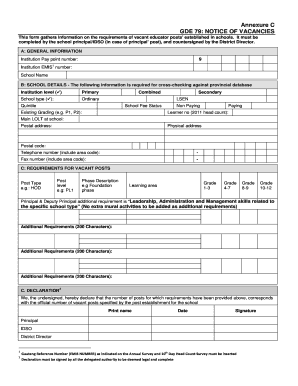
- Begin by entering the general information in Section A. Fill in the institution pay point number, EMIS number, and school name.
- Proceed to Section B and provide school details. Specify the institution level and type, including options such as primary, ordinary, combined, or LSEN. Indicate the existing grading and school fee status, along with learner numbers and languages of learning and teaching.
- In Section C, outline the requirements for vacant posts. Specify the post type, post level, and phase description. Fill out the learning areas for each grade phase, ensuring you adhere to the character limits for additional requirements.
- Complete the declaration section by having all required parties, including the principal, IDSO, and district director, print their names, sign, and date the form.
- Finally, review all entries for accuracy, and once satisfied, save changes, download, print, or share the completed form as necessary.
Complete the Gde 79 Form online now and ensure a smooth submission of your vacancy requirements.
In a customs declaration statement, write a brief description of each item you are bringing into the country, including its estimated value. Clearly indicate if any items are gifts. By providing factual and complete information, particularly for the Gde 79 Form, you will ensure compliance with customs regulations.