Loading

Open form follow the instructions

Easily sign the form with your finger

Send filled & signed form or save
How to fill out the Composite Claim Form In Death Cases In Word Format online
Filling out the Composite Claim Form in death cases is a crucial process to ensure that the claims are handled efficiently. This guide aims to provide you with a clear understanding of each step involved in completing the form accurately online.
Follow the steps to complete your form with ease.
- Click the ‘Get Form’ button to obtain the form and open it in your chosen editor.
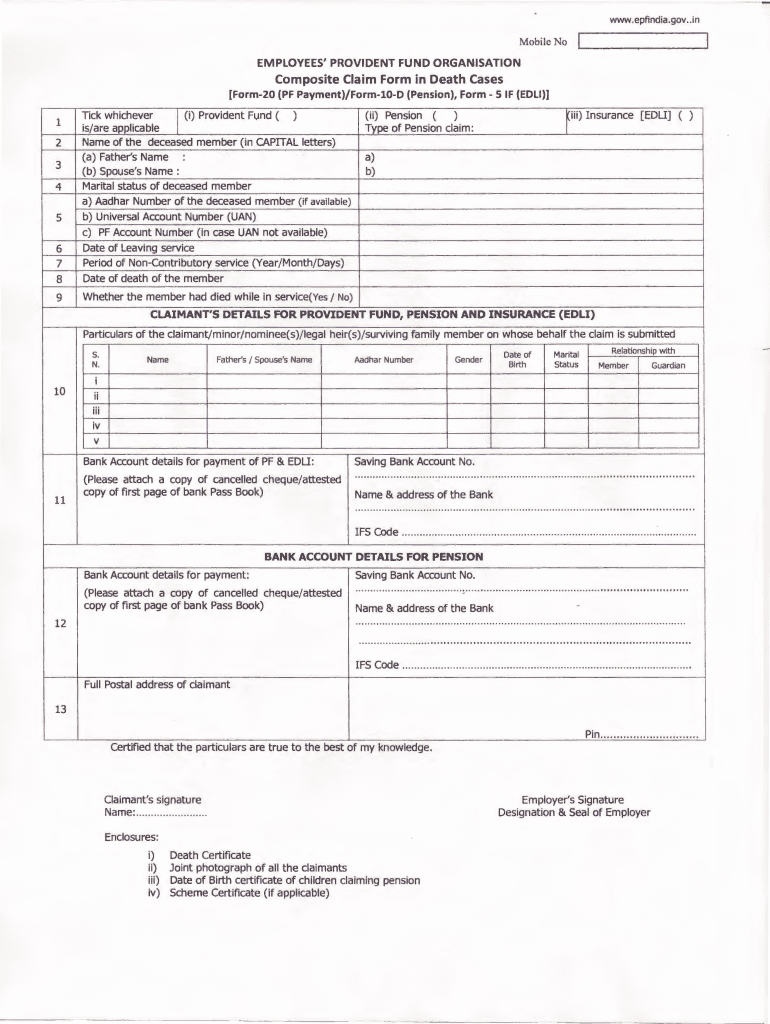
- In the first section, select the applicable options by ticking the relevant boxes: Provident Fund, Pension, or Insurance. Ensure that you provide the name of the deceased member in capital letters along with their father's and spouse's names.
- Indicate the marital status of the deceased member and fill in their Aadhaar Number and Universal Account Number (UAN). If UAN is not available, provide the PF Account Number. Also, include the date of leaving service and the date of death of the member.
- Answer whether the member died while in service by selecting 'Yes' or 'No' as applicable.
- Provide the claimant's details, including the names, father's or spouse's name, Aadhaar Number, gender, date of birth, marital status, relationship with the deceased member, and the guardian's name if appropriate.
- Fill out the bank account details for the payment of Provident Fund and Insurance, including the saving bank account number and the name and address of the bank along with the IFS code. Remember to attach a copy of a canceled cheque or an attested copy of the bank passbook's first page.
- Repeat the previous step for the pension payment, ensuring all details are accurate and consistent.
- Complete the postal address of the claimant, including the pin code.
- Sign and date the form, certifying that all particulars are true to the best of your knowledge. Include the signatures of the employer along with their designation and seal if required.
- Gather all necessary enclosures such as the death certificate, joint photograph of all claimants, date of birth certificates of children claiming pension, and scheme certificate if applicable.
- Once you have filled out the form and attached the necessary documents, save any changes, then download, print, or share the form as needed.
Start completing your Composite Claim Form online today to ensure timely processing of your claims.
Experience a faster way to fill out and sign forms on the web. Access the most extensive library of templates available.
Related content
Sep 11, 2025 — The executor of a decedent's estate uses Form 706 to figure the estate...
In either case the Form CMS-1500 claim shows the Healthcare Common. Procedure Coding...
This transmittal introduces Chapter 40, Hospital and Hospital Health Care Complex Cost...
Get answers to your most pressing questions about US Legal Forms API.
How to claim provident fund for deceased?
To claim the provident fund for a deceased individual, complete the Composite Claim Form In Death Cases In Word Format. This form guides you through the necessary steps and required documentation, including proof of death and identification of the claimant. Submit the completed form to the EPFO to initiate your claim.
What is the amount of death claim in EPFO?
The death claim amount in EPFO is determined based on the deceased's accumulated provident fund balance. Typically, the nominee receives this amount upon approval of the Composite Claim Form In Death Cases In Word Format. The total includes the PF contributions made during the individual's employment.
How to withdraw PF pension amount?
To withdraw the PF pension amount, you must complete the Composite Claim Form In Death Cases In Word Format. This form facilitates the withdrawal process by consolidating required information and documentation. After filling out the form, submit it to the relevant EPFO office for processing.
How to claim PF amount in case of death?
In the unfortunate event of death, claiming the PF amount involves submitting the Composite Claim Form In Death Cases In Word Format. Gather all necessary documents, including the deceased's identification and death certificate. Submit these documents alongside the form to the EPFO office to begin the claim process.
How to fill a death claim form?
Filling out a death claim form requires attention to detail. Start by obtaining the Composite Claim Form In Death Cases In Word Format from the EPFO website. Ensure you provide accurate personal information, attach the death certificate, and include identification for the claimant. Double-check the form before submission to avoid delays.
How to claim PF amount after death?
To claim the PF amount after a beneficiary's death, you need to fill out the Composite Claim Form In Death Cases In Word Format. This form collects essential details such as the deceased's information and the claimant's details. After completing the form, submit it to the EPFO office with necessary documents, including the death certificate.
How to fill composite claim form in death case?
To fill out the composite claim form in a death case, start by accurately entering the deceased's personal details and policy information. Next, add details related to the claim and attach any required documents like the death certificate. Using the Composite Claim Form In Death Cases In Word Format will provide you with a well-structured layout, making this task straightforward and manageable.
What is the composite form?
A composite form is a consolidated document that combines multiple claim forms into a single format for ease of submission. It simplifies the claims process by allowing claimants to report various types of claims on one form. Utilizing the Composite Claim Form In Death Cases In Word Format enhances your ability to provide comprehensive information efficiently.
How do I submit a basis of claim form?
To submit a basis of claim form, start by completing all required sections with accurate information. Depending on the organization, submissions may be made online or via traditional mail. To ensure a smooth submission process, you can leverage the Composite Claim Form In Death Cases In Word Format to help clearly outline your claim.
How do I submit a composite claim form?
Submitting a composite claim form involves filling out the required details accurately and completely. Once your form is ready, check if you can submit it online through the insurer's platform or if you must mail it to a specific address. For better organization, you can utilize the Composite Claim Form In Death Cases In Word Format available on uslegalforms to streamline your submission process.
Use professional pre-built templates to fill in and sign documents online faster. Get access to thousands of forms.
If you believe that this page should be taken down, please follow our DMCA take down process here.