Loading
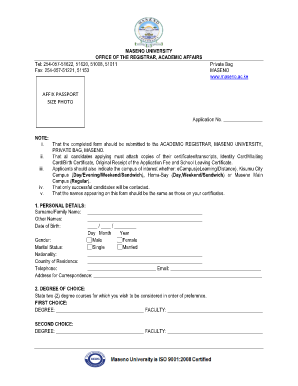
Get Application Mmust Ac Ke 2020-2026
How it works
-

Open form follow the instructions
-

Easily sign the form with your finger
-

Send filled & signed form or save
How to fill out the Application Mmust Ac Ke online
This guide provides a clear, step-by-step process for completing the Application Mmust Ac Ke online. We aim to assist users in accurately filling out the necessary fields to ensure a smooth application experience.
Follow the steps to successfully complete your application
- Locate and press the 'Get Form' button to initiate the process of obtaining the Application Mmust Ac Ke form.
- Begin with Section 1, titled 'Personal Details.' Fill in your surname, other names, date of birth, gender, marital status, nationality, country of residence, telephone number, email, and correspondence address. Ensure that the information provided matches your official documents.
- Proceed to Section 2, 'Degree of Choice.' Clearly state your first and second choice of degree programs, including the respective faculties. Make sure to list these in your order of preference.
- In Section 3, 'Academic Background,' provide your academic qualifications. For the Kenya Certificate of Secondary Education and any equivalent exams, include details such as the last school attended, admission and completion dates, examination year, index number, and grades.
- If applicable, fill in the details required for the Kenya Advanced Certificate of Education. Similar information will be needed as in the previous step, including school attended, admission and graduation dates, and exam results.
- Continue to Section 4, 'Professional or Other Qualifications.' Here, detail any professional qualifications you possess, including where you obtained them, the dates, and the certificate awarded. Attach the relevant documentation as proof.
- In Section 5, 'Employment History,' list your relevant work experience, specifying employment dates, job titles, and any additional details that showcase your experience.
- If applicable, complete Section 6, 'Academic Referees.' Provide the names, contacts, and designations of two academic referees who can vouch for your qualifications.
- Finally, read through the declaration statement carefully before signing and dating the application form. Ensure that all information is accurate and complete to avoid any issues with your application.
- Once all fields are filled out accurately, save your changes, and proceed to download, print, or share the completed form as required.
Complete your application online today to ensure your timely submission.
Related links form
To download your admission letter from KUCCPs, log into the KUCCPs portal using your credentials. Follow the prompts to verify your details and then access your admission letter. This process is integral to the Application Mmust Ac Ke, ensuring you have the necessary documents to proceed with your studies.
Industry-leading security and compliance
US Legal Forms protects your data by complying with industry-specific security standards.
-
In businnes since 199725+ years providing professional legal documents.
-
Accredited businessGuarantees that a business meets BBB accreditation standards in the US and Canada.
-
Secured by BraintreeValidated Level 1 PCI DSS compliant payment gateway that accepts most major credit and debit card brands from across the globe.