O APPLICATION(S) WILL BE ACCEPTED IF ANY OF THE BELOW-MENTIONED REQUIREMENTS ARE OUTSTANDING. PLEASE NOTE THAT THE REGISTRATION FEE IS NON-REFUNDABLE. 1. Entity documentation required for registration: 1.1. Partnership - Partnership Agreement MUST BE DRAFTED BY AN ATTORNEY 1.2. Trust - Trust Documents MASTER OF THE HIGH COURT OR 1.3. New Business registration documents as per CIPC 2. Individual documentation required from each Member, Director, Partner, Trustee 2.1. Suretyship Form (SI.
Loading

Open form follow the instructions

Easily sign the form with your finger

Send filled & signed form or save
How to fill out the ZA SIRA-2 online
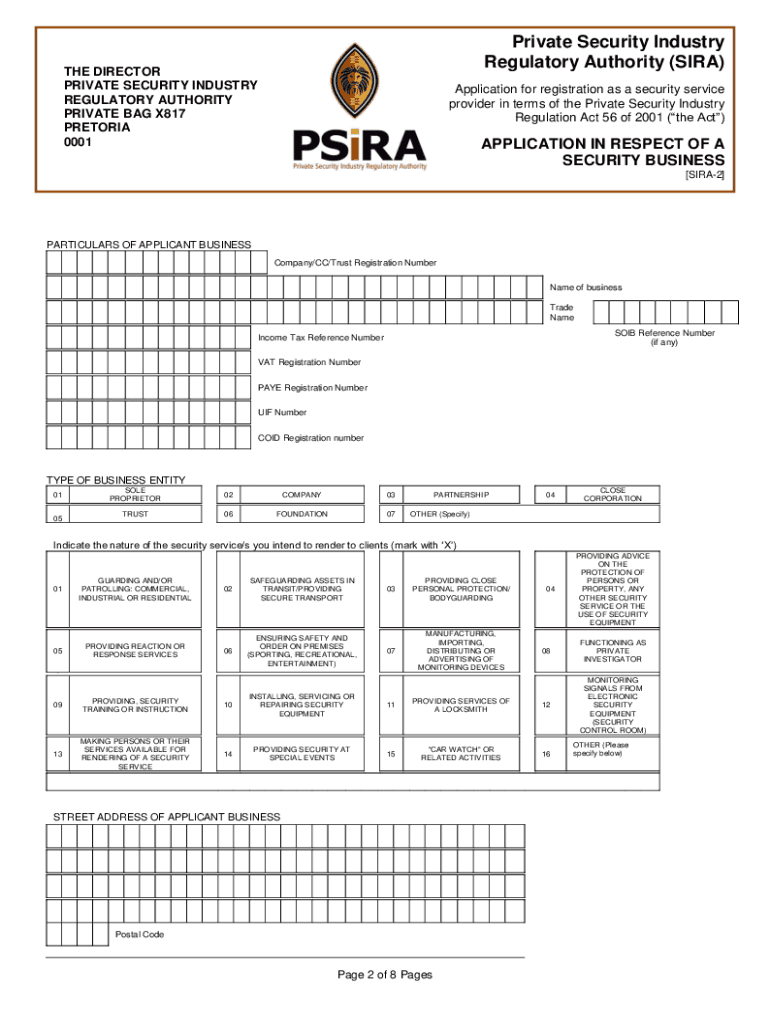
The ZA SIRA-2 form is integral for registering a security service provider in compliance with the Private Security Industry Regulation Act. This guide will help you navigate each section of the form accurately, ensuring a smoother online submission process.
Follow the steps to complete your ZA SIRA-2 form online.
- Click ‘Get Form’ button to obtain the form and open it in the online editor.
- Enter the particulars of the applicant business, including the registration number, name, and trade name. Ensure accuracy to prevent delays in processing.
- Specify the income tax reference number, VAT registration number, PAYE registration number, and UIF number where applicable.
- Select the type of business entity from the provided options, marking the appropriate category (sole proprietor, company, trust, etc.).
- Indicate the nature of the security services you intend to render by marking the relevant options with an ‘X’. This may include guarding, patrolling, personal protection, etc.
- Fill in the street address of the applicant business and the administration office if different. Ensure that postal codes are included.
- Provide contact details, including telephone numbers, fax, and an email address for further communication.
- List the full names and capacities of individuals involved with the business, including owners, directors, and partners. Include their residential addresses and any existing SIRA registration numbers.
- Complete the declaration and undertaking section, signing and dating the form where indicated. Ensure all required signatories have signed.
- Review all entered information for accuracy and completeness. Save your changes, and prepare to download, print, or share the form as needed.
Complete your ZA SIRA-2 form online today to ensure your compliance in the security industry.
Experience a faster way to fill out and sign forms on the web. Access the most extensive library of templates available.
Related content
being buried in the ash site at Williamsburg. Mr. Herbein did state that the. Fossil Fuel...
Jedan proteinima bogat obrok. Uzivajte Za palentu nam treba: 1 litar vode 1 kasikica soli...
Honeywell Industrial Switches and Sensors provide a wide selection of products and...
Get answers to your most pressing questions about US Legal Forms API.
What is the WhatsApp number for Psira office?
You can find the WhatsApp number for the Psira office on their official site. This number is included in the contact information section of the ZA SIRA-2 platform. Utilizing WhatsApp can make it easier for you to get in touch with them for any questions or clarifications.
What to do if your psira is rejected?
If your psira application is rejected, first review the reasons outlined in the communication you received. It is essential to address any issues pointed out, and then you can resubmit your application via the ZA SIRA-2 platform. If you need personalized assistance, consider reaching out to them directly.
How do I update my psira certificate online?
To update your psira certificate online, log into your account on the ZA SIRA-2 website. Once inside, navigate to the certificate section where you can submit your updated information. This process ensures that your records stay up to date and reflect your current status.
How long does psira take to approve?
Generally, the approval time for psira applications can vary depending on several factors. Typically, most applications submitted through the ZA SIRA-2 platform are processed within a few weeks. For urgent inquiries, consider reaching out directly through their contact options.
What is the WhatsApp number for Psira?
The WhatsApp number for Psira is available on their official website. You can find it in the contact section of the ZA SIRA-2 platform. This convenient communication option allows you to reach them for quick inquiries and support.
How do I update my psira profile online?
Updating your psira profile online is a straightforward task. Head to the ZA SIRA-2 portal and log into your account. Once logged in, you can easily access your profile settings and make the necessary updates to ensure your information is current and accurate.
How do I check my psira certificate online?
To check your psira certificate online, visit the official ZA SIRA-2 website and navigate to the certificate verification section. Enter your identification details as prompted. This simple process allows you to confirm the validity of your certificate quickly and efficiently.
How much to register a security company in South Africa?
Registering a security company in South Africa involves several costs, including registration fees and compliance charges. Overall, it can range from a few thousand rand upwards, depending on various factors. For tailored advice on the process, consider utilizing tools and guides from ZA SIRA-2.
How do I get my PSiRA number online?
To get your PSiRA number online, you need to register on the PSiRA platform. After completing the registration, you'll receive your unique number, which is essential for various functions. For thorough guidance on this process, explore the resources available on ZA SIRA-2.
Can I get my PSiRA certificate online?
Yes, you can obtain your PSiRA certificate online through the official PSiRA website. It's a straightforward process that allows for immediate access to your official documentation. With ZA SIRA-2, you can find detailed steps to navigate the online system successfully.
Use professional pre-built templates to fill in and sign documents online faster. Get access to thousands of forms.
If you believe that this page should be taken down, please follow our DMCA take down process here.