Loading
Get Kzn Database Login
How it works
-

Open form follow the instructions
-

Easily sign the form with your finger
-

Send filled & signed form or save
How to fill out the Kzn Database Login online
Completing the KZN Database Login is an essential step for vendors wishing to register with the KwaZulu-Natal Department of Education. This guide provides detailed, step-by-step instructions on how to accurately fill out the registration form to ensure successful registration.
Follow the steps to complete your KZN Database Login form.
- Click ‘Get Form’ button to obtain the registration form and open it in the specified editor.
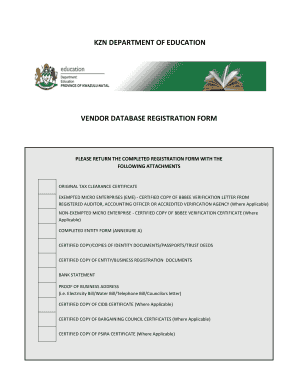
- Ensure you have the required documentation ready, including a valid tax clearance certificate, certified copies of ID documents, and business registration documents.
- In Section A, fill in your business registration information, ensuring all mandatory fields are completed. This includes your registration number, registered name, and trade name.
- Provide your business contact information in Section B, including physical and postal addresses, telephone numbers, and preferred methods of contact.
- In Section C, provide your banking details and tax information, marking whether your business is registered for various tax types and including your tax clearance certificate information.
- Section D is for ownership information. List all owners, their percentage of ownership, and provide certified copies of their ID documents.
- Complete Section E regarding SMME status, answering questions about employment and financial details as required.
- Sections F through K require detailed information regarding BBBEE status, areas of operation, goods and services offered, and previous business experience.
- Finally, ensure that all provided information is correct and sign Section L and M, certifying that all details are true and accurate. Include your completed entity form (Annexure A) before submission.
- Once all sections are filled in and verified for accuracy, save the changes, download or print your completed form if necessary, and submit it along with the required documentation.
Complete your Kzn Database Login online today to ensure your business is registered with the KZN Department of Education.
Getting in touch with the Department of Education in South Africa can be done through their official website, where you will find contact information. You can also reach out via email or phone. For quicker communication, consider using the online resources available after logging into the KZN Database Login.