Open form follow the instructions
Easily sign the form with your finger
Send filled & signed form or save
How to fill out the Equifax Dispute Pdf Form online
Filing a dispute with Equifax can help correct inaccuracies on your credit file. This guide provides clear and supportive instructions on how to fill out the Equifax Dispute Pdf Form online, ensuring that you understand each section and can submit your dispute efficiently.
Follow the steps to complete the Equifax Dispute Pdf Form.
- Click ‘Get Form’ button to obtain the form and open it in the editor.
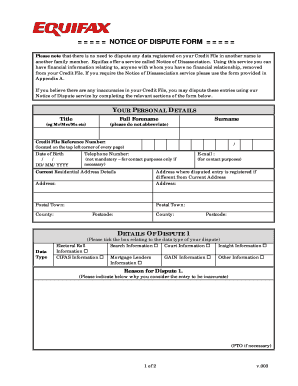
- Fill in your personal details in the 'Your Personal Details' section. Provide your title, full forename, surname, and credit file reference number. Ensure that your date of birth is entered in the format DD/MM/YYYY. You may also include your telephone number and current residential address details. Include your email for contact purposes.
- Identify the address where the disputed entry is registered, if it differs from your current address. Complete all required fields, including postal town, county, and postcode.
- In the 'Details of Dispute 1' section, indicate the data type of your dispute by ticking the appropriate box. Provide the reason for your dispute clearly; if you need more space, continue on a separate page.
- Repeat the process for 'Details of Dispute 2' and 'Details of Dispute 3', ensuring you provide accurate data types and reasons for each entry.
- After reviewing all sections for accuracy, proceed to save your changes. You may also choose to download, print, or share the completed form as needed.
Take action and file your dispute online using the Equifax Dispute Pdf Form today.
Experience a faster way to fill out and sign forms on the web. Access the most extensive library of templates available.
Related content
To dispute, use the sample letter, include your report number, list disputed items, and...
You can submit a dispute to the credit reporting company by phone, by mail, or online...
YOU ARE NOT REQUIRED TO PURCHASE YOUR. CREDIT REPORT FROM TRANSUNION INTERACTIVE IN ORDER...
Get answers to your most pressing questions about US Legal Forms API.
How to fill an Equifax dispute form?
Filling an Equifax dispute form is straightforward when you follow the guidelines. Start by entering your identification details and then specify the items you are disputing. The clearer your explanation of why the information is incorrect, the better. Utilizing US Legal Forms can greatly assist you in obtaining and completing the Equifax Dispute PDF Form correctly, facilitating a smoother dispute process.
How do I fill out a credit dispute form?
Filling out a credit dispute form requires careful attention to detail. Begin by entering your personal details, including your full name and contact information. Clearly identify the errors in your credit report, using the Equifax Dispute PDF Form to ensure that you provide all necessary information concisely and accurately, increasing the likelihood of a successful resolution.
How do I write to Equifax dispute?
When writing to Equifax to dispute an item, start by gathering all necessary details and documentation to support your case. Make sure to use the Equifax Dispute PDF Form for structure and clarity. Address the letter to Equifax's dispute resolution department and include your personal information, a clear description of the disputed items, and any evidence that supports your claim.
How do I open a PDF from Equifax?
To open a PDF from Equifax, you first need to download the document from the Equifax website or your email. Simply click on the download link, and the PDF should open in your browser or PDF viewer. If you encounter issues, make sure you have a suitable PDF reader installed to access the Equifax Dispute PDF Form and any other related documents.
How to fill out Equifax dispute form?
Filling out the Equifax Dispute Form requires you to provide your personal information, including your name, address, and Social Security number. Next, list the specific items you are disputing and explain why you believe them to be inaccurate. US Legal Forms offers guidance to ensure that your Equifax Dispute PDF Form is filled out correctly, enhancing your chances of a successful dispute.
How do you write a successful dispute letter?
Writing a successful dispute letter involves clarity and organization. Begin by stating your intent to dispute the information on your credit report, then clearly identify the items you are disputing. Include any supporting documentation that corroborates your claim, using the Equifax Dispute PDF Form as a template to help structure your letter effectively.
How to get Equifax PDF?
To get the Equifax Dispute PDF Form, you can visit the Equifax website where they provide downloadable forms. Additionally, you can find the form through reputable resources like US Legal Forms. Simply search for the Equifax Dispute PDF Form and you can easily access it to start your dispute process.
How do I raise a dispute with Equifax?
To raise a dispute with Equifax, prepare your dispute details and submit them through their official channels, either online or via mail. Gather all necessary documents to support your case. Utilizing the Equifax Dispute Pdf Form can help simplify this process and expedite the resolution.
How to fill out a credit dispute form?
Filling out a credit dispute form involves providing accurate information about your identity, the credit account in question, and a description of the inaccuracies. Be thorough yet concise so that your concerns are clearly communicated. If you’re using the Equifax Dispute Pdf Form, ensure you follow the prescribed instructions carefully.
How to upload documents to Equifax dispute online?
To upload documents for your Equifax dispute online, log into your Equifax account. There should be an option to submit documents alongside your dispute. Make sure your documents are in the correct format and include a note about the Equifax Dispute Pdf Form if applicable.
Use professional pre-built templates to fill in and sign documents online faster. Get access to thousands of forms.
If you believe that this page should be taken down, please follow our DMCA take down process here.