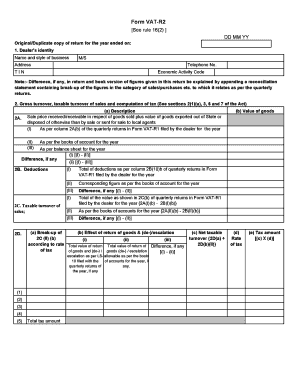
Ode Note:- Difference, if any, in return and book version of figures given in this return be explained by appending a reconciliation statement containing break-up of the figures in the category of sales/purchases etc. to which it relates as per the quarterly returns. 2. Gross turnover, taxable turnover of sales and computation of tax (See sections 2(1)(u), 3, 6 and 7 of the Act) 2A. (a) Description Sale price received/receivable in respect of goods sold plus value of goods exported out of Stat.

How it works
  • Open form

    Open form follow the instructions

  • Easily sign form

    Easily sign the form with your finger

  • Share form

    Send filled & signed form or save

How to fill out the Haryana Vat Utility Download online

The Haryana Vat Utility Download is essential for completing your VAT return process. This guide will provide you with step-by-step instructions to fill out the form accurately and submit it online, ensuring compliance with Haryana state regulations.

Follow the steps to complete the Haryana Vat Utility Download.

  1. Click 'Get Form' button to obtain the form and open it in the editor.
  2. Begin by entering the dealer's identity, including the name and style of your business, your address, telephone number, TIN (Tax Identification Number), and Economic Activity Code. Ensure that all information is correct and matches your official records.
  3. Proceed to report your gross turnover and taxable turnover of sales. Fill in the required details as per sections 2(1)(u), 3, 6, and 7 of the Act. Make sure to cross-reference these with your previous quarterly returns.
  4. For the section on deductions, carefully input any adjustments or differences. Be explicit about the categories of sales and purchases that may affect your tax liabilities.
  5. Complete the computation of input tax. Ensure that you account for any tax paid on purchases made in the state as specified in section 8 of the Act.
  6. If applicable, fill in sections related to tax payable, refundable, or adjustable. Note any negative values and how they should be handled.
  7. Review all provided data for accuracy, ensuring that it matches your accounts and records before submission.
  8. Once you have filled out the entire form, save your changes. You may have the option to download, print, or share the completed form for your records.

Complete your Haryana Vat Utility Download online to ensure your compliance and avoid penalties.

Get form

Experience a faster way to fill out and sign forms on the web. Access the most extensive library of templates available.

Related content

Employee Relocation Resource Center Centralized...

Sep 26, 2017 — This Request for Offers (RFO) transmits the issuance of the 2017-2018...

Learn more
Financing Metropolitan Governments in Developing...

by RW Bahl · Cited by 129 — Financing metropolitan governments in developing countries...

Learn more
2017 -18

STEEL STRIPS WHEELS LIMITED. (CIN: L27107PB1985PLC006159). Regd. Of ce: Village...

Learn more
Questions & Answers

Get answers to your most pressing questions about US Legal Forms API.

Contact support

What is VAT R1 in Haryana?

VAT R1 is a specific return form used by businesses in Haryana to report their VAT transactions. This return captures details about sales and purchases made during the reporting period. You can easily find the VAT R1 form via the 'Haryana VAT Utility Download' on the tax portal. It's important to file this return accurately to ensure compliance with state regulations.

The due date for VAT payment in Haryana typically falls on the 21st day of the month following the end of the quarter. It is crucial to keep track of these dates to avoid late fees. Access the Haryana tax portal regularly for updates or any changes. Using the 'Haryana VAT Utility Download' can help you stay organized with your payment schedule.

To file a VAT return for liquor in Haryana online, you should utilize the specific guidelines available on the Haryana tax website. The 'Haryana VAT Utility Download' will be especially helpful in this case, providing tailored instructions and forms for liquor taxation. Complete the required fields in the utility and ensure compliance with all regulations before submitting your return. Keep track of your submission status for any future reference.

Filing your Haryana VAT return online is a straightforward process. Start by accessing the Haryana government's tax website, where you can use the 'Haryana VAT Utility Download' to get the necessary software. After collecting your data, fill in the return details accurately and submit it electronically. Make sure to keep a copy of your submission for your records.

To apply for VAT in Haryana, visit the official Haryana government tax portal. There, you will find the option for the 'Haryana VAT Utility Download' which provides necessary forms and guidelines. After completing the application form, submit it along with the required documents. Always ensure that your application is submitted before the deadline to avoid any penalties.

VAT, or Value Added Tax, is a tax applied at each stage of the supply chain on goods and services sold in Haryana. It is collected by businesses and submitted to the state government, contributing to public revenue. Understanding VAT is essential for compliance, so consider the Haryana VAT utility download a vital tool for managing your tax obligations effectively.

The principal secretary to the government of Haryana's excise and taxation department oversees VAT regulations and is responsible for tax administration. For specific contact details or inquiries, you may want to check the official Haryana government website. Accessing the Haryana VAT utility download can also help you with your tax-related questions.

To download your Haryana ration card on the EPDS Haryana portal, visit the official EPDS website. Navigate to the ration card section where you can find the download option. Ensure you have your details ready, then follow the instructions for an easy Haryana VAT Utility Download alongside your ration card details.

Yes, VAT is still applicable in Haryana as it is a form of indirect tax on the sale of goods. The government has regulations in place regarding VAT collection and filing. For detailed procedures and updates, consider referring to the Haryana VAT utility resources available for download.

To download the Haryana VAT utility, visit the official Haryana government website. Look for the download section specifically for tax utilities. Follow the instructions provided on the site and ensure you have the necessary details ready to complete your Haryana VAT Utility Download smoothly.

Get This Form Now!

Use professional pre-built templates to fill in and sign documents online faster. Get access to thousands of forms.

If you believe that this page should be taken down, please follow our DMCA take down process here.

Get Haryana Vat Utility Download