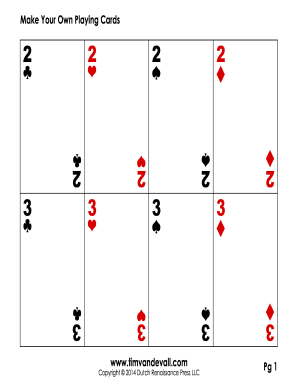
Open form follow the instructions
Easily sign the form with your finger
Send filled & signed form or save
How to fill out the Playing Card Template online
Filling out the Playing Card Template online can be an engaging and creative process. This guide provides step-by-step instructions to help you navigate each section of the form efficiently.
Follow the steps to complete the Playing Card Template online.
- Click ‘Get Form’ button to obtain the form and open it in your browser.
- Begin by entering the required personal details in the designated fields, such as your name and contact information.
- Next, select the type of playing cards you wish to create from the available options.
- Proceed to customize the face designs of the cards. You may upload images or select from provided templates.
- After customizing your card faces, move on to the back design. Make your selections or upload a custom image.
- Review all entered information and make any necessary edits for accuracy.
- Finally, save your changes, and choose to download, print, or share the form as needed.
Start creating your unique playing cards online today!
Experience a faster way to fill out and sign forms on the web. Access the most extensive library of templates available.
Related content
by D Jagoda · 2023 — The deck consists of 9 sets (142 cards), game instructions, game...
Mar 31, 2025 — Select “Custom” size and set dimensions appropriate for your cards...
Get answers to your most pressing questions about US Legal Forms API.
What format are playing cards?
Playing cards are usually in a rectangular format, which allows for ergonomic use and easy stacking. Each card’s dimensions usually follow the standard size of 2.5 inches by 3.5 inches. When you design your playing card template, use these measurements to create a consistent and professional appearance. This attention to detail enhances the playing experience for all users.
What is the format of a playing card?
The format of a playing card typically measures 2.5 inches by 3.5 inches, allowing for easy handling and storage. This size is standard across various card games, ensuring compatibility and accessibility. When creating a playing card template, adhere to these dimensions for the best outcome. Incorporating this format will make your custom cards perfect for any game night.
What type of card are playing cards printed on?
Playing cards are generally printed on a specific type of cardstock that combines thickness and flexibility. This type of material allows for a professional feel while providing enough strength for shuffling and handling during gameplay. When designing your playing card template, select a paper type that mirrors this quality for the best results. A well-designed template makes all the difference in the final product.
Are playing cards paper or cardboard?
Playing cards are typically made from a type of cardstock, which is a heavier paper that provides durability and flexibility. Most playing card templates can mimic this texture, ensuring your designs feel authentic when printed. The material choice enhances the tactile experience during games. For creating high-quality cards, consider using a sturdy cardstock in your template.
How to make a playing card template in Word?
To create a playing card template in Word, start by setting up your document size to match the dimensions of your cards. Use tables to organize your layout, allowing for precise placements of each card. Incorporate designs or images directly into the cells for customization. This method can effectively provide you with a clean and professional-looking playing card template.
What is 52-card format?
The 52-card format refers to the standard deck of playing cards used for many card games. This format includes four suits: hearts, diamonds, clubs, and spades, each containing thirteen cards. When designing a playing card template, it's crucial to incorporate this format for versatility across games. You can easily create templates that align with this classic structure.
How many playing cards fit on 8.5 x 11?
You can fit a total of ten standard playing cards on an 8.5 x 11 sheet of paper when arranged in two rows of five. This layout is perfect for creating a playing card template, allowing you to print out multiple cards at once. To achieve the best results, ensure proper spacing between each card for cutting. Consider using a cutting tool for a clean finish.
What kind of cardstock is used for playing cards?
Playing cards typically utilize a type of cardstock that is thick and coated for a professional finish. This cardstock offers superior strength and a smooth surface for vibrant color printing. When creating your playing card designs, employing a playing card template can help you choose the appropriate cardstock weight and finish.
What type of printer do I need to print playing cards?
To print playing cards effectively, a high-quality inkjet or laser printer that can handle thick cardstock is recommended. These printers provide the necessary resolution and color fidelity to make your designs stand out. Utilizing a playing card template ensures your printer settings align with the dimensions and characteristics of your chosen cardstock.
What is the best paper to print cards on?
The best paper for printing cards is typically a heavyweight cardstock that offers a smooth surface for clear printing. This choice enhances color vibrancy and detail on your cards. Using a playing card template can guide you in selecting the perfect cardstock, tailored to your design and use case.
Use professional pre-built templates to fill in and sign documents online faster. Get access to thousands of forms.
If you believe that this page should be taken down, please follow our DMCA take down process here.