
Open form follow the instructions

Easily sign the form with your finger

Send filled & signed form or save
How to fill out the Online Prescription Maker online
Completing the Online Prescription Maker form is a straightforward process that allows users to submit their prescription information electronically. This guide will provide you with clear instructions on how to effectively fill out each section of the form to ensure a smooth submission.
Follow the steps to successfully complete your online prescription form.
- Press the ‘Get Form’ button to access the Online Prescription Maker and open it in the provided editing interface.
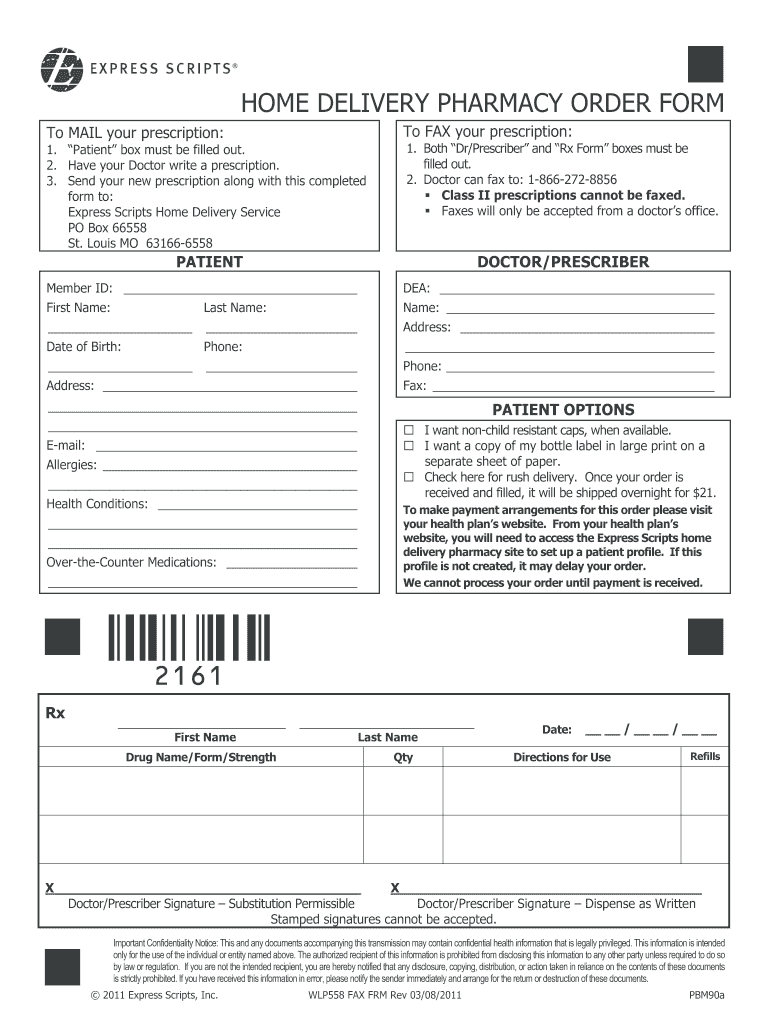
- In the 'Patient' section, fill out the member ID, first name, last name, address, date of birth, and phone number to correctly identify yourself.
- In the 'Doctor/Prescriber' section, enter your doctor’s name, address, phone number, DEA, and fax number to ensure that your healthcare provider is noted.
- Indicate any allergies or health conditions in the designated fields to provide comprehensive medical information that may affect your prescription.
- List any over-the-counter medications you are currently taking. This information helps in ensuring there are no adverse interactions with your prescription.
- In the 'Patient Options' section, you can choose preferences such as non-child resistant caps, large print labels, or rush delivery. Check the appropriate boxes as needed.
- In the 'Prescription' section, provide the first name, last name, drug name/form/strength, quantity, directions for use, and the number of refills you require.
- Your doctor must provide their signature in the specified area, indicating if substitution is permissible or if the prescription must be dispensed as written.
- Review all entered information for accuracy. Once complete, you can save the changes, download, print, or share the form as required.
Complete your documents online today to ensure a hassle-free prescription process.
Experience a faster way to fill out and sign forms on the web. Access the most extensive library of templates available.
Related content
Jan 8, 2025 — A medication list is a tool to help you keep track of all the prescription...
With SOPHIE, you can produce professional simulated drug labels for your medical...
Dec 9, 2024 — Prescription and non-prescription medications or substances. •...
Get answers to your most pressing questions about US Legal Forms API.
How do online prescriptions work?
Online prescriptions work by allowing users to input relevant patient and medication information into an Online Prescription Maker. The online platform then generates a prescription that meets legal requirements. This digital format makes it easy to manage and share prescriptions with pharmacies.
How do I use online prescriptions?
Using online prescriptions is simple and straightforward. Start by selecting a reliable Online Prescription Maker. Enter the required information about the patient and the medication. Once you finalize the details, the platform will create a prescription for you, which can be printed or sent electronically.
How to write a digital prescription?
Writing a digital prescription typically requires the assistance of an Online Prescription Maker. Healthcare professionals use specialized software to enter patient information, prescription details, and dosage instructions. This digital format ensures accuracy and improves the efficiency of the prescription process.
How do I get a digital prescription?
To get a digital prescription, you can use an Online Prescription Maker that connects you with a licensed healthcare provider. Simply provide your medical history and symptoms online, and the provider will assess your situation and issue a digital prescription if appropriate. This streamlined process saves you time and effort.
Can I get a prescription online without seeing the doctor?
Yes, you can obtain a prescription online without an in-person visit to a doctor. Using an Online Prescription Maker, you can connect with licensed healthcare professionals who can evaluate your condition electronically. This approach offers convenience and efficiency, making it easier for you to access necessary medications.
How to make a prescription online?
Making a prescription online is easy with an Online Prescription Maker. You'll start by creating an account on a reputable platform. After that, provide the necessary medical information, and the system will guide you through generating a valid prescription tailored to your needs.
Can I turn my paper script into an eScript?
Yes, you can convert a paper script into an eScript with the right tools. Using an Online Prescription Maker, simply upload your existing prescription and follow the platform’s instructions to create a digital version. This conversion helps to streamline your medication process.
How to make an e-prescription?
To make an e-prescription, you will need access to an Online Prescription Maker platform. After signing up, follow the guided steps to input patient information, select medications, and complete any required forms. This process eliminates the need for paper scripts and enhances accuracy.
How do I set up an ePrescribe?
Setting up an ePrescribe is straightforward. You’ll need to register on a platform that offers an Online Prescription Maker and follow the instructions for creating your account. Once registered, you can start generating electronic prescriptions that are secure and easy to manage.
Can I get a script without going to the doctor?
Yes, it is possible to receive a script without an office visit. Online Prescription Makers provide an efficient way to connect with healthcare professionals. By answering some questions about your health, you may receive a prescription that suits your needs.
Use professional pre-built templates to fill in and sign documents online faster. Get access to thousands of forms.
If you believe that this page should be taken down, please follow our DMCA take down process here.