Loading
Get Oktap Agriculture Exemption 2020-2026
How it works
-

Open form follow the instructions
-

Easily sign the form with your finger
-

Send filled & signed form or save
How to fill out the Oktap Agriculture Exemption online
The Oktap Agriculture Exemption application allows users to apply for, renew, or update their exemption permits. This guide provides a step-by-step approach to help users complete the application smoothly and efficiently.
Follow the steps to complete your application with ease.
- Click the 'Get Form' button to access the application form and open it in your browser.
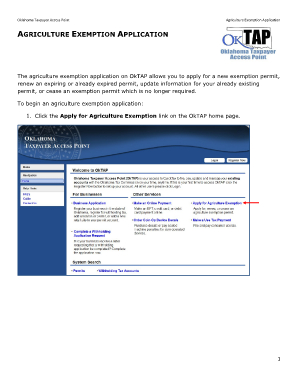
- Begin the application by clicking the 'Apply for Agriculture Exemption' link on the Oktap home page.
- Click the 'To Begin, Click Here to Select Your County' link to choose your county from the drop-down menu. If you are an out-of-state applicant, remember to check the 'Out Of State' box.
- If the selected county is not participating in the Oktap application process, a screen will inform you that submission is not possible through this platform.
- Select the type of request you want to make by clicking the 'Select Request Type' link. You will have options for various request types available.
- Indicate whether you are applying as an individual or a business. Enter the necessary identification and application information. Once complete, click the OK button.
- Proceed to the 'Enter Address Information' section. Input your mailing address and verify it with USPS information using the provided link.
- Choose the 'Verified' address that matches your mailing address. If there is no match, select the ‘As Entered’ address option.
- Repeat the address validation for your farm's location. If your location matches your mailing address, check the 'Same As Mailing' box.
- If your farm lacks a physical location address, select the 'No Location Address' box and enter the legal description.
- Once all fields are filled without errors, click the OK button to proceed.
- Next, access the 'Enter Agriculture Information' section. If enrolled in FSA, check the corresponding box and provide your FSA number.
- Enter the total number of acres on your farm and the primary product you produce.
- If applicable, enter the number and type of livestock you are raising.
- Click the 'Click to add/remove machinery' link to provide details about any machinery you wish to claim. Enter the necessary information and click the OK button.
- Verify that all information is accurate and complete, and click the OK button.
- Proceed to the 'Electronic Signature' section. Enter your first and last name and check the 'Digital Signature' box.
- After confirming all information is correct, click the OK button.
- Complete your application by clicking the 'Submit' button to send it to the designated county for review.
- Once submitted, note your confirmation number for future reference before clicking the OK button to return to the Oktap home page.
Start your application online today to ensure you secure your agriculture exemption.
Generally, you will need at least 5 acres of land to qualify for the Oktap Agriculture Exemption in Oklahoma. This land should be actively used for agricultural production. However, depending on your county’s regulations, this requirement may vary. Understanding your local criteria is crucial for successfully acquiring this exemption and enjoying related tax benefits.