Loading
Open form follow the instructions
Easily sign the form with your finger
Send filled & signed form or save
How to fill out the Driving Log online
Filling out the Driving Log is an important step in tracking your practice driving hours. This guide will provide detailed instructions to help you complete the form accurately and efficiently.
Follow the steps to successfully complete your Driving Log online.
- Click ‘Get Form’ button to obtain the form and open it in the editor.
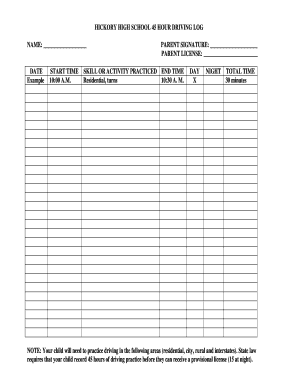
- Begin by entering the name of the person who is practicing driving in the designated 'NAME' field. This ensures that the log is properly attributed to the correct individual.
- In the 'DATE' section, write the date when the driving practice occurs. This helps in maintaining a chronological record of the practice hours.
- Record the 'START TIME' when the practice begins. Be sure to follow the correct time format for clarity.
- After completing the practice, fill in the 'END TIME' to indicate when the session concluded.
- In the 'SKILL OR ACTIVITY PRACTICED' section, specify the driving skills or activities practiced during the session, such as 'residential turns' or any other relevant skills.
- Check the appropriate box under 'DAY' or 'NIGHT' to indicate the time of day during which the practice occurred.
- Calculate and enter the ‘TOTAL TIME’ spent practicing driving in minutes. This should reflect the difference between the start time and end time.
- Lastly, ensure that a parent or guardian signs the form in the 'PARENT SIGNATURE' field and includes their license number in 'PARENT LICENSE' for verification purposes.
- After completing all sections of the form, save your changes, and consider downloading or printing the document for your records.
Encourage others to complete their Driving Log online and stay compliant with driving practice requirements.
Experience a faster way to fill out and sign forms on the web. Access the most extensive library of templates available.
Related content
All drivers under the age of 18 must present this driving log to the Kentucky State Police...
Print and use this log to keep track of your teen's behind-the-wheel practice and their...
The login name belongs to the driver and is linked to the driver's personal information...
Get answers to your most pressing questions about US Legal Forms API.
How to properly fill out a driver's log book?
To properly fill out a driver's log book, begin by entering essential details such as the trip date, total miles driven, and any breaks taken. Make sure to be truthful and meticulous with your entries, as this log serves as an official record for compliance. Consider using templates available from US Legal Forms, as they provide guidance to help maintain accuracy.
How do you fill out a log sheet?
Filling out a log sheet involves documenting critical details such as date, time, and specific activities completed during your driving schedule. Be sure to include any relevant observations or notes, as these can be valuable for future reference. Using a log sheet template from US Legal Forms can simplify the process and keep your entries consistent.
How do I fill out an attachment logbook?
To fill out an attachment logbook, first note the date and type of attachment along with any relevant details about the log entries. It's important to track both completed and pending tasks to ensure accountability and transparency. By using templates from US Legal Forms, you can easily structure your attachment logbook for maximum efficiency and clarity.
How to fill out a driver's time record?
Filling out a driver's time record involves accurately logging your driving hours, breaks, and rest periods. Begin with the date at the top, followed by the total duration of your driving session. Clearly indicate any stops and ensure the information is chronologically arranged. Using US Legal Forms provides an efficient way to maintain structured time records.
How to fill out a driving log?
To fill out a driving log, start by writing down the necessary details including the date, time, and purpose of your drive. Make sure to record your start and end mileage, along with any time spent resting or refueling. Keeping your driving log organized can assist you in tracking your driving habits, and US Legal Forms offers convenient templates to make this easier.
How do I fill out a driver log?
Filling out a driver log requires you to enter essential information, such as the date, total hours driven, and your vehicle's identification. Don’t forget to document any breaks and fuel stops, as this aids in thorough record-keeping. Utilizing a driving log template from US Legal Forms can simplify this task, ensuring accuracy and compliance with regulations.
How to fill out a permit driving log?
To fill out a permit driving log, start by noting the date, time, and duration of your driving hours. Next, indicate your starting and ending locations and any significant stops along the way. It's important to keep records clear and up to date, as this log helps you track your progress. Using a service like US Legal Forms can provide you with templates to streamline this process.
How do I get my 36-month driving record in Arizona?
To obtain your 36-month driving record in Arizona, you can request it through the Arizona Department of Transportation website or in person at their office. Having a driving log on hand may assist you to verify the information. This record provides a comprehensive overview of your driving history and any traffic violations.
How do you write a good logbook?
To write a good logbook, focus on clarity and accuracy. Each entry should include essential details like date, location, times, and any breaks taken. Consistently using your driving log not only helps keep track of your activities but also supports compliance with transportation regulations.
How do you fill a daily log?
Filling a daily log involves documenting your driving activities for each day. Begin with the date, then record departure times, arrival times, and total miles driven. Make sure to include any off-duty time, and keep your entries clear and accurate to avoid discrepancies.
Use professional pre-built templates to fill in and sign documents online faster. Get access to thousands of forms.
If you believe that this page should be taken down, please follow our DMCA take down process here.