Loading
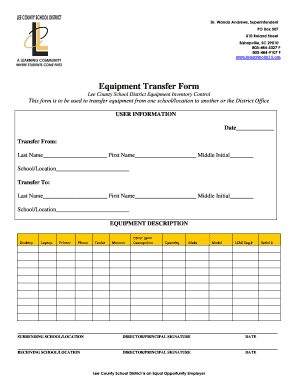
Get Equipment Transfer Form - Leeschoolsk12.org 2020-2026
How it works
-

Open form follow the instructions
-

Easily sign the form with your finger
-

Send filled & signed form or save
How to fill out the Equipment Transfer Form - Leeschoolsk12.org online
The Equipment Transfer Form is essential for the efficient transfer of equipment within the Lee County School District. This guide provides clear, step-by-step instructions for completing the form online to ensure a smooth and accurate transfer process.
Follow the steps to successfully complete the Equipment Transfer Form.
- Click ‘Get Form’ button to obtain the Equipment Transfer Form and open it in your preferred online form editor.
- Fill in the date on the form, located at the top section. Ensure the date is accurate as it will be referenced later in the transfer process.
- In the 'Transfer From' section, enter the last name, first name, and middle initial of the person initiating the transfer. Also, specify the school or location from which the equipment is being transferred.
- In the 'Transfer To' section, provide the same details for the recipient of the equipment: last name, first name, middle initial, and school/location.
- Under 'Equipment Description,' indicate the type of equipment being transferred by selecting from the provided options: Desktop, Laptop, Printer, Phone, Tablet, Monitor, or Other. If you select 'Other,' please provide a brief description of the equipment.
- Next, indicate the quantity of the equipment being transferred.
- Fill in the make and model of the equipment, as well as the LCSD tag number and serial number, to uniquely identify the items being transferred.
- In the 'Surrendering School/Location' section, obtain the required signature from the director or principal of the school/location from which the transfer is occurring, along with the date.
- Similarly, in the 'Receiving School/Location' section, obtain the necessary signature from the director or principal of the receiving location, ensuring to include the date.
- After completing all fields, review the information for accuracy. Save any changes, download, print, or share the form as needed.
Complete your Equipment Transfer Form online today to ensure smooth equipment transfers within the Lee County School District.