Le Code (CVC) Section 1808.45 and federal law, the Drivers Privacy Protection Act of 1994, states in summary, that the willful, unauthorized disclosure, false representation to obtain, use of information for a purpose other than the one stated in the request and approved by DMV, or the sale or other distribution of any information not disclosed in the request, is a misdemeanor, punishable by a ine not exceeding ive thousand dollars ($5,000) or by imprisonment in the county jail not exceeding one.
Loading

Open form follow the instructions

Easily sign the form with your finger

Send filled & signed form or save
How to fill out the Dmv Inf 70 online
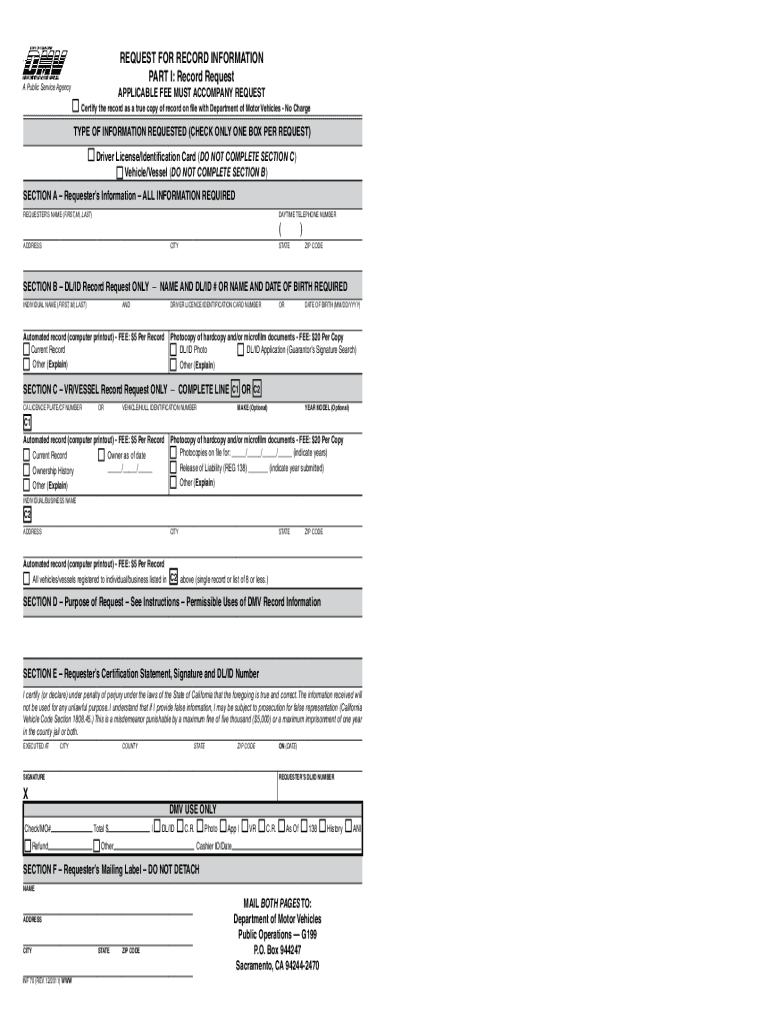
The Dmv Inf 70 form is used to request record information from the Department of Motor Vehicles in California. This guide will provide you with clear and concise instructions on how to complete the form online, ensuring a smooth submission process.
Follow the steps to fill out the Dmv Inf 70 online effectively.
- Begin by clicking the ‘Get Form’ button to access the Dmv Inf 70 and open it in your online editor.
- In Section A, provide your true full name or the business entity name, along with your physical address including city, state, zip code, and your daytime telephone number.
- Determine the type of information you need in Section B for a Driver License/Identification Card record or Section C for a Vehicle/Vessel registration. Check only one box for your request.
- For Section B, if requesting driver license/identification card information, supply either the individual's name along with their DL/ID number or the name alongside their date of birth.
- In Section C, if you are requesting vehicle or vessel registration information, enter the California license plate or vehicle/hull identification number.
- Complete Section D by indicating the permissible use of the requested information according to federal law.
- In Section E, certify the information by signing, providing the city, county, and state where the form was completed, along with the date.
- Finally, ensure to complete Section F with your mailing label and review all entries for accuracy before proceeding to print the form.
- After reviewing, save your changes, then download, print, or share the completed form as needed, ensuring to include any applicable fees.
Start filling out the Dmv Inf 70 online today for a quick and efficient process.
Experience a faster way to fill out and sign forms on the web. Access the most extensive library of templates available.
Related content
This form is used by individuals to request their own driver record license/identification...
DMV Form INF 70, the "Application for Original or Renewal of Driver's License or...
The National Veterans Registration Card is a veterans identification card issued by the...
Get answers to your most pressing questions about US Legal Forms API.
How to fill out INF 70?
To fill out the INF 70, begin by carefully reading the instructions provided with the form. Input all required details, including vehicle information and your identification. Ensure everything is accurate to prevent issues with vehicle registration later. Resources available through the Dmv Inf 70 can assist you in completing this form with confidence.
How to fill out medical authorization form?
Filling out a medical authorization form requires you to provide personal information along with the details of the medical professional who will have access to your records. Clearly state the duration for which you authorize access and specify any limitations if needed. If you're unsure, the Dmv Inf 70 can help clarify any related requirements, making the process smoother.
How to fill out a certificate of ownership?
To fill out a certificate of ownership, start by providing precise information about the vehicle, including its make, model, and year. Include your name and address as the owner, and check for any additional details required by your state. The Dmv Inf 70 can serve as a helpful resource, guiding you through each section of this important document.
What is INF 70 form?
The INF 70 form is an important document used in vehicle title transfers in the United States. It helps you officially record the ownership of your vehicle, ensuring all legal guidelines are met. For those not familiar with the form, reviewing the Dmv Inf 70 instructions can provide clarity and simplify the process.
How to fill out title paperwork?
Filling out title paperwork can seem daunting, but it's straightforward. Start by gathering necessary information such as the vehicle's VIN, your personal details, and any required signatures. Using the Dmv Inf 70, you can find guidance to ensure that all sections are completed accurately, avoiding delays in processing.
How can I clean my DMV record?
You can clean your DMV record by attending defensive driving courses or traffic school for points reduction. Additionally, ensuring that you drive safely and avoid violations will help maintain a clean record over time. Dmv Inf 70 is a useful guide to explore further actions you can take to improve your driving history.
How do I delete my driving history?
Deleting your driving history is generally not possible, as records are maintained for legal and safety reasons. However, you can attend traffic school to remove points associated with minor violations. For more comprehensive assistance, consider the resources provided by Dmv Inf 70 to understand your options and obligations.
How do I get my driving record from NY DMV?
To get your driving record from the NY DMV, you can request it online, by mail, or in person at a DMV office. You will need to provide some personal information and identification. It's recommended to review the Dmv Inf 70 for specific instructions on obtaining your record without any hassle.
What is a DMV senior ID?
A DMV senior ID is a special identification offered to senior citizens, allowing them to carry valid proof of identity without requiring a driver's license. This ID can be useful for various purposes, including age verification and accessing senior discounts. If you're interested, the Dmv Inf 70 can guide you through the application process effectively.
How do I get my driving record wiped clean?
To wipe your driving record clean, you may need to complete a traffic school course for minor infractions. For more serious offenses, you might need to seek legal help, depending on the circumstances. The Dmv Inf 70 provides insight into the necessary steps you must take to manage your record effectively. Always consider consulting professionals for guidance.
Use professional pre-built templates to fill in and sign documents online faster. Get access to thousands of forms.
If you believe that this page should be taken down, please follow our DMCA take down process here.