Loading
Get Application For Vacant Seat Admission
How it works
-

Open form follow the instructions
-

Easily sign the form with your finger
-

Send filled & signed form or save
How to fill out the Application For Vacant Seat Admission online
This guide is designed to help you navigate the online filling process for the Application For Vacant Seat Admission. We aim to provide clear and detailed instructions to ensure a smooth completion of your application.
Follow the steps to successfully complete your admission application.
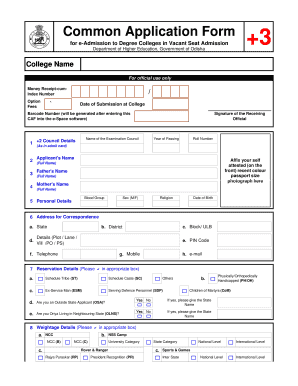
- Click the ‘Get Form’ button to retrieve the application form and open it in the online editor.
- Begin by entering the college name in the designated field. Ensure that the name is spelled correctly.
- In the applicant's section, enter your full name, father's name, and mother's name as they appear on official documents.
- Fill out your address for correspondence, including your state, district, block/ULB, postal details, telephone, mobile number, and email address.
- In the reservation details section, mark the relevant boxes that apply to your status (e.g., Schedule Tribe, Schedule Caste, etc.).
- Complete the weightage details, if applicable, by marking boxes related to your participation in NCC, NSS camps, or sports events.
- List your preferences for streams and honours in order of importance. You can mention up to five choices.
- Read and agree to the undertaking statement. Sign or provide your thumb impression where required.
Complete your application online today to secure your vacant seat admission!
When writing a letter asking for school admission, begin with a polite salutation. Clearly state your request for admission and include relevant personal information, such as your background and why you are interested in the school. Highlight how your goals connect with the program, especially regarding the Application For Vacant Seat Admission.