Loading
Get Blank Sign In Sheet
How it works
-

Open form follow the instructions
-

Easily sign the form with your finger
-

Send filled & signed form or save
How to fill out the Blank Sign In Sheet online
Filling out the Blank Sign In Sheet online is a straightforward process that allows users to record attendance efficiently. This guide provides clear, step-by-step instructions to help you complete the form accurately and effectively.
Follow the steps to fill out the Blank Sign In Sheet online.
- Click the ‘Get Form’ button to access the Blank Sign In Sheet and open it in your preferred online editor.
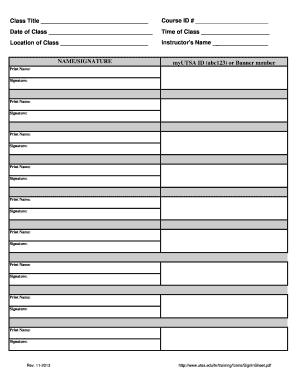
- In the first section, enter the class title in the designated space to identify the subject of the class.
- Input the course ID number in the specified field. This information is vital for tracking course participation.
- Fill in the date of the class in the provided field to indicate when the session takes place.
- Enter the time of the class in the corresponding area to specify when it will occur.
- Provide the location of the class in the designated space to inform participants where the session will be held.
- Write the instructor's name in the appropriate field to identify the person leading the class.
- For the attendance section, users should enter either their myUTSA ID or Banner number in the specified format.
- Print their names and signatures in the provided fields. Each participant should fill out their respective name and signature to confirm attendance.
- Once all fields are completed, save your changes. You may also download, print, or share the completed form as needed.
Complete your documents online today for a more streamlined experience.
Creating an empty page in Excel is easy. Open a new workbook, and you will automatically have an empty page ready for use. You can designate this page as your Blank Sign In Sheet by labeling the necessary columns and entering relevant details. This method keeps your document organized and user-friendly.