Loading
Get Dave Ramsey Financial Snapshot 2009-2026
How it works
-

Open form follow the instructions
-

Easily sign the form with your finger
-

Send filled & signed form or save
How to fill out the Dave Ramsey Financial Snapshot online
The Dave Ramsey Financial Snapshot is a crucial tool for tracking your financial progress. This guide will provide clear, step-by-step instructions to help you complete the form effectively online.
Follow the steps to complete your financial snapshot.
- Click ‘Get Form’ button to access the financial snapshot. This will allow you to open the form in your preferred online editor.
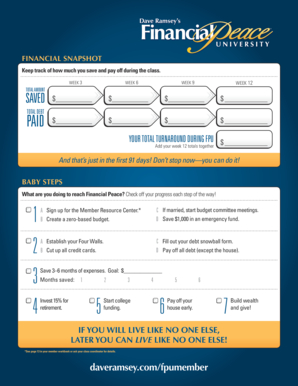
- Begin by entering your savings for each week. Fill in the amounts you saved for weeks 3, 6, 9, and 12, as well as the total amount saved at the bottom.
- Next, document the total debt paid. Ensure you populate your total turnaround amount during the Financial Peace University (FPU) program by summing up your week 12 totals.
- Under the Baby Steps section, check off the steps you have completed on your journey toward Financial Peace. Progress through the numbered steps, marking each one as you finish.
- For the emergency fund goal, indicate your target amount for saving 3-6 months of expenses and fill in the number of months you have saved.
- Finish by including information about your retirement investment, as per the instructions in the form.
- After completing the fields, make sure to save your changes, and you can then download, print, or share the completed financial snapshot.
Start filling out your financial snapshot online today to take control of your financial future.
To get a financial snapshot, begin by gathering all your financial documents, including income, expenses, and savings. You can use online tools or platforms, like US Legal Forms, which can guide you in creating a comprehensive picture of your finances. This snapshot will help you identify your current financial status, assisting you in achieving your long-term goals, as emphasized in the Dave Ramsey Financial Snapshot.