Loading
Get Ok Wtp 10003
How it works
-

Open form follow the instructions
-

Easily sign the form with your finger
-

Send filled & signed form or save
How to fill out the Ok Wtp 10003 online
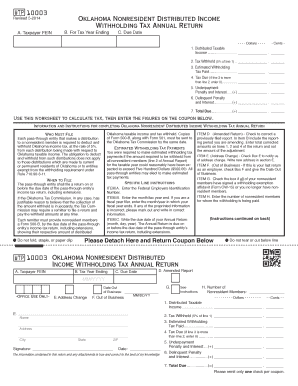
Filling out the Ok Wtp 10003 form is an essential step for pass-through entities needing to report distributed income for nonresident members. This guide provides detailed, step-by-step instructions to help you complete the form accurately and efficiently, ensuring compliance with Oklahoma tax requirements.
Follow the steps to complete the Ok Wtp 10003 form easily.
- Press the ‘Get Form’ button to access the Ok Wtp 10003 form. This will open the document in your preferred online editor, allowing you to begin the filling process.
- In Item A, enter the Federal Employer Identification Number (FEIN) associated with your entity. This is crucial for tax identification purposes.
- In Item B, input the tax year ending date. If you operate on a fiscal year, specify the month and year accordingly. Make sure to correct any pre-printed errors by striking through incorrect information and writing the right details.
- For Item C, write the due date of your Annual Return in the prescribed format (month, day, year). Remember that this due date aligns with your entity's income tax return deadlines, including extensions.
- If necessary, check Item D for Amended Report, and provide the reporting period being amended in Item B. Adjust totals on lines 1, 2, and 4 as needed.
- In Item E, check the appropriate box if you have an address change, and provide the new address details.
- If this is your final return, check Item F and include your Date Out of Business.
- For Item G, check the box only if all nonresident members have signed a withholding exemption affidavit or if you do not have any nonresident members.
- In Item H, indicate the number of nonresident members for whom withholding is being paid.
- Complete the calculation section with the appropriate figures. Enter the taxable income distributed to nonresident members on line 1. On line 2, list the tax withheld (5% of line 1). In line 3, input any estimated tax payments that were made. For line 4, calculate any tax due based on the earlier entries.
- If applicable, calculate and enter penalties for underpayment and delinquency on lines 5 and 6 respectively.
- Finally, total the amounts on line 7 to determine the total amount due. Review your entries for accuracy.
- After finalizing your form, save any changes made. You can choose to download, print, or share the filled form as needed.
Complete your Ok Wtp 10003 form online efficiently to ensure accurate tax reporting and compliance.
To form an S corporation in Oklahoma, begin by establishing a regular corporation by filing the Articles of Incorporation. After that, you need to file Form 2553 with the IRS to elect S corp status. This process can be streamlined with the help of USLegalForms, making sure all paperwork is correctly completed and submitted.