Get Nc Pre-k Dental Screening Form 2020-2026
How it works
-

Open form follow the instructions
-

Easily sign the form with your finger
-

Send filled & signed form or save
How to fill out the NC Pre-K Dental Screening Form online
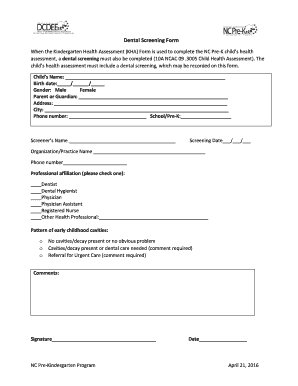
This guide will provide you with a comprehensive and user-friendly overview of how to complete the NC Pre-K Dental Screening Form online. You will find step-by-step instructions to ensure all necessary information is accurately recorded for your child's health assessment.
Follow the steps to complete the form effectively.
- Click 'Get Form' button to obtain the form and open it in the editor.
- Begin by entering the child's name in the designated field. Ensure that the name matches official documents to avoid any discrepancies.
- Fill in the child's birth date using the format month/day/year. Ensure accuracy as this information is critical for the health assessment.
- Select the child's gender by choosing the appropriate option, ensuring that you select the one that correctly identifies the child.
- Complete the parent or guardian's information by entering their name in the provided field.
- Fill in the address, including street, city, and zip code, where the child resides.
- Provide a contact phone number for the parent or guardian. This will be important for communication regarding the child's health.
- Indicate the school or Pre-K program the child is enrolled in, ensuring to provide full and accurate details.
- Enter the name of the screener, which is the professional conducting the dental screening.
- Fill in the screening date using the same format as the birthdate.
- Record the organization or practice name conducting the screening, along with a contact phone number for that organization.
- Select from the professional affiliation options. Check one box that best indicates the screener's professional designation.
- Assess the pattern of early childhood cavities by selecting the appropriate option based on the child's oral health status.
- Provide any additional comments or observations that may be relevant to the child's dental health in the comments section.
- The screener must sign the form to verify that the assessment has been completed accurately.
- Finally, ensure the date is filled in at the bottom of the form. Review all entries for accuracy before submission.
- Once all information is complete, save changes, download, print, or share the form as needed for further processing.
Complete your child's dental screening form online today for a comprehensive health assessment!
The NC Pre-K health assessment is a procedure designed to evaluate the health and development of children enrolling in pre-kindergarten programs. It includes a review of physical health, vision, hearing, and dental health, often utilizing tools like the NC Pre-K Dental Screening Form. This assessment ensures children are ready for school and receive the necessary health interventions early on.