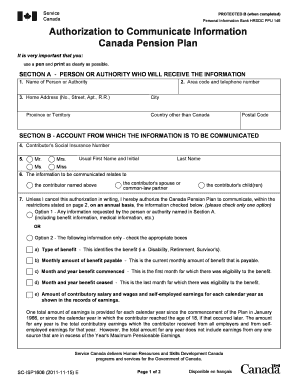
Get Authorization To Communicate Information - Canada Pension Plan. Sc-isp1606 (2011-11-15) E - Fnislp 2020-2025
How it works
-

Open form follow the instructions
-

Easily sign the form with your finger
-

Send filled & signed form or save
How to fill out the Authorization To Communicate Information - Canada Pension Plan. SC-ISP1606 (2011-11-15) E - Fnislp online
Filling out the Authorization to Communicate Information form for the Canada Pension Plan is essential for ensuring that designated individuals can access necessary information. This guide offers a user-friendly approach to completing the form online.
Follow the steps to successfully complete the form.
- Press the ‘Get Form’ button to access the form and open it in the provided editor.
- In Section A, provide the name of the person or authority who will receive the information. Include their area code and telephone number, followed by their home address, city, province or territory, country (if applicable), and postal code.
- In Section B, enter the contributor's Social Insurance Number. Then, select the appropriate title (Mr., Mrs., Ms., Miss) and fill in the usual first name and initial, along with the last name.
- Indicate whether the information to be communicated relates to the contributor, their spouse or common-law partner, or their child(ren).
- In Section B, you have to select between two options for the information to be shared. Option 1 allows for any requested information, while Option 2 requires you to choose specific details related to benefits. Ensure you check the appropriate boxes for the specific information you wish to communicate.
- Move to Section C and confirm your authorization by checking the appropriate status (contributor, beneficiary, or representative) and providing your usual first name and initial, along with last name and home address.
- Complete the date, sign the document, and ensure that your signature is present.
- In Section D, the authorized person or authority must fill out their information and sign, including the date of completion.
- Review the form for completeness and accuracy before proceeding to save, download, print, or share the document as needed.
Start filling out your Authorization to Communicate Information form online today!
Downloading the CPP application form is straightforward. Visit the Canada Pension Plan website, navigate to the application section, and locate the correct form suited for your needs. Ensure you look for the Authorization To Communicate Information - Canada Pension Plan, SC-ISP1606 (2011-11-15) E - Fnislp if you need a specific authorization form. After downloading, carefully fill it out and submit it as directed.
Industry-leading security and compliance
-
In businnes since 199725+ years providing professional legal documents.
-
Accredited businessGuarantees that a business meets BBB accreditation standards in the US and Canada.
-
Secured by BraintreeValidated Level 1 PCI DSS compliant payment gateway that accepts most major credit and debit card brands from across the globe.