Loading
Get Ssa 520 Form 2020-2026
This website is not affiliated with any governmental entity
How it works
-

Open form follow the instructions
-

Easily sign the form with your finger
-

Send filled & signed form or save
How to fill out the Ssa 520 Form online
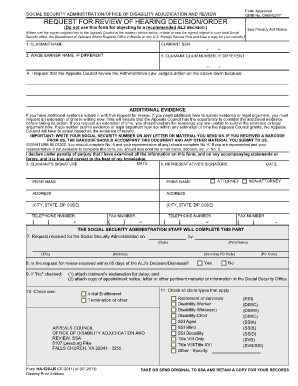
The Ssa 520 Form is a critical document for requesting a review of a hearing decision by the Appeals Council of the Social Security Administration. This guide will provide you with comprehensive, step-by-step instructions on how to fill out the Ssa 520 Form online, ensuring your request is completed accurately and efficiently.
Follow the steps to complete the Ssa 520 Form online
- Press the ‘Get Form’ button to access the Ssa 520 Form and open it in your online document editor.
- Begin filling in your personal information in the various fields. Start by entering your name in the 'Claimant Name' section. Make sure to include your Social Security Number in the designated field as well.
- If applicable, provide the name of the wage earner in the designated area, especially if this name differs from your own.
- Include your claim number in the next field, if it is different from your Social Security Number.
- In the section requesting your reason for appealing the Administrative Law Judge's decision, clearly articulate your rationale for this request. If you have additional evidence to submit, note this here and ensure it accompanies your form.
- If you require more time to compile additional evidence or arguments, request an extension and provide a brief explanation of your circumstances.
- Complete the signature section. As the claimant, sign and date the form. If you have a representative, they should also sign and provide their details in the 'Representative's Signature' section. Ensure all required contact information for both parties is included.
- Once you have filled out the form, review all the information entered to ensure accuracy.
- Save your changes, and then you have the option to download, print, or share the form as needed.
Complete your Ssa 520 Form online today to ensure your appeal is submitted promptly.
If you applied for Social Security or Supplemental Security Income (SSI) disability benefits and were denied for medical reasons, you may request an appeal online. If you do not wish to appeal a medical decision online, you can use the Form SSA-561, Request for Reconsideration.