Loading

Open form follow the instructions

Easily sign the form with your finger

Send filled & signed form or save
How to fill out the Iremit Online online
Filling out the Iremit Online form is a straightforward process designed to streamline your remittance experience. This guide will provide you with clear, step-by-step instructions to ensure that you accurately complete the form to meet your needs.
Follow the steps to successfully complete the Iremit Online form.
- Press the ‘Get Form’ button to access the form and open it in the editor.
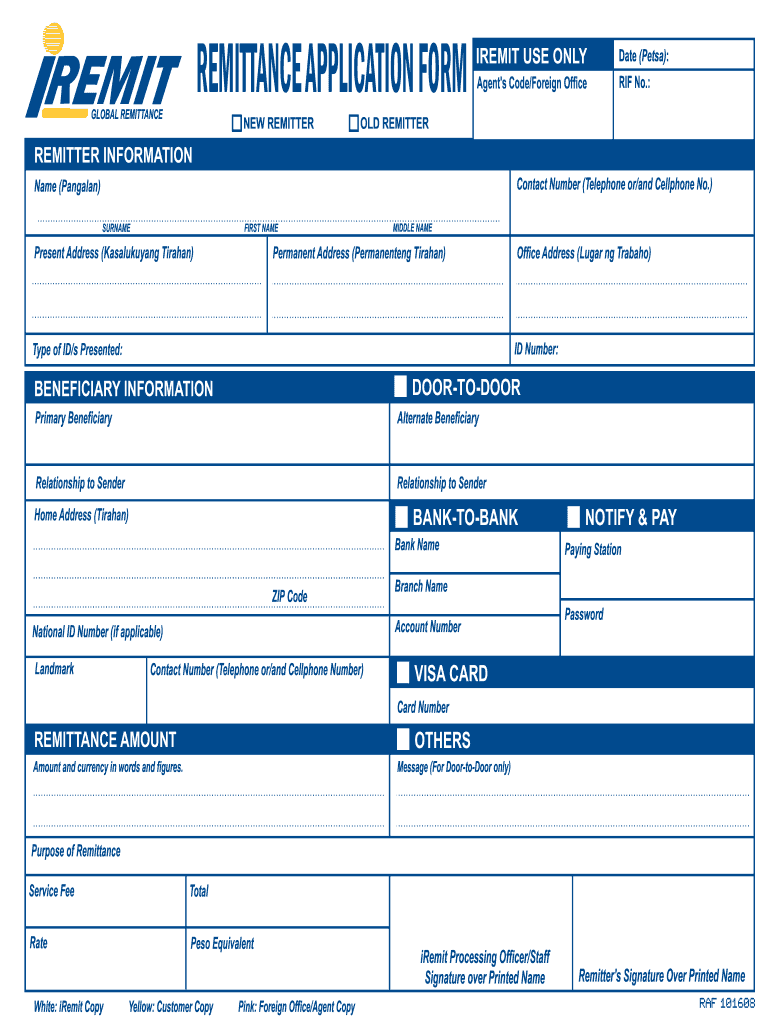
- Enter the date in the designated section marked 'Date (Petsa)', ensuring that you use the current date when completing the form.
- For new remitters, fill in the agent's code or foreign office as well as the RIF number in the 'Iremit Use Only' section.
- Provide your contact number, including both telephone and cellphone numbers, in the 'Remitter Information' section.
- Fill out your full name as follows: enter your surname, first name, and middle name in the corresponding fields.
- Indicate your present address in the 'Present Address (Kasalukuyang Tirahan)' section, as well as your permanent address in the 'Permanent Address (Permanenteng Tirahan)' field.
- Complete the office address in the 'Office Address (Lugar ng Trabaho)' section to provide additional identification.
- Input your ID number and specify the type of IDs presented in the 'ID Number' and 'Type of ID/s Presented' sections.
- If applicable, enter the details of the primary beneficiary and alternate beneficiary, including their relationship to you.
- Fill in the home address and contact number for both the primary and alternate beneficiaries.
- For bank-to-bank remittance, provide the bank name, branch name, account number, and the national ID number if applicable.
- Specify the paying station and create a password for security purposes in the 'Notify & Pay' section.
- If using a visa card, enter the card number in the 'VISA CARD' section.
- Indicate the remittance amount, including both the numerical figures and the equivalent in words.
- Complete the sections for 'Purpose of Remittance', 'Service Fee', 'Total', 'Rate', and 'Peso Equivalent'.
- Review all entered information for accuracy, then save changes, download, or print the completed form as needed.
Complete your documents online now for a seamless remittance experience.
Experience a faster way to fill out and sign forms on the web. Access the most extensive library of templates available.
Related content
This IRM provides procedures for Field Collection remittance processing, including Form...
A remittance transfer provider shall provide, in writing and in a form that the sender may...
Ripple helps I-Remit provide low-cost, real-time cross-border payments around the world...
Get answers to your most pressing questions about US Legal Forms API.
What is the maximum remittance limit?
The maximum remittance limit when using Iremit Online is influenced by your account type and compliance with international transfer laws. Typically, individuals can send larger amounts once they complete necessary verifications. Since Iremit is dedicated to providing seamless and secure transactions, users are encouraged to reach out for assistance if they have questions about remittance limits.
What is the maximum remittance of Iremit?
When using Iremit Online, the maximum remittance amount depends on several factors, including country regulations and user verification levels. Users often find that the limits are set appropriately to facilitate both small and large transactions. For the most accurate information, consult the Iremit platform directly to determine your specific remittance capabilities.
What is the maximum remittance for Iremit?
The maximum remittance limit for Iremit Online varies depending on the destination country and the user's verification status. Generally, Iremit allows users to send substantial amounts, ensuring they can meet their transfer needs effectively. Always check the specific guidelines on the Iremit platform to understand the limitations for your situation.
How do I use iRemit online?
Step 1: Compute – Type-in the total amount you want to remit and choose the delivery mode. Step 2: Provide Details – Let us know whom you want to send money to by providing the details of your beneficiary. Step 3: Remit – Fund your transfer and we will deliver.
How long does it take to receive money from iRemit?
The beneficiary can pick up the cash from an iRemit branch 24 hours after the deposit. Home delivery. Funds can be delivered to the recipient's door.
How do I get my money from iRemit?
Simply send money by loading your beneficiary's I-Remit Visa Card. In minutes, your money will be transferred and can be withdrawn by your beneficiary from all local ATMs in the Philippines.. Your beneficiary may pick-up anywhere from over 21,000 Pay-out Centers. No bank account required.
What is the maximum remittance for iRemit Singapore?
The maximum remittance limit per transaction is $25,000 (inclusive of Service Fee) if you are paying through PAYNOW or Direct Bank Transfer (subject to corridors' foreign currency). You may remit up to a maximum limit of SGD25,000 per day (and SGD100,000 per month). Remittance limit is reset on calendar date.
How much are telegraphic transfer fees?
A telegraphic transfer is a way to send money electronically between banks, where the start and the end of a transfer are in different countries. Average fees for sending an overseas transfer with SWIFT can range from $10 to $30 USD. For domestic rates, it can range by financial provider starting from $0 upwards.
Where can I withdraw money from iRemit?
Our Services Credit to Bank Account. BDO, BPI, Metrobank, PNB, Landbank and all other Philippine banks. Cash Pick Up. from more than 21,000 payout locations nationwide. Bills Payment. SSS, Pag-ibig, PhilHealth and more than 50 other merchants and billers.
How much is the service fee of iRemit?
If you pay for a bank transfer using a credit card, you will be charged an $8 'remittance' fee. If you arrange a cash pickup for the recipient, you must pay $9.
Use professional pre-built templates to fill in and sign documents online faster. Get access to thousands of forms.
If you believe that this page should be taken down, please follow our DMCA take down process here.