Loading
Get Cerere Dispozitive Medicale.doc 2020-2026
How it works
-

Open form follow the instructions
-

Easily sign the form with your finger
-

Send filled & signed form or save
How to fill out the Cerere Dispozitive Medicale.doc online
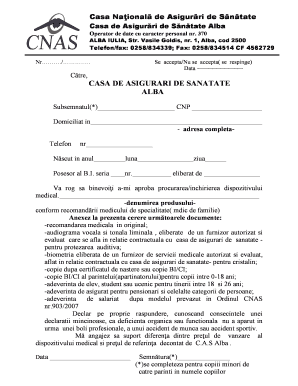
Filling out the Cerere Dispozitive Medicale.doc form is an essential step for individuals seeking approval for medical devices. This guide provides a clear, step-by-step approach to help users complete the form accurately and efficiently online.
Follow the steps to complete the form correctly.
- Click the ‘Get Form’ button to obtain the form and open it in the preferred editor.
- In the designated field, enter your name (*Subsemnatul*) clearly, followed by your unique identification number (CNP).
- Fill in your complete address information in the section labeled ‘Domiciliat in’ to ensure accurate processing.
- Provide your date of birth in the format specified: year, month, and day.
- Indicate your identity card details by filling in the series and number of your identification document, and state the issuing authority.
- Request approval for acquiring or renting a medical device by describing the device you need, referencing the medical recommendation you received.
- Attach the required documents as listed, including the original medical recommendation and any other relevant paperwork, ensuring they are current and authorized.
- Make a declaration of responsibility regarding the nature of your condition, confirming that it was not caused by an occupational illness or accident.
- Acknowledge your commitment to cover any price difference between the medical device's selling cost and the price covered by the local health insurance.
- Finally, date the form and sign it. If completing the form for a minor, ensure a parent or guardian signs on their behalf.
- Once completed, save your changes, and you can then download, print, or share the form as needed.
Complete your documents online today to ensure timely processing of your medical device request.