Loading
Form preview
  • US Legal Forms
  • Other Templates
  • More Forms
  • More Uncategorized Forms
  • Example Of A Quit Claim Deed Completed

Get Example Of A Quit Claim Deed Completed

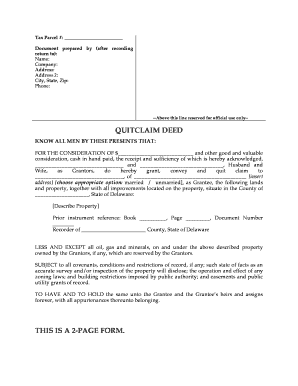
LL MEN BY THESE PRESENTS THAT: FOR THE CONSIDERATION OF $ and other good and valuable consideration, cash in hand paid, the receipt and sufficiency of which is hereby acknowledged, and , Husband and Wife, as Grantors, do hereby grant, convey and quit claim to , of insert address choose appropriate option: married / unmarried ,.

How it works

  1. Open form

    Open form follow the instructions

  2. Easily sign form

    Easily sign the form with your finger

  3. Share form

    Send filled & signed form or save

How to fill out the Example Of A Quit Claim Deed Completed online

Filling out a quit claim deed can seem daunting, but understanding each section of the form makes the process manageable. This guide provides step-by-step instructions to ensure you complete the Example Of A Quit Claim Deed Completed correctly and effectively.

Follow the steps to complete your quit claim deed form online

  1. Click ‘Get Form’ button to obtain the form and open it in your preferred online editor.
  2. In the 'Tax Parcel #' field, enter the unique identification number assigned to the property. This information helps in identifying the property being transferred.
  3. Fill in the 'Document prepared by (after recording return to)' section with your name, company name, and the complete address, ensuring to include city, state, and zip code. Also, add your phone number for contact purposes.
  4. In the first blank of the quit claim deed, indicate the consideration amount (e.g., $1.00 or another agreed amount) that the Grantees are receiving for the property.
  5. In the sections for Grantors, complete the names of the individuals transferring the property. Indicate their marital status as either 'Husband and Wife' or another appropriate designation if applicable.
  6. For the Grantee field, enter the name of the individual or entity receiving the property. Below that, provide the current address of the Grantee, ensuring it is complete and accurate.
  7. Describe the property being transferred in detail. This could include a legal description or a brief overview that provides necessary details about the land and any buildings or improvements on it.
  8. Complete the 'Prior instrument reference' by entering the book and page number from which this transfer is referenced, along with the document number for record tracking.
  9. Review any covenants, conditions, and restrictions of the property and acknowledge them. Make sure to understand how these may affect the property rights.
  10. Once all fields are completed, save any alterations. You may also choose to download, print, or share the form if necessary.

Complete your quit claim deed online with confidence and ensure your property transfer is legally sound.

Get form

Experience a faster way to fill out and sign forms on the web. Access the most extensive library of templates available.
Get form

Related content

quitclaim deed
A quitclaim deed transfers all of the grantor's right, title, interest, claim and demand...
Learn more
QUIT CLAIM DEED
Does hereby convey, release, remise, and forever quit claim unto the grantee(s):. Whose...
Learn more
Grand County WebEx Planning Commission November...
Nov 18, 2020 — 6. Quit Claim Deeds to describe the amended legal description of the lots...
Learn more

Related links form

APPLICATION FOR ROADSIDE GRAZING - Moyne Shire Orders For School California Form MVAL Residence Form STUDY TRIP MANUAL - Fremont Unified School District

Questions & Answers

Get answers to your most pressing questions about US Legal Forms API.

Contact support

To obtain a copy of a recorded quit claim deed, you can visit the local county recorder's office where the deed was filed. Alternatively, many counties now offer online access to public records, enabling you to request a copy digitally. US Legal Forms also provides services to help streamline the process of obtaining property records.

An example of a quitclaim could involve a parent transferring property ownership to a child, especially when there is a strong trust in place. This kind of transfer typically occurs without any payment, as the parties usually seek to clarify ownership for estate planning purposes. Seeing a completed example can help you understand the format and necessary components.

The primary disadvantage of a quit claim deed lies in the lack of guarantees regarding the property title. Without warranties, the grantee assumes all risks related to the property's title and any potential claims. Additionally, a quit claim deed may not be suitable for high-value properties when there are complex ownership concerns.

A quit claim deed is most commonly used to transfer property between family members, in divorce settlements, or to correct title issues. Its straightforward nature makes it an attractive option when parties know each other well and trust each other. However, always ensure the deed is properly recorded to solidify the transfer.

To fill out a quit claim deed correctly, start by stating the names of both the grantor and grantee clearly. Ensure that the property's legal description is accurate and includes any relevant identifiers. Using a reliable template can simplify this process; consider utilizing US Legal Forms for a well-structured example of a quit claim deed completed.

Once a quit claim deed is recorded, it becomes part of public records, ensuring that the transfer of property rights is officially recognized. This process provides clarity regarding ownership and can prevent disputes over property rights. It is essential for anyone involved in the property transfer to keep a copy of the recorded deed for their records.

Filling out a quit claim deed involves several key steps including entering the names of the grantor and grantee, describing the property, and signing the document in front of a notary. You should also ensure you follow local laws regarding the recording of deeds. To simplify this process, consider looking for templates or guides. Finding an example of a quit claim deed completed can serve as an excellent reference as you prepare your document.

The most common reason for using a quit claim deed involves transferring property between family members or in divorce settlements. This type of deed allows for quick and straightforward changes to ownership without the need for a lengthy process. However, its simplicity often comes with the risk of unclear titles. Before proceeding, reviewing an example of a quit claim deed completed can provide valuable insights.

Yes, you can create your own quit claim deed in Georgia, provided you follow state guidelines. It's important to include details such as property description and the names of the parties involved. However, consulting a legal expert can help ensure you avoid common pitfalls. Utilizing examples of quit claim deeds completed can also guide you through the process more effectively.

After you file a quit claim deed, the property title transfers to the grantee, but they may not have full rights without due diligence. It’s crucial to record the deed with your local county office to formalize the transaction. Moreover, the new owner should verify any potential claims or debts against the property to prevent future complications. It's wise to consult an example of a quit claim deed completed for clarity on the next steps.

Get This Form Now!

Use professional pre-built templates to fill in and sign documents online faster. Get access to thousands of forms.
Get form
If you believe that this page should be taken down, please follow our DMCA take down processhere.
Get Example Of A Quit Claim Deed Completed
Get form
  • Adoption
  • Bankruptcy
  • Contractors
  • Divorce
  • Home Sales
  • Employment
  • Identity Theft
  • Incorporation
  • Landlord Tenant
  • Living Trust
  • Name Change
  • Personal Planning
  • Small Business
  • Wills & Estates
  • Packages A-Z
  • Affidavits
  • Bankruptcy
  • Bill of Sale
  • Corporate - LLC
  • Divorce
  • Employment
  • Identity Theft
  • Internet Technology
  • Landlord Tenant
  • Living Wills
  • Name Change
  • Power of Attorney
  • Real Estate
  • Small Estates
  • Wills
  • All Forms
  • Forms A-Z
  • Other Templates
  • Legal Hub
  • About Us
  • Help Portal
  • Legal Resources
  • Blog
  • Affiliates
  • Contact Us
  • Delete My Account
  • Site Map
  • Industries
  • Forms in Spanish
  • Localized Forms
  • State-specific Forms
  • Forms Kit
  • Real Estate Handbook
  • All Guides
  • Notarize
  • Incorporation services
  • For Consumers
  • For Small Business
  • For Attorneys
  • USLegal
  • FormsPass
  • pdfFiller
  • signNow
  • altaFlow
  • DocHub
  • Instapage
Form Packages
  • Adoption
  • Bankruptcy
  • Contractors
  • Divorce
  • Home Sales
  • Employment
  • Identity Theft
  • Incorporation
  • Landlord Tenant
  • Living Trust
  • Name Change
  • Personal Planning
  • Small Business
  • Wills & Estates
  • Packages A-Z
Form Categories
  • Affidavits
  • Bankruptcy
  • Bill of Sale
  • Corporate - LLC
  • Divorce
  • Employment
  • Identity Theft
  • Internet Technology
  • Landlord Tenant
  • Living Wills
  • Name Change
  • Power of Attorney
  • Real Estate
  • Small Estates
  • Wills
  • All Forms
  • Forms A-Z
  • Other Templates
Customer Service
  • Legal Hub
  • About Us
  • Help Portal
  • Legal Resources
  • Blog
  • Affiliates
  • Contact Us
  • Delete My Account
  • Site Map
  • Industries
  • Forms in Spanish
  • Localized Forms
  • State-specific Forms
  • Forms Kit
Legal Guides
  • Real Estate Handbook
  • All Guides
Prepared for you
  • Notarize
  • Incorporation services
Our Customers
  • For Consumers
  • For Small Business
  • For Attorneys
Our Sites
  • USLegal
  • FormsPass
  • pdfFiller
  • signNow
  • altaFlow
  • DocHub
  • Instapage
Social Media
Call us now toll free:
+1 833 426 79 33
As seen in:
© Copyright 1999-2026 airSlate Legal Forms, Inc. 17 Station Street, Suite 303, Brookline, MA 02445
  • Your Privacy Choices
  • Terms of Service
  • Privacy Notice
  • Content Takedown Policy
  • Bug Bounty Program