Loading
Get Kjopekontrakt 2020-2026
How it works
-

Open form follow the instructions
-

Easily sign the form with your finger
-

Send filled & signed form or save
How to fill out the Kjopekontrakt online
Filling out the Kjopekontrakt online can streamline the process of purchasing a used car. This guide provides a clear, step-by-step approach to help users complete the form accurately and efficiently.
Follow the steps to complete the Kjopekontrakt online
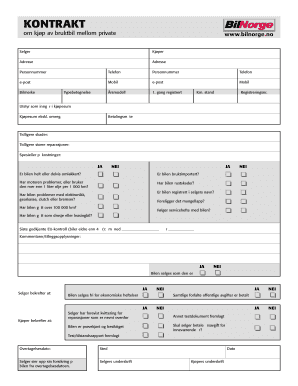
- Click ‘Get Form’ button to obtain the Kjopekontrakt form and open it in the editor.
- Begin by entering the seller's information, including their name, address, personal identification number, and contact details.
- Next, input the buyer's information, mirroring the same fields required for the seller, ensuring all details are accurate.
- Fill in the vehicle details, including the model year, first registration date, make, model designation, odometer reading, and registration number.
- List included equipment that is part of the purchase price.
- Specify the purchase amount excluding any transfer costs and detail the payment method.
- Indicate any previous damages or repairs and answer the questions regarding the vehicle's condition, such as paint, engine issues, and other mechanical concerns.
- Complete the additional questions regarding the vehicle's history, such as mileage and previous uses (e.g., taxi or leasing), as well as whether a service booklet is included.
- Fill in the date of the last approved vehicle inspection if applicable and add any additional comments or information.
- Confirm that the car is being sold as is, ensuring that both parties acknowledge financial liabilities and a test drive has been completed.
- Indicate the takeover date and obtain signatures from both the seller and the buyer at the bottom of the form.
- Finally, save your changes and download, print, or share the completed Kjopekontrakt as needed.
Complete your Kjopekontrakt online today to ensure a smooth and secure transaction.