Loading

Open form follow the instructions

Easily sign the form with your finger

Send filled & signed form or save
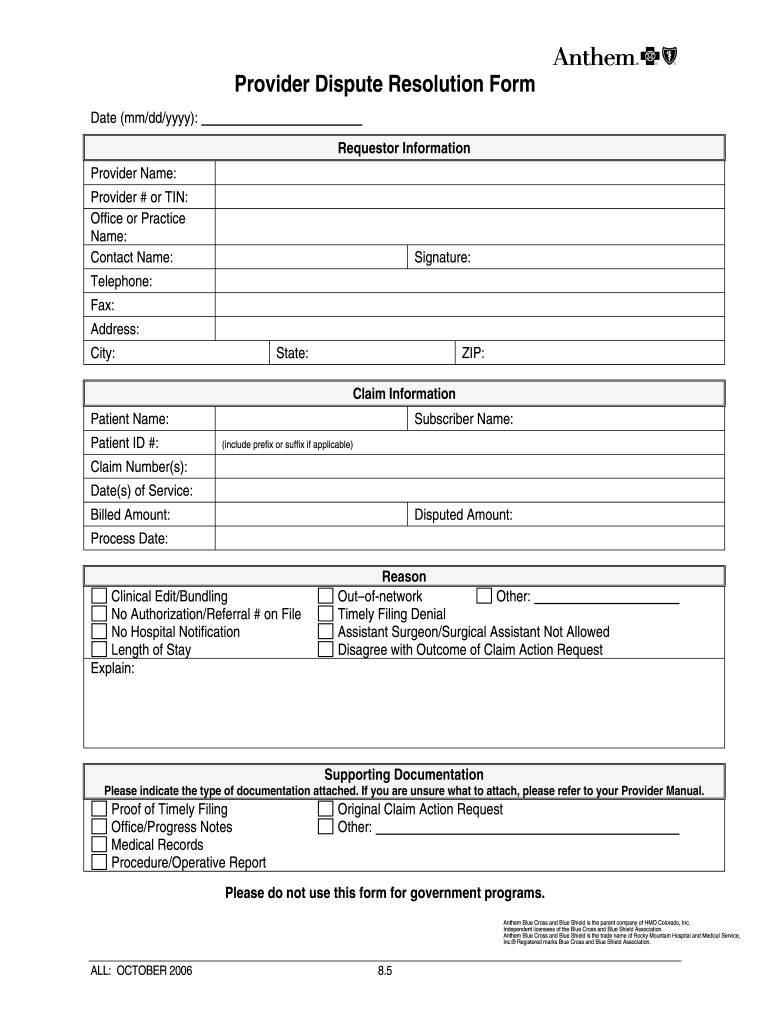
How to fill out the Anthem Provider Dispute Form online
Filling out the Anthem Provider Dispute Form online is an essential process for providers seeking resolution on claim disputes. This guide will take you through each section of the form, ensuring you provide the necessary information to support your case.
Follow the steps to complete the form successfully.
- Click ‘Get Form’ button to obtain the form and open it in your document editor.
- Start by filling out the date in the specified format (mm/dd/yyyy) at the top of the form. This indicates when you are submitting the dispute.
- In the Requestor Information section, provide your details as the provider. Include the provider name, provider number or TIN, office or practice name, contact name, telephone, fax number, complete address, city, state, and ZIP code.
- Next, fill in the Claim Information section. Enter the patient’s name and ID number, the subscriber’s name (including any prefixes or suffixes), the claim number(s), the dates of service, the billed amount, and the disputed amount.
- In the Clinical Edit/Bundling section, indicate any relevant issues such as 'No Authorization/Referral # on File' or 'Length of Stay' by checking the appropriate box. You may also provide additional explanations for disputes.
- Outline your reason for the dispute in the Reason section. Check all that apply, including options for out-of-network issues or a disagreement with the claim's outcome.
- In the Supporting Documentation section, indicate the type of documentation you are attaching. Options include proof of timely filing, office/progress notes, medical records, procedure/operative report, and original claim action request.
- Once you have completed all sections, review the form for accuracy. Make any necessary corrections before saving your changes. You can then download, print, or share the completed form as needed.
Submit your completed Anthem Provider Dispute Form online to ensure timely processing of your dispute.
Experience a faster way to fill out and sign forms on the web. Access the most extensive library of templates available.
Related content
If one physician is on call or covering for another, the billing provider must complete...
Please explain your grievance. Include, if available, the following information: • The...
Provider Dispute Resolution Process. 5. Balance Billing. Section 20 ... copy the member...
Get answers to your most pressing questions about US Legal Forms API.
What is a provider dispute?
A provider dispute occurs when a healthcare provider disagrees with a claim decision, such as a denial or payment amount. This can involve billing misunderstandings, code discrepancies, or service authorizations. When facing a provider dispute, you can utilize the Anthem Provider Dispute Form to formally communicate your concerns and seek resolution. Our platform offers support to simplify this process and enhance your chances of a favorable outcome.
What is the timely filing limit for Anthem Blue Cross provider appeal?
For appealing a claim with Anthem Blue Cross, the timely filing limit is usually 180 days from the date of the initial claim denial. It is crucial to adhere to this timeframe to avoid losing the right to appeal. You can use the Anthem Provider Dispute Form to facilitate this process and ensure you provide all necessary information for a successful appeal.
What is the timely filing limit for Anthem BCBS Healthcare Solutions?
The timely filing limit for Anthem BCBS Healthcare Solutions is typically within 90 days from the date of service. However, this can vary based on specific contracts or agreements. To ensure compliance, check your provider agreement for details. Utilizing the Anthem Provider Dispute Form can help streamline your claims and manage any disputes effectively.
How to appeal a blue cross denial?
To appeal a Blue Cross denial, you must first understand the reason for the denial. Gather all relevant documentation, including the claim and the original denial letter. You can then fill out the Anthem Provider Dispute Form to initiate the appeal process. Remember to submit your appeal within the specified timeframe for the best chance of success.
What is the address for Anthem Blue Cross provider dispute?
To submit your Anthem Provider Dispute Form, you will need the correct mailing address. Typically, the address is specified in your provider agreements or on the official Anthem Blue Cross website. Ensuring you send your dispute to the right location can expedite the review process. It's always a good idea to double-check the most current details to avoid any unnecessary delays.
Why is Anthem denying my claims?
Anthem may deny your claims for various reasons, such as missing documentation or failure to meet specific policy requirements. To address these denials effectively, you might consider using the Anthem Provider Dispute Form. This form allows you to appeal the decision and provide necessary information to support your case. Understanding the reasons behind the denial can help you prepare a stronger argument when submitting your dispute.
How do I appeal an Anthem grievance?
To appeal an Anthem grievance, gather all relevant documentation and prepare your appeal letter. You should include details about the initial grievance and any evidence supporting your case. Submit your appeal using the specified channels outlined by Anthem, ensuring you meet their timelines. For a structured approach, you can utilize the Anthem Provider Dispute Form to streamline your appeal process.
What is the Anthem Claim information Adjustment Request 151 form?
The Anthem Claim information Adjustment Request 151 form is used to request adjustments on a processed claim. This form allows providers to correct any errors or misunderstandings regarding payout amounts. Completing this form accurately ensures your request receives prompt attention. If you have additional concerns, consider the Anthem Provider Dispute Form for a comprehensive resolution process.
What is the timely filing limit for Anthem federal appeal?
The timely filing limit for an Anthem federal appeal is generally 180 days from the date of the decision you are disputing. This allows you some time to review your claim and gather necessary documentation. Following this timeline helps ensure that your appeal is considered. Use the Anthem Provider Dispute Form for a more efficient and organized submission.
What is the timely filing limit?
The timely filing limit refers to the specific time frame in which you must submit your insurance claims. This limit can vary by insurance provider and type of plan, often ranging from 90 to 180 days. Following these timelines is crucial to ensure you receive the coverage you deserve. If you experience issues, using the Anthem Provider Dispute Form can help you address your concerns effectively.
Use professional pre-built templates to fill in and sign documents online faster. Get access to thousands of forms.
If you believe that this page should be taken down, please follow our DMCA take down process here.