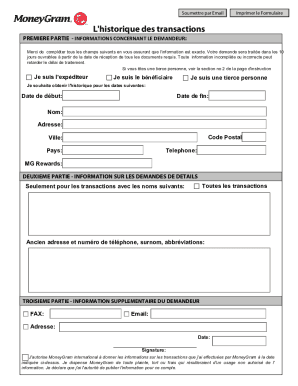
Open form follow the instructions
Easily sign the form with your finger
Send filled & signed form or save
How to fill out the Historique Moneygram online
The Historique Moneygram form is essential for users seeking a complete transaction history through Moneygram. This guide provides clear step-by-step instructions to help you accurately complete the form online.
Follow the steps to successfully fill out the Historique Moneygram form.
- Press the 'Get Form' button to access the Historique Moneygram form and open it in your online editor.
- In the first section, provide your personal information. Make sure to correctly fill in your name, address, postal code, city, country, and telephone number. This data is crucial for identifying your transaction history.
- Indicate your role in the transaction history by selecting the appropriate option: 'I am the sender', 'I am the recipient', or 'I am a third party'. Ensure that you make a selection as this helps clarify your relationship to the transactions.
- Specify the date range for the transaction history you wish to obtain by filling in the 'Start date' and 'End date' fields. This will help you focus your request on the relevant transactions.
- In the next section, indicate the details regarding the transactions you need. You can choose to request all transactions or specify certain names or details.
- Provide your email address and a fax number if applicable for communication regarding your request. Ensure this information is accurate to avoid delays.
- Sign the form, indicating your authorization for Moneygram to release the transaction information requested. Ensure you read the disclaimer regarding your authority to provide this information.
- Once you have completed the form, you can save your changes. After saving, you can choose to download, print, or share the completed Historique Moneygram form as needed.
Complete your Historique Moneygram form online now for a swift transaction history retrieval.
Experience a faster way to fill out and sign forms on the web. Access the most extensive library of templates available.
Related content
Aug 9, 2018 — édition de solde d'historique, ••). N/D avec l'étranger. Retrait...
by AE Shaw-Nevins · 2008 — MoneyGram, Western Union, entre otros, así como los costos...
Get answers to your most pressing questions about US Legal Forms API.
Can MoneyGram transaction be traced?
As mentioned earlier, MoneyGram transactions can be traced. This tracing capability helps to prevent fraud and ensures a safe transfer of funds. Both senders and recipients benefit from the ability to track their transactions, providing peace of mind throughout the process.
How do I claim my remittance from MoneyGram?
To claim your remittance from MoneyGram, visit a local MoneyGram agent location. Bring a valid form of identification and the reference number associated with your transaction. After verifying your identity, the agent will assist you in accessing your funds quickly and securely.
Can you track a MoneyGram payment?
Tracking a MoneyGram payment is straightforward. You can use the receipt number provided at the time of your transaction to follow its progress. This feature allows you to stay informed and ensure that your funds reach their destination safely and promptly.
Can you delete MoneyGram history?
Unfortunately, you cannot delete your transaction history from MoneyGram. The historique Moneygram is maintained for security and regulatory reasons, ensuring all transactions are documented. If you have privacy concerns, consider reviewing MoneyGram’s privacy policy or reach out to their support for more insights.
How to get transaction history from MoneyGram?
To access your transaction history from MoneyGram, you should log in to your MoneyGram account online. After signing in, look for the section dedicated to 'Transaction History' where you can view detailed records of your transactions. If you prefer, you can also contact MoneyGram customer service for assistance in retrieving your historique Moneygram.
What happened with MoneyGram?
MoneyGram has experienced various changes over the years, including mergers, acquisitions, and shifts in service offerings. These changes aim to enhance service efficiency and security for users. If you’re curious about specific developments, checking their official announcements will provide the latest information. Additionally, you can use uslegalforms to navigate any recent changes and understand how they may impact your transactions.
How can I see my MoneyGram history?
To view your MoneyGram history, log in to your account on the MoneyGram website or app. You can access a detailed list of your previous transactions, including date, amount, and status. This feature ensures that tracking your financial activity is easy and efficient. Remember, reviewing your Historique Moneygram is crucial for personal budgeting and expense tracking.
Is the MoneyGram system down right now?
You can check if the MoneyGram system is down by visiting their official website or social media channels for any service alerts. Occasionally, the system may undergo maintenance, leading to temporary outages. For the latest updates, rely on these official platforms. In case of persistent issues, platforms like uslegalforms can help you with alternative options.
How to get MoneyGram transaction history?
To obtain your MoneyGram transaction history, simply log into your account on the MoneyGram website. From there, navigate to the history section to download or view past transactions. If you need tailored assistance, platforms like US Legal Forms can help guide you in accessing and managing your Historique Moneygram.
Does MoneyGram give you a receipt?
Yes, MoneyGram provides a receipt for each transaction. This receipt contains vital information like the transaction amount, reference number, and sender's details. Keeping this receipt helps you maintain an accurate Historique Moneygram for future reference.
Use professional pre-built templates to fill in and sign documents online faster. Get access to thousands of forms.
If you believe that this page should be taken down, please follow our DMCA take down process here.