How it works
  • Open form

    Open form follow the instructions

  • Easily sign form

    Easily sign the form with your finger

  • Share form

    Send filled & signed form or save

How to fill out the Your Business Name - Purchase Order Template online

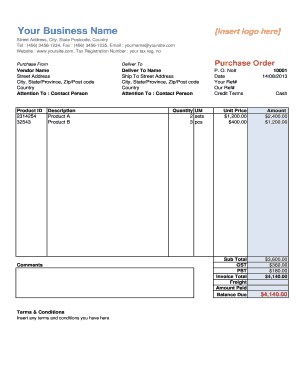
This guide provides a clear and supportive approach to completing the Your Business Name - Purchase Order Template online. By following these instructions, you will navigate each section of the form with confidence and accuracy.

Follow the steps to complete the purchase order template effectively.

  1. Press the ‘Get Form’ button to access the purchase order template and open it in your preferred online editor.
  2. In the 'Purchase From' section, input your business name along with the street address, city, state, postcode, country, telephone number, fax number, email address, website, and tax registration number.
  3. In the 'Deliver To' section, enter the name of the individual or company receiving the order, including their street address, city, state, postcode, country, and contact person.
  4. Fill in the 'Purchase Order No.' field with the unique identification number for this order. Next, enter the date of the order and relevant references, if applicable.
  5. Specify the credit terms for the purchase in the designated field.
  6. In the 'Product ID' section, include the identification numbers for all products being ordered.
  7. Provide a brief description of each product, including 'Product A' and 'Product B'.
  8. Indicate the quantity and unit of measure for each product ordered.
  9. Input the unit price for each product and the calculated amount, which is obtained by multiplying the unit price by the quantity.
  10. Calculate the subtotal of the order, along with any applicable Goods and Services Tax (GST) and Provincial Sales Tax (PST).
  11. Finally, provide the invoice total, any freight charges, and ensure that the balance due is clearly stated.
  12. Once you have filled out all fields accurately, you can save changes, download, print, or share the completed purchase order template.

Complete your purchase order template online today to streamline your purchasing process.

Get form

Experience a faster way to fill out and sign forms on the web. Access the most extensive library of templates available.

Related content

Reserve a Business Name with Georgia Secretary of...

Download and fill out a name reservation request form. Mail the completed form and $35...

Learn more
Purchase Order Request Form

The Purchase Order Request form is the electronic equivalent of a paper purchase order...

Learn more
11. General Purchase Order | IcSoft ERP and MES...

Purchase orders are raised to purchase items such as raw materials, consumables, and...

Learn more
Questions & Answers

Get answers to your most pressing questions about US Legal Forms API.

Contact support

What are the four types of purchasing with examples?

The four types of purchasing include direct purchasing, indirect purchasing, recurring purchasing, and project-based purchasing. Direct purchasing involves acquiring goods needed for production, like raw materials. Indirect purchasing focuses on supplies not directly tied to production, such as office supplies. Recurring purchasing happens for ongoing needs, like subscriptions, while project-based purchasing supports specific projects, ensuring timely resource allocation.

A purchase order, or PO, is a legal document a buyer sends to a supplier or vendor to authorize a purchase. Purchase orders outline what the buyer would like to purchase and how much of it they would like to receive. These agreements help both the buyer and seller document transactions.

A purchase order (PO) is a formal document that is created by a buyer and sent to a seller as a request for goods or services.

How to write a purchase order letter Identify the purchase items. Determine which items you plan to purchase from the seller. ... Prepare necessary details. Identify the contact information of the seller and confirm the number of items you need. ... List and detail items. ... Use a business closing. ... Review your letter.

Purchase order process flow Create a purchase order. Send out multiple requests for quotation(RFQ) Analyze and select a vendor. Negotiate contract and send PO. Receive goods/services. Receive and check invoice (3-Way Matching) Authorize invoice and pay the vendor. Record keeping.

Open a new Word document and select a template Navigate to "New Document" and type "Purchase Order" into the search bar. This task prompts Word to display various templates, and you can pick whichever one you prefer. Once you decide on a template you like, double-click on the icon to open it.

What Is a Purchase Order Form? A purchase order form (PO form) is needed whenever you want to purchase goods and services from a vendor. A purchase order form is used as an official record and contractual agreement of the business transaction between buyer and supplier, and outlines key information of the order.

How to Create a Purchase Order Choose a template. Add issue data. Write the PO number. Add business information including the billing address for the buyer and the seller. Mention product details including item descriptions, model numbers, quantity, and so on. Mention the delivery date.

A purchase order form is an official contract document in which a buyer agrees to purchase goods or services from a vendor. Purchase order forms are crucial because they standardize the business' procurement process.

Get This Form Now!

Use professional pre-built templates to fill in and sign documents online faster. Get access to thousands of forms.

If you believe that this page should be taken down, please follow our DMCA take down process here.

Get Your Business Name - Purchase Order Template