Loading
Get Chaperone Renewal - Rotherham.gov.uk 2020-2026
How it works
-

Open form follow the instructions
-

Easily sign the form with your finger
-

Send filled & signed form or save
How to fill out the CHAPERONE RENEWAL - Rotherham.gov.uk online
Filling out the CHAPERONE RENEWAL form is a critical step in ensuring you are legally approved to work with children and young persons. This guide provides clear, step-by-step instructions to help you complete the form efficiently and correctly.
Follow the steps to complete your application online.
- Press the ‘Get Form’ button to access the application form and open it in your preferred document editor.
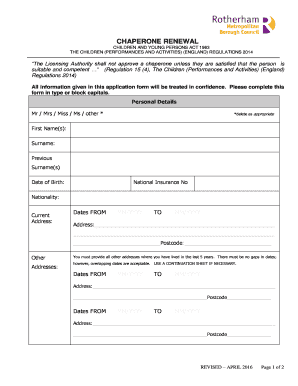
- Begin by filling out your personal details. Select the appropriate title from the options provided (Mr, Mrs, Miss, Ms, or other) and input your first name(s), surname, and any previous surnames you may have.
- Proceed to provide your date of birth and national insurance number. Ensure this information is accurate as it verifies your identity.
- Indicate your nationality and fill in your current address along with the respective dates you have lived there. Use the correct format (MM/YYYY) for the dates.
- List any other addresses where you have lived in the last five years. Ensure there are no gaps in the dates, although overlapping dates are accepted. If necessary, use a continuation sheet for additional information.
- Provide your contact number specifically for queries regarding your application.
- Mention the name of the theatre, dance school, or organization you are currently connected to or working for.
- Read and sign the declaration. This confirms your consent for necessary background checks to be conducted to assess your suitability for the chaperone role.
- Enclose a passport-size photograph with your name written on the reverse and ensure that all required documentation is ready to submit.
- Return your completed application form along with the photograph to the provided address: SCHOOL ATTENDANCE & CME TEAM, RIVERSIDE HOUSE, MAIN STREET, ROTHERHAM, S60 1AE.
- After submission, be aware that a Disclosure & Barring Service Check will be required, and further information on how to apply will be provided upon receipt of your application.
Complete your CHAPERONE RENEWAL application online today to ensure your eligibility to work with children and young persons.
You can contact Rotherham Council through their main website, where you'll find detailed contact information including phone numbers and email addresses. If you wish to make inquiries regarding CHAPERONE RENEWAL - Rotherham.uk, they have dedicated departments ready to assist you with any questions or needs you might have.