Loading
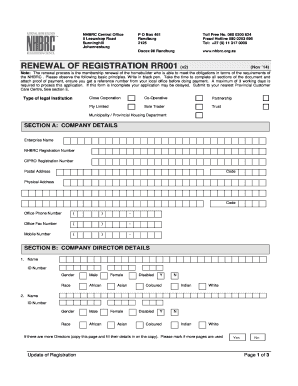
Get Nhbrc Renewal
How it works
-

Open form follow the instructions
-

Easily sign the form with your finger
-

Send filled & signed form or save
How to fill out the Nhbrc Renewal online
Renewing your NHBRC registration is an essential process for homebuilders to ensure compliance and continued eligibility. This guide provides a clear and supportive approach to completing the Nhbrc Renewal form online.
Follow the steps to successfully complete your Nhbrc Renewal form.
- Press the ‘Get Form’ button to access the Nhbrc Renewal form and open it in your preferred document editor.
- Begin by filling out Section A with your company details, including the enterprise name and registration numbers.
- In Section B, provide the names, ID numbers, and gender of the company directors. If there are more than two directors, duplicate the page as necessary and indicate this.
- Proceed to Section C to consent to a credit check. Attach the signed consent letter and complete your banking details.
- Fill out Section D by ticking off the required documents you are attaching. Ensure all copies are recent and certified as necessary.
- Review all sections for completeness and clarity. Remember to use a black pen when filling out the form.
- Finally, save your changes, download a copy of the form, and prepare to submit it either by printing it or sharing it online as required.
Complete your Nhbrc Renewal form online today to ensure your registration remains active.
Related links form
Becoming a home builder in South Africa involves several important steps. First, you must understand the legal requirements and complete the NHBRC registration process. This registration includes submitting your details, demonstrating your experience, and obtaining necessary training. Achieving and renewing your NHBRC status ensures you meet all regulations and qualify to offer services to homeowners.