Loading
Form preview
  • US Legal Forms
  • Form Library
  • More Forms
  • More Uncategorized Forms
  • F24 Predeterminato

Get F24 Predeterminato

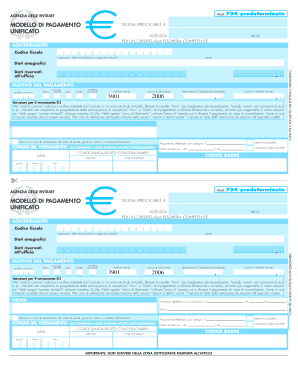
E cognome, denominazione o ragione sociale nome Dati riservati all ufficio , MOTIVO DEL PAGAMENTO Ravv. codice comune Immob. variati Acc. Saldo numero immobili codice tributo anno di riferimento importi a debito versati detrazione ICI abitazione principale 2006 3901 , , Istruzioni per il versamento ICI Nel codice comune indicare il codice catastale del Comune in cui sono situati gli immobili. Barrare le caselle: Ravv. per pagamento da ravvedimento; Immob. varia.

How it works

  1. Open form

    Open form follow the instructions

  2. Easily sign form

    Easily sign the form with your finger

  3. Share form

    Send filled & signed form or save

How to fill out the F24 Predeterminato online

The F24 Predeterminato is an essential payment form used for various taxes in Italy. This guide provides clear, step-by-step instructions to help users fill out this form online effectively.

Follow the steps to complete the F24 Predeterminato online.

  1. Click 'Get Form' button to access the F24 Predeterminato online. This will allow you to open the necessary form in the editor.
  2. Begin filling in your personal information in the designated fields, including your tax code, surname, and first name.
  3. In the 'Motivo del pagamento' section, select the appropriate payment reason. If needed, check the box for 'Ravv.' for late payment, 'Immob. variati' for property variations, or 'Acc.' or 'Saldo' if the payment is for an advance or final payment.
  4. In the 'codice comune' field, input the cadastral code of the municipality where the property is located.
  5. Indicate the number of properties involved in the payment by entering a maximum of three digits in the 'numero immobili' field.
  6. Specify the 'anno di riferimento', which is the tax year relevant to the payment. In the case of a late payment, indicate the year the tax was originally due.
  7. In the 'importi a debito versati' section, enter the tax amount net of any applicable deductions for your primary residence.
  8. Fill in the 'Estremi del versamento' section, including the date of payment and the relevant banking details.
  9. If applicable, check the box for payments made by a beneficiary, guardian, or bankruptcy curator.
  10. Review all entered information for accuracy. Once confirmed, save your changes. You can then download, print, or share the completed F24 Predeterminato form.

Complete and submit your F24 Predeterminato online today to ensure timely processing.

Get form

Experience a faster way to fill out and sign forms on the web. Access the most extensive library of templates available.
Get form

Related content

(DOC) Diritto Tributario
... (F24) può essere oggetto di compensazione con i crediti spettanti al contribuente...
Learn more
F24 predeterminato codice tributo 9006. CODICE...
Il codice 9006 viene utilizzato principalmente per sitzioni specifiche che rigrdano il...
Learn more

Related links form

Prototype Geographic Search And Query Tools For A Library Digital ... Where Are They? A Spatial Inquiry Of Sex Offenders In Brazos County Thessaloniki Water Supply & Sewerage Co. S.A. Uses ArcObjects ... Search Form 2001.AI - ZiefBrief

Questions & Answers

Get answers to your most pressing questions about US Legal Forms API.

Contact support

To obtain access to F13 to F24, consider using remapping programs or keyboard tools that allow you to create these function keys. Many users find that utilizing devices specifically designed for advanced function key access greatly enhances their productivity. Utilization of F24 Predeterminato can also streamline various tasks in your workflow, making key access essential for maximizing efficiency.

To access F13 to F24, you can use specific software that supports additional function keys or customize your keyboard layout through your operating system settings. Some keyboards have these keys mapped by default, but on others, you'll need to enable them manually. By properly accessing these keys, you can take full advantage of features in applications that integrate with F24 Predeterminato.

If your keyboard lacks an F14 key, you can enable it through software settings or configure a macro key to function as F14. This customization provides flexibility in managing application commands. You can further enhance your experience with F24 Predeterminato by setting up key combinations that align with your workflow.

To reassign your F keys, you'll need to access your keyboard settings or use dedicated software that allows customization. Many operating systems, like Windows and macOS, have built-in options to modify keyboard shortcuts. Once you reach these settings, you can assign your preferred functions to each key, including those from F24 Predeterminato.

To address the F24 error code on a boiler, start by checking the water pressure levels. Low pressure can lead to F24 errors, so ensure it meets the recommended minimum. Additionally, inspect the boiler's components for any signs of malfunction, and clear any blockages in the system. For ongoing issues, consider seeking expert help to resolve the F24 Predeterminato code effectively.

To fix the F24 error code, start by inspecting the drainage system of your dishwasher. Look for any blockages in the drain hose and clean the filter if necessary. Additionally, ensure that the drain plug is clear and that there is no oversaturation of water. By following these steps, you may resolve the F24 Predeterminato error without requiring professional help.

The F24 error code usually refers to a malfunction in the dishwasher's drainage function. It serves as an alert for users that water is not exiting the appliance as it should. Understanding what the F24 Predeterminato means can help you take quick action to prevent further damage. By addressing this error promptly, you can ensure your dishwasher continues to run effectively.

The F24 fault on a dishwasher indicates a problem with the appliance's drainage system. This error typically occurs when water does not drain properly from the machine. To resolve this issue, check the drain hose and filter for clogs. If the problem persists, you may need professional assistance to ensure your dishwasher operates smoothly and efficiently.

The F23 form is another important tax document in Italy, primarily used for payments related to various taxes and fees. Unlike the F24, the F23 form does not have a predeterminato version, making it less convenient in some scenarios. Understanding the differences between these forms is essential for effective tax management. Platforms like uslegalforms can assist you in navigating these forms easily.

To download the F24 form, you can visit the official Italian Revenue Office website or use platforms like uslegalforms. The F24 Predeterminato version is readily available and often provided in downloadable formats for your convenience. This helps you access the form anytime, ensuring you can easily manage your tax responsibilities.

Get This Form Now!

Use professional pre-built templates to fill in and sign documents online faster. Get access to thousands of forms.
Get form
If you believe that this page should be taken down, please follow our DMCA take down processhere.

Industry-leading security and compliance

US Legal Forms protects your data by complying with industry-specific security standards.
  • In businnes since 1997
    25+ years providing professional legal documents.
  • Accredited business
    Guarantees that a business meets BBB accreditation standards in the US and Canada.
  • Secured by Braintree
    Validated Level 1 PCI DSS compliant payment gateway that accepts most major credit and debit card brands from across the globe.
Get F24 Predeterminato
Get form
  • Adoption
  • Bankruptcy
  • Contractors
  • Divorce
  • Home Sales
  • Employment
  • Identity Theft
  • Incorporation
  • Landlord Tenant
  • Living Trust
  • Name Change
  • Personal Planning
  • Small Business
  • Wills & Estates
  • Packages A-Z
  • Affidavits
  • Bankruptcy
  • Bill of Sale
  • Corporate - LLC
  • Divorce
  • Employment
  • Identity Theft
  • Internet Technology
  • Landlord Tenant
  • Living Wills
  • Name Change
  • Power of Attorney
  • Real Estate
  • Small Estates
  • Wills
  • All Forms
  • Forms A-Z
  • Form Library
  • Legal Hub
  • About Us
  • Help Portal
  • Legal Resources
  • Blog
  • Affiliates
  • Contact Us
  • Delete My Account
  • Site Map
  • Industries
  • Forms in Spanish
  • Localized Forms
  • State-specific Forms
  • Forms Kit
  • Real Estate Handbook
  • All Guides
  • Notarize
  • Incorporation services
  • For Consumers
  • For Small Business
  • For Attorneys
  • USLegal
  • FormsPass
  • pdfFiller
  • signNow
  • altaFlow
  • DocHub
  • Instapage
Form Packages
  • Adoption
  • Bankruptcy
  • Contractors
  • Divorce
  • Home Sales
  • Employment
  • Identity Theft
  • Incorporation
  • Landlord Tenant
  • Living Trust
  • Name Change
  • Personal Planning
  • Small Business
  • Wills & Estates
  • Packages A-Z
Form Categories
  • Affidavits
  • Bankruptcy
  • Bill of Sale
  • Corporate - LLC
  • Divorce
  • Employment
  • Identity Theft
  • Internet Technology
  • Landlord Tenant
  • Living Wills
  • Name Change
  • Power of Attorney
  • Real Estate
  • Small Estates
  • Wills
  • All Forms
  • Forms A-Z
  • Form Library
Customer Service
  • Legal Hub
  • About Us
  • Help Portal
  • Legal Resources
  • Blog
  • Affiliates
  • Contact Us
  • Delete My Account
  • Site Map
  • Industries
  • Forms in Spanish
  • Localized Forms
  • State-specific Forms
  • Forms Kit
Legal Guides
  • Real Estate Handbook
  • All Guides
Prepared for you
  • Notarize
  • Incorporation services
Our Customers
  • For Consumers
  • For Small Business
  • For Attorneys
Our Sites
  • USLegal
  • FormsPass
  • pdfFiller
  • signNow
  • altaFlow
  • DocHub
  • Instapage
Social Media
Call us now toll free:
+1 833 426 79 33
As seen in:
© Copyright 1999-2026 airSlate Legal Forms, Inc. 3720 Flowood Dr, Flowood, Mississippi 39232
  • Your Privacy Choices
  • Terms of Service
  • Privacy Notice
  • Content Takedown Policy
  • Bug Bounty Program