Loading
Get Nps Form Version 1 3 2020-2026
How it works
-

Open form follow the instructions
-

Easily sign the form with your finger
-

Send filled & signed form or save
How to fill out the Nps Form Version 1 3 online
Filling out the Nps Form Version 1 3 online can seem daunting, but this guide provides clear, step-by-step instructions to help you through the process. This form is essential for subscribing to the National Pension System and includes various important sections that require your attention.
Follow the steps to successfully complete the Nps Form Version 1 3 online.
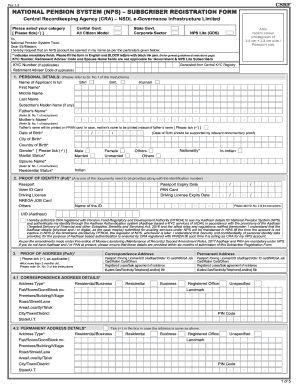
- Press the ‘Get Form’ button to access the form and open it in the online editor.
- Select your category from the options provided, such as 'Central Govt.', 'State Govt.', 'Corporate Sector', or 'All Citizen Model' by ticking the appropriate box.
- Affix a recent color photograph of size 3.5 cm × 2.5 cm in the designated area on the form. Ensure it is clear and well-positioned.
- Fill out your personal details in section 1, including your full name, date of birth, city and country of birth, gender, and marital status. Remember to provide the names of your father and mother.
- In section 2, provide proof of identity by ticking one of the acceptable documents (e.g., passport, voter ID). Ensure to fill out any additional relevant fields.
- Complete section 3 regarding proof of address. Submit either recent utility bills, bank statements, or other accepted documents.
- In section 5, provide your contact details, including your mobile number, email address, and any telephone numbers.
- Discuss your occupation in section 6 and select the appropriate category, as well as providing your income range and educational background.
- In section 7, specify the subscriber bank details. Provide your account type (savings/current), bank name, account number, and IFS code.
- Fill in the subscriber nomination details in section 8. You can nominate up to three individuals; ensure the percentage shares add up to 100.
- In section 10, select your desired pension fund and investment option, paying attention to the guidelines for the sector you belong to.
- Complete the FATCA compliance declaration in section 11, providing your country of tax residency and TIN if applicable.
- Sign and date the declaration section in step 12, confirming that all the information provided is accurate and complete.
- If you're a government subscriber, fill out the declaration by your employer in section 13. For corporate subscribers, complete section 14.
- Finally, review the entire form for accuracy, save any changes you have made, and either download or print the completed form for submission.
Start completing your Nps Form Version 1 3 online today to secure your future!
To scan your signature for the NPS Form Version 1 3, use a scanner or a scanning app on your smartphone. Ensure the background is clear for better quality. After that, upload your signature file to the NPS portal during the eSigning process to ensure proper identification.