Loading
Form preview
  • US Legal Forms
  • Other Templates
  • Social Forms
  • District of Columbia Social Forms
  • Dc Bread For The City Liability Waiver 2018

Get Dc Bread For The City Liability Waiver 2018-2026

How it works

  1. Open form

    Open form follow the instructions

  2. Easily sign form

    Easily sign the form with your finger

  3. Share form

    Send filled & signed form or save

How to fill out the DC Bread for the City Liability Waiver online

Filling out the DC Bread for the City Liability Waiver online is an essential part of participating in volunteer activities. This guide will provide you with clear and supportive instructions to ensure that you complete the form accurately and efficiently.

Follow the steps to successfully complete the waiver form.

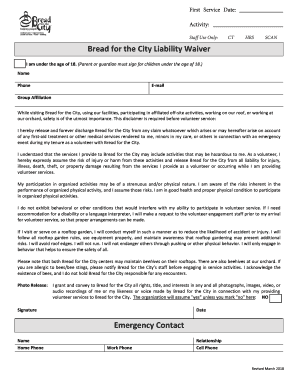
  1. Click the ‘Get Form’ button to access the liability waiver document and open it in the form editor.
  2. Begin by entering the first service date and the activity you will be participating in. This information helps Bread for the City manage their records effectively.
  3. Indicate your age by checking the appropriate box. If you are under the age of 18, remember that a parent or guardian will need to sign the form on your behalf.
  4. Fill in your name, phone number, and email address to provide your contact details. This information allows the organization to reach you if necessary.
  5. If you belong to a specific group or organization, please include that information in the group affiliation section.
  6. Carefully read through the liability waiver statements to fully understand your rights and the risks associated with volunteering. Ensure you acknowledge the release of any claims against Bread for the City.
  7. If applicable, indicate whether you need any accommodations or assistance due to a disability or require a language interpreter. Doing this in advance ensures proper preparations can be made.
  8. If you are serving in areas such as the rooftop garden, review and agree to comply with safety guidelines to minimize risks. It's important to show awareness of your surroundings.
  9. Complete the photo release section by indicating your preferences regarding the use of images or recordings taken during your service. Mark ‘no’ if you do not grant permission.
  10. Sign and date the waiver to confirm your agreement with the terms stated in the document.
  11. Finally, fill out the emergency contact information, including their name, relationship, and contact numbers, to ensure your safety during activities.
  12. Once you have filled out all necessary fields, review the form for accuracy. Save your changes, and download or print the completed waiver for your records. You may also share it as needed.

Complete your DC Bread for the City Liability Waiver online today to get started with your volunteer work!

Get form

Experience a faster way to fill out and sign forms on the web. Access the most extensive library of templates available.
Get form

Related content

Bread v. DC (Statement of Interest as filed in...
Feb 22, 2024 — Before this Court is the District's Motion to Dismiss, which asserts in...
Learn more
Social Services
Bread for the City – provides legal and social services, food, clothing, and medical...
Learn more
DC Inside Cho Doo-soon false accusation case
2021 April 1st internet community In DC Inside 's cartoon gallery , a user secretly filmed...
Learn more

Related links form

AE Form 600-17A, March 2012 - Exchange Marks And Spencer Jobs Application Form M&s Cash Isa Application Form - M&S Bank - Marks & Spencer PPI CSU Fax Form 12-7-2009.doc

Questions & Answers

Get answers to your most pressing questions about US Legal Forms API.

Contact support

The charity rating for Bread for the City is generally positive, reflecting its commitment to serving the community effectively. Various charity evaluators recognize its transparency and impact, which enhances its reputation among donors. If you engage with the DC Bread for the City Liability Waiver, you'll support an organization with strong ethical standards and community-focused initiatives.

To write a simple liability waiver, begin by defining it as a document that releases liability for a specific activity. Include sections for participant details, a description of the event, a statement of understanding risks, and a signature line. Utilizing a template from US Legal Forms can simplify this process, especially for the DC Bread for the City Liability Waiver, ensuring no critical details are overlooked.

A liability waiver should clearly state the activity, outline the risks involved, and specify that the participant understands and accepts those risks. For the DC Bread for the City Liability Waiver, it must also include a release of liability for the organization. Being explicit about these points helps protect all parties involved and sets clear expectations.

Generally, you do not need a lawyer to write a liability waiver, including the DC Bread for the City Liability Waiver. You can create your own waiver by following a template or using an online legal service like US Legal Forms. These resources guide you through the process, ensuring you include all necessary elements. However, consulting a lawyer is wise if your situation is complex.

Filling out the DC Bread for the City Liability Waiver is straightforward. Start by providing your name, date, and the specific activity or event for which the waiver applies. Next, read through the terms carefully, ensuring you understand what you're agreeing to. Finally, sign and date the form, confirming your acceptance of the liability waiver.

Yes, liability waivers can work effectively to protect organizations like DC Bread for the City from legal claims. However, the effectiveness depends on how well the waiver is written and whether it meets legal requirements. To maximize validity, utilize proven templates or resources from uslegalforms.

A liability waiver becomes enforceable when it is clear, concise, and signed willingly by all participants in the DC Bread for the City program. The waiver should not contain ambiguous language and must outline the risks involved. Following guidelines from legal platforms like uslegalforms can further ensure you meet all necessary criteria.

Yes, you can write your own liability waiver for DC Bread for the City. It is important to ensure that your waiver includes clear language outlining the risks involved, and that participants understand what they are signing. However, to make sure it is valid, consider using templates or resources available from trusted platforms like uslegalforms.

Bread for the City's headquarters are located at 1525 7th St NW, Washington, District of Columbia, 20001, United States What is Bread for the City's phone number? Bread for the City's phone number is (202) 265-2400 What is Bread for the City's official website?

The Bread for the World organization was founded in the early 1970s by Reverend Arthur Simon, then pastor of Trinity Lutheran Church on the Lower East Side of New York City.

Get This Form Now!

Use professional pre-built templates to fill in and sign documents online faster. Get access to thousands of forms.
Get form
If you believe that this page should be taken down, please follow our DMCA take down processhere.
Get DC Bread for the City Liability Waiver
Get form
  • Adoption
  • Bankruptcy
  • Contractors
  • Divorce
  • Home Sales
  • Employment
  • Identity Theft
  • Incorporation
  • Landlord Tenant
  • Living Trust
  • Name Change
  • Personal Planning
  • Small Business
  • Wills & Estates
  • Packages A-Z
  • Affidavits
  • Bankruptcy
  • Bill of Sale
  • Corporate - LLC
  • Divorce
  • Employment
  • Identity Theft
  • Internet Technology
  • Landlord Tenant
  • Living Wills
  • Name Change
  • Power of Attorney
  • Real Estate
  • Small Estates
  • Wills
  • All Forms
  • Forms A-Z
  • Other Templates
  • Legal Hub
  • About Us
  • Help Portal
  • Legal Resources
  • Blog
  • Affiliates
  • Contact Us
  • Delete My Account
  • Site Map
  • Industries
  • Forms in Spanish
  • Localized Forms
  • State-specific Forms
  • Forms Kit
  • Real Estate Handbook
  • All Guides
  • Notarize
  • Incorporation services
  • For Consumers
  • For Small Business
  • For Attorneys
  • USLegal
  • FormsPass
  • pdfFiller
  • signNow
  • altaFlow
  • DocHub
  • Instapage
Form Packages
  • Adoption
  • Bankruptcy
  • Contractors
  • Divorce
  • Home Sales
  • Employment
  • Identity Theft
  • Incorporation
  • Landlord Tenant
  • Living Trust
  • Name Change
  • Personal Planning
  • Small Business
  • Wills & Estates
  • Packages A-Z
Form Categories
  • Affidavits
  • Bankruptcy
  • Bill of Sale
  • Corporate - LLC
  • Divorce
  • Employment
  • Identity Theft
  • Internet Technology
  • Landlord Tenant
  • Living Wills
  • Name Change
  • Power of Attorney
  • Real Estate
  • Small Estates
  • Wills
  • All Forms
  • Forms A-Z
  • Other Templates
Customer Service
  • Legal Hub
  • About Us
  • Help Portal
  • Legal Resources
  • Blog
  • Affiliates
  • Contact Us
  • Delete My Account
  • Site Map
  • Industries
  • Forms in Spanish
  • Localized Forms
  • State-specific Forms
  • Forms Kit
Legal Guides
  • Real Estate Handbook
  • All Guides
Prepared for you
  • Notarize
  • Incorporation services
Our Customers
  • For Consumers
  • For Small Business
  • For Attorneys
Our Sites
  • USLegal
  • FormsPass
  • pdfFiller
  • signNow
  • altaFlow
  • DocHub
  • Instapage
Social Media
Call us now toll free:
+1 833 426 79 33
As seen in:
© Copyright 1999-2026 airSlate Legal Forms, Inc. 17 Station Street, Suite 303, Brookline, MA 02445
  • Your Privacy Choices
  • Terms of Service
  • Privacy Notice
  • Content Takedown Policy
  • Bug Bounty Program