How it works
  • Open form

    Open form follow the instructions

  • Easily sign form

    Easily sign the form with your finger

  • Share form

    Send filled & signed form or save

How to fill out the MetLife Authorization to Repair - Direction to Pay online

Filling out the MetLife Authorization to Repair - Direction to Pay form online is a straightforward process that empowers users to authorize repairs on their vehicle and direct payments to the repair facility. This guide will provide you with clear, step-by-step instructions to ensure you complete the form accurately and efficiently.

Follow the steps to complete the form online:

  1. Click ‘Get Form’ button to obtain the form and open it for editing.
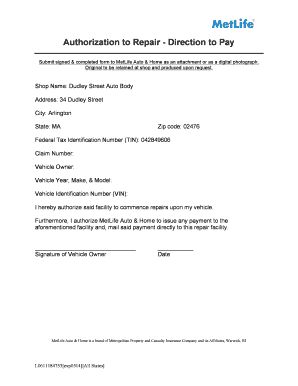
  2. Begin by filling in the shop information. Enter the shop name, which in this instance is Dudley Street Auto Body.
  3. Add the shop's address. Include the street address, city (Arlington), state (MA), and the zip code (02476).
  4. Input the Federal Tax Identification Number (TIN) as 042849606.
  5. Fill in the claim number if applicable.
  6. Enter the vehicle owner's name in the designated field.
  7. Provide details about the vehicle, including the year, make, and model.
  8. Fill in the Vehicle Identification Number (VIN) accurately.
  9. Review the authorization statement and check the box or provide signature of the vehicle owner.
  10. Enter the date of signing.
  11. Once all fields are filled out, carefully review the form for accuracy before submission.
  12. Save your changes, and then you can download, print, or share the completed form as needed.

Complete your documents online today for a smooth handling process.

Get form

Experience a faster way to fill out and sign forms on the web. Access the most extensive library of templates available.

Related content

The MetLife Federal Dental Plan

Premium deductions will start with the first full pay period beginning on/after January 1...

Learn more
SPD MetLife Dental High Option - Human Resources

If You enroll for Contributory Insurance, You must also give the Policyholder Written...

Learn more
GE 2014 Annual Report

Feb 27, 2015 — We positioned our businesses to achieve superior customer outcomes. And...

Learn more
Questions & Answers

Get answers to your most pressing questions about US Legal Forms API.

Contact support

How do I make a Payment to MetLife?

Making a payment to MetLife can be done easily online or via phone. Log onto your MetLife account to access the payment options available. You can also use their mobile app for convenience or send checks directly to MetLife with your account information for processing.

All you need to do is: Log into our secure customer portal "myMetLife" using your user ID and password. Select the policy you want to pay and click on the “Pay Online” option (You will be redirected to a secure page for premium payment). Pay your premium using your Debit or Credit card.

How to Cancel MetLife Insurance Policies Cancel by phone, by calling 1-800-638-5433 or the specific number for your type of policy. Cancel by email if your specific policy allows it. ... You cannot cancel a MetLife insurance policy without the assistance of a representative.

Online payments from your bank account are available for some products. For products that offer this option, payments can be made via your online account or our QuickPay website.

You can register online for fast, convenient, and secure access to MetOnline. With MetOnline you can view your account balance, view your current crediting rate, download statements, and more. If you already have a TCA and would like to register for online access visit online.metlife.com and click Register Now.

If your policy is in jeopardy of lapsing, then you may have received a bill that was higher than your regular payment. That amount, labeled Premium Due to Retain Coverage, covers your regular monthly deduction that was due, plus the next two monthly deductions that will be due during the 61-day grace period.

The most common accepted payment methods are personal checks, cashier's check or an electronic fund transfer (EFT).

Get This Form Now!

Use professional pre-built templates to fill in and sign documents online faster. Get access to thousands of forms.

If you believe that this page should be taken down, please follow our DMCA take down process here.

Get MetLife Authorization to Repair - Direction to Pay