Loading
Get Partners Healthcare 84182bwh 2016-2026
How it works
-

Open form follow the instructions
-

Easily sign the form with your finger
-

Send filled & signed form or save
How to fill out the Partners Healthcare 84182BWH online
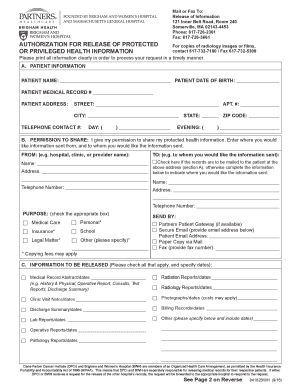
Filling out the Partners Healthcare 84182BWH form is a crucial step for individuals seeking to authorize the release of their protected health information. This guide provides a clear, step-by-step approach to ensuring that all necessary sections are completed accurately and efficiently.
Follow the steps to successfully complete the form
- Click ‘Get Form’ button to obtain the form and open it in the editor.
- In section A, enter the patient's information. Fill in the patient's name, date of birth, medical record number, address (street, apartment number, city, state, and zip code), and telephone contact numbers for daytime and evening.
- In section B, provide permission to share the protected health information. Indicate where the information is to be sent from and to whom it is to be sent. Include names and additional addresses if needed. If you want records mailed to the patient, check the appropriate box.
- Select the purpose for sharing the information by checking the relevant box in section B. Be aware that some purposes may incur copying fees.
- Specify the method of sending the information in section B. Options include Partners Patient Gateway, secure email (include the email address), paper copy via mail, or fax (provide the fax number).
- In section C, check all types of information to be released and specify the relevant dates for each type of record requested.
- In section D, check 'Yes' for any specific sensitive information being released, such as HIV test results or mental health details. Ensure you specify the dates as required.
- Review section E, which outlines your understanding and agreement regarding the release of information. It is crucial to understand that the authorization is voluntary.
- Ensure you sign and date the form where indicated as the patient or, if applicable, have a legal representative sign. Indicate the relationship of the representative to the patient.
- After completing all sections, you can save changes, download, print, or share the form as needed.
Complete your Partners Healthcare 84182BWH form online today to manage your health information effectively.
You can easily get your MRI scan results through the Partners Healthcare 84182BWH patient portal. Just log into your account to view and download your results at your convenience. If you prefer a more personal approach, don't hesitate to call the imaging center to have your results explained to you.