Loading
Form preview
  • US Legal Forms
  • Other Templates
  • Industry Forms
  • Industry Bank & Financial Forms
  • Toro Visa Prepaid Card Rebate Form 2017

Get Toro Visa Prepaid Card Rebate Form 2017-2026

How it works

  1. Open form

    Open form follow the instructions

  2. Easily sign form

    Easily sign the form with your finger

  3. Share form

    Send filled & signed form or save

How to fill out the Toro Visa Prepaid Card Rebate Form online

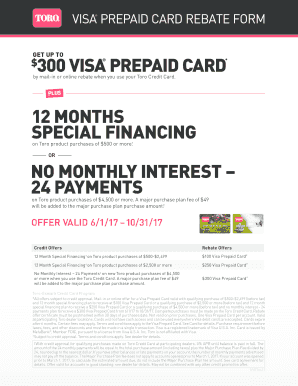
The Toro Visa Prepaid Card Rebate Form is designed to facilitate the processing of your rebate when making eligible purchases with your Toro Credit Card. This guide will provide you with clear instructions on completing the form online, ensuring you receive the rebate you are entitled to.

Follow the steps to successfully fill out the rebate form.

  1. Click ‘Get Form’ button to access the Toro Visa Prepaid Card Rebate Form and open it in the editing interface.
  2. Make a qualifying pre-tax purchase of $500 or more using your Toro Credit Card between June 1, 2017, and October 31, 2017. Ensure that your purchase aligns with the special financing plans available.
  3. Fill out the required fields in the form, including your name, address, city, state, zip code, home telephone number, email address (optional), and the last four digits of your Toro Credit Card number.
  4. Review all entered information for accuracy and completeness to avoid any delays in processing.
  5. If you choose to mail the form, send it together with your Toro Credit Card invoice to the specified address: Toro Consumer and Commercial Rebate, Dept #702900, P.O. Box 1919, Memphis, TN 38101.
  6. After submission, monitor the status of your rebate. You may call 1-844-686-9373 if the rebate card is not received within 6-8 weeks.

Start filling out the Toro Visa Prepaid Card Rebate Form online now to secure your rebate!

Get form

Experience a faster way to fill out and sign forms on the web. Access the most extensive library of templates available.
Get form

Related content

Credit Card Program Agreement
This Credit Card Program Agreement is made as of the 22nd day of October, 2012...
Learn more
for everthing else, there's taxes: why credit card...
by TH Fry · 2025 · Cited by 2 — As the prevalence of credit cards and other digital...
Learn more
Toro Visa® Prepaid Card Rebate Form
TORO VISA®. PREPAID CARD REBATE FORM. *Receive a $50 Visa prepaid card on qualifying...
Learn more

Related links form

Cskccoreflex Coresource Com Stamford Recreation Services Summer Camp Counselor Application ... SdR044948-00-Krapur7845-KompAGB Site Survey Forms Santa Calls - Stamford Recreation

Questions & Answers

Get answers to your most pressing questions about US Legal Forms API.

Contact support

Using a prepaid Visa card often requires a PIN, especially for ATM withdrawals or when making purchases in stores. When you fill out the Toro Visa Prepaid Card Rebate Form, it usually comes with instructions for setting up a PIN. You should keep this PIN secure, as it protects your funds from unauthorized use. However, some online transactions may not require a PIN.

A prepaid card via rebate is a card that you receive after completing certain requirements, usually as a reward. The Toro Visa Prepaid Card Rebate Form specifies what actions are necessary to qualify for your rebate. Once you submit the form and meet the requirements, you will receive your prepaid card loaded with an agreed amount. This flexible payment option allows easy spending like any regular card.

Redeeming prepaid Visa cards is straightforward when you have your Toro Visa Prepaid Card Rebate Form handy. Visit the issuing bank's website to activate your card, or you may be able to do this via phone. Once activated, you can use the card like a debit card for online or in-store purchases. Keep in mind to check any fees or restrictions that may apply.

To redeem a prepaid Visa card, first ensure that you have your Toro Visa Prepaid Card Rebate Form completed. You can then access your card's online account or call the customer service number provided with your card. Follow the instructions for redeeming your balance and using your card for purchases. Always check for any specific terms related to your card before proceeding.

While prepaid Visa cards can be used without registration, doing so may offer added benefits like enhanced security and easier tracking of transactions. Registration often helps in case you need to replace a lost or stolen card. If you are using the Toro Visa Prepaid Card Rebate Form, ensure your information is up to date to maximize your benefits.

To fill out a prepaid Visa card, you start by entering your personal details, followed by the card number and security code. Make sure your information is accurate to prevent issues with transactions or rebates. Use the Toro Visa Prepaid Card Rebate Form to ensure you capture any rewards you earn. Completing this form ensures you enjoy the fullest benefits of your prepaid card.

A prepaid rebate is a benefit offered on a prepaid card, such as the Toro Visa Prepaid Card, where you can receive a specific amount back after making eligible purchases. This rebate incentivizes users to spend more while enjoying rewards. To claim your rewards, you will need to fill out the Toro Visa Prepaid Card Rebate Form. This system enhances the value of your shopping experience.

Get This Form Now!

Use professional pre-built templates to fill in and sign documents online faster. Get access to thousands of forms.
Get form
If you believe that this page should be taken down, please follow our DMCA take down processhere.
Get Toro Visa Prepaid Card Rebate Form
Get form
  • Adoption
  • Bankruptcy
  • Contractors
  • Divorce
  • Home Sales
  • Employment
  • Identity Theft
  • Incorporation
  • Landlord Tenant
  • Living Trust
  • Name Change
  • Personal Planning
  • Small Business
  • Wills & Estates
  • Packages A-Z
  • Affidavits
  • Bankruptcy
  • Bill of Sale
  • Corporate - LLC
  • Divorce
  • Employment
  • Identity Theft
  • Internet Technology
  • Landlord Tenant
  • Living Wills
  • Name Change
  • Power of Attorney
  • Real Estate
  • Small Estates
  • Wills
  • All Forms
  • Forms A-Z
  • Other Templates
  • Legal Hub
  • About Us
  • Help Portal
  • Legal Resources
  • Blog
  • Affiliates
  • Contact Us
  • Delete My Account
  • Site Map
  • Industries
  • Forms in Spanish
  • Localized Forms
  • State-specific Forms
  • Forms Kit
  • Real Estate Handbook
  • All Guides
  • Notarize
  • Incorporation services
  • For Consumers
  • For Small Business
  • For Attorneys
  • USLegal
  • FormsPass
  • pdfFiller
  • signNow
  • altaFlow
  • DocHub
  • Instapage
Form Packages
  • Adoption
  • Bankruptcy
  • Contractors
  • Divorce
  • Home Sales
  • Employment
  • Identity Theft
  • Incorporation
  • Landlord Tenant
  • Living Trust
  • Name Change
  • Personal Planning
  • Small Business
  • Wills & Estates
  • Packages A-Z
Form Categories
  • Affidavits
  • Bankruptcy
  • Bill of Sale
  • Corporate - LLC
  • Divorce
  • Employment
  • Identity Theft
  • Internet Technology
  • Landlord Tenant
  • Living Wills
  • Name Change
  • Power of Attorney
  • Real Estate
  • Small Estates
  • Wills
  • All Forms
  • Forms A-Z
  • Other Templates
Customer Service
  • Legal Hub
  • About Us
  • Help Portal
  • Legal Resources
  • Blog
  • Affiliates
  • Contact Us
  • Delete My Account
  • Site Map
  • Industries
  • Forms in Spanish
  • Localized Forms
  • State-specific Forms
  • Forms Kit
Legal Guides
  • Real Estate Handbook
  • All Guides
Prepared for you
  • Notarize
  • Incorporation services
Our Customers
  • For Consumers
  • For Small Business
  • For Attorneys
Our Sites
  • USLegal
  • FormsPass
  • pdfFiller
  • signNow
  • altaFlow
  • DocHub
  • Instapage
Social Media
Call us now toll free:
+1 833 426 79 33
As seen in:
© Copyright 1999-2026 airSlate Legal Forms, Inc. 17 Station Street, Ste. 203, Brookline, MA 02445
  • Your Privacy Choices
  • Terms of Service
  • Privacy Notice
  • Content Takedown Policy
  • Bug Bounty Program