Open form follow the instructions
Easily sign the form with your finger
Send filled & signed form or save
How to fill out the UK HMRC SA109 online
Filling out the UK HMRC SA109 form can seem complex, but this guide aims to simplify the process for you. This document is essential for those with specific residence and remittance circumstances for the tax year, providing the necessary steps to accurately complete it online.
Follow the steps to complete the UK HMRC SA109 online.
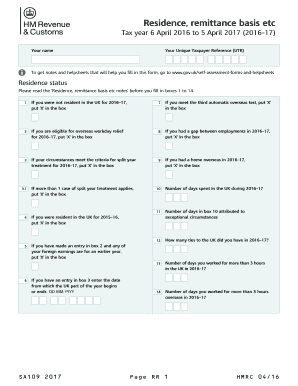
- Press the ‘Get Form’ button to obtain the form and open it in the corresponding editor.
- Enter your name in the designated field. This helps identify your submission.
- Input your Unique Taxpayer Reference (UTR), ensuring accuracy to avoid any delays in processing.
- Review the box for residence status. Depending on your circumstances for the tax year 2016–17, mark an appropriate box (1-14) as per the instructions provided in the form notes.
- If applicable, provide details on personal allowances in boxes 15-17. Ensure you are claiming them correctly based on your residency status.
- Complete sections on residence in other countries and the necessary codes for your nationality and residency status by filling in boxes 18-20.
- For domicile relevance regarding your tax liability, check the box if applicable and provide necessary dates in boxes 23-27.
- If you are making a remittance basis claim, place an ‘X’ in box 28 and proceed as instructed, including relevant amounts in boxes 29-39.
- If you have any additional information that needs to be reported, utilize box 40 to detail this.
- After completing all sections, review the form for accuracy. You can then save any changes, download, print, or share the completed form.
Complete your HMRC SA109 form online today for a smoother tax submission experience.
Experience a faster way to fill out and sign forms on the web. Access the most extensive library of templates available.
Related content
Find out about: • checking if you need to send a ... Introduction. If you do need to...
Get answers to your most pressing questions about US Legal Forms API.
Can you complete SA109 online?
Yes, you can complete the UK HMRC SA109 form online through the HMRC Self Assessment portal. This option simplifies the filing process and provides instant confirmation. Using an online platform can quicker help you manage your tax return effectively, especially when living abroad.
How do I inform HMRC about leaving the UK?
You can inform HMRC about your departure by completing the UK HMRC SA109 form. It is essential to provide accurate details about your exit date and future plans. By doing this, you ensure your tax affairs are in order and avoid any potential issues after leaving.
What to do when leaving the UK?
When leaving the UK, it is essential to inform HMRC of your departure to ensure you comply with tax regulations. Complete the UK HMRC SA109 form as part of your tax return, and consider notifying your bank and utility providers. This step helps to manage your tax matters effectively after you leave.
Do I have to file a UK tax return if I live abroad?
If you live abroad, you may still need to file a UK tax return, especially if you have UK income or are deemed a tax resident. The UK HMRC SA109 form is particularly useful for non-residents to report earnings. Always check your residency status and consult with a tax expert for guidance.
Is there an UK exit tax?
Yes, there is a potential UK exit tax that may apply when you leave the UK for good. This tax generally affects individuals who have made certain gains on assets. However, the UK HMRC SA109 form will help you assess your situation and clarify if you are liable for this tax based on your residency and assets.
How to download tax year overview HMRC?
To download your tax year overview from HMRC, log into your HMRC online account. Navigate to the 'Self Assessment' section and select 'Tax Year Overview.' From there, you can download a PDF version for your records. This overview will help you track your tax obligations for the year.
How do I file a UK tax return as a non-resident?
Filing your UK tax return as a non-resident involves completing the UK HMRC SA109 form along with your main tax return. You will need to provide information about your income and any foreign tax credits. You can submit your forms online through the HMRC website or by using a tax professional to assist you.
How do I report foreign income on my UK tax return?
When reporting foreign income on your UK tax return, include it in the SA109 form and provide all necessary details regarding the source and amount. Make sure to convert the income into GBP at the correct exchange rate. Using USLegalForms can simplify this process by providing clear guidelines and forms tailored for your needs.
How to tell HMRC you are no longer working?
To inform HMRC that you are no longer working, update your tax information either by calling their helpline or including this information in your Self Assessment. If you have applied for benefits or tax credits, ensure that HMRC receives all necessary updates. Correct information helps you avoid tax miscalculations.
What do I need to do if I am leaving the UK?
If you are leaving the UK, you should update your tax records with HMRC by filing the SA109 form. Additionally, consider closing any UK bank accounts or ensuring that your ongoing obligations are fulfilled. Proper documentation will help you avoid future tax complications.
Use professional pre-built templates to fill in and sign documents online faster. Get access to thousands of forms.
If you believe that this page should be taken down, please follow our DMCA take down process here.
This form is available in several versions. Select the version you need from the drop-down list below.