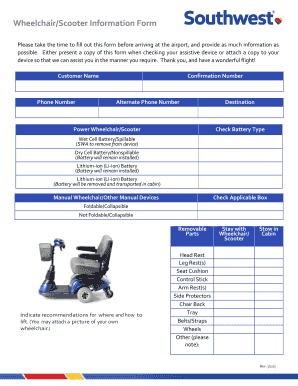
Get Southwest Airlines Wheelchair/scooter Information Form 2015-2025
How it works
-

Open form follow the instructions
-

Easily sign the form with your finger
-

Send filled & signed form or save
How to fill out the Southwest Airlines Wheelchair/Scooter Information Form online
Completing the Southwest Airlines Wheelchair/Scooter Information Form is essential for ensuring a smooth travel experience. This guide provides step-by-step instructions on filling out the form online, making it easier for users to communicate their needs effectively.
Follow the steps to complete your form accurately.
- Locate and press the ‘Get Form’ button to access the Wheelchair/Scooter Information Form. This action will allow you to open the document in an editable format.
- Begin by entering your personal information, including your full name, phone number, alternate phone number, and confirmation number. This ensures that Southwest Airlines can easily contact you if needed.
- Indicate the type of assistive device you will be using by selecting either 'Power Wheelchair/Scooter' or 'Manual Wheelchair/Other Manual Devices'. Make sure to choose the correct category for accurate assistance.
- For power wheelchairs or scooters, check the appropriate battery type you are using. Options include 'Wet Cell Battery/Spillable,' 'Dry Cell Battery/Nonspillable,' or 'Lithium-ion (Li-ion) Battery.' Each option has specific handling instructions, so select carefully.
- If you are using a manual wheelchair or other devices, check the applicable box indicating whether your device is 'Foldable/Collapsible' or 'Not Foldable/Collapsible.'
- Provide details regarding removable parts of your device. Indicate any recommendations for how personnel should lift your wheelchair or scooter, including any specific requests about its handling during transport.
- Specify how you would like your wheelchair or scooter to be stowed while traveling. You may choose from options such as 'Stay with Wheelchair/Scooter' or 'Stow in Cabin.'
- Lastly, review all entered information for accuracy. Ensure that any additional instructions regarding parts like headrests, leg rests, or any unique equipment are clearly noted. You may also attach a picture of your wheelchair for further clarification.
- Once you have filled out the form completely, save your changes. You can then download, print, or share the form as needed. Make sure to have a copy handy when checking your assistive device at the airport.
Complete and submit your Wheelchair/Scooter Information Form online today to ensure a seamless travel experience.
Yes, you can check a wheelchair on Southwest Airlines without any hassle. By completing the Southwest Airlines Wheelchair/Scooter Information Form, you ensure that your wheelchair is taken care of throughout your journey. Informing the airline in advance aids in prompt handling upon check-in and at arrival. Enjoy peace of mind knowing that your wheelchair will be waiting for you at your destination.
Industry-leading security and compliance
-
In businnes since 199725+ years providing professional legal documents.
-
Accredited businessGuarantees that a business meets BBB accreditation standards in the US and Canada.
-
Secured by BraintreeValidated Level 1 PCI DSS compliant payment gateway that accepts most major credit and debit card brands from across the globe.