Loading
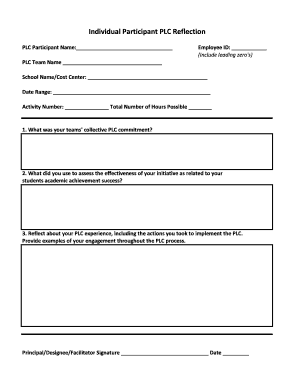
Get Fl Scps Individual Participant Plc Reflection Form
How it works
-

Open form follow the instructions
-

Easily sign the form with your finger
-

Send filled & signed form or save
How to fill out the FL SCPS Individual Participant PLC Reflection Form online
This guide provides clear instructions on how to complete the FL SCPS Individual Participant PLC Reflection Form online. By following these steps, users will be equipped to effectively reflect on their Professional Learning Community experience.
Follow the steps to successfully fill out the form online.
- Click ‘Get Form’ button to obtain the form and open it in the suitable editor.
- In the first field, please enter your name as the PLC participant. Ensure that the name is accurately spelled and complete.
- Next, input your Employee ID, including any leading zeros, to precisely identify your record.
- For the PLC Team Name, provide the official name of your team. This helps in organizing reflections by team.
- In the School Name/Cost Center field, enter the name of your school or cost center. This is important for contextualizing your reflection.
- Record the date range of the PLC activities in the provided space. This section should reflect the time frame relevant to your specific learning community.
- Indicate the Activity Number relevant to your PLC reflection, followed by the total number of hours possible. This keeps a record of your involvement.
- Answer the first reflective question regarding your team's collective PLC commitment in detail. Share thoughts that encapsulate your team's goals.
- For the second question, describe the methods you used to assess the effectiveness of your initiative as related to your students' academic achievement. Specific examples will help clarify your assessment approach.
- Reflect thoroughly about your PLC experience in the final question. Include actions taken, challenges faced, and examples of your engagement throughout the PLC process.
- Lastly, ensure that the Principal, Designee, or Facilitator signs the form and dates it. This final step authenticates your reflection.
- After filling in all necessary fields and ensuring accuracy, save your changes. You may then download, print, or share the completed form as required.
Take action now to complete your FL SCPS Individual Participant PLC Reflection Form online.