How it works
  • Open form

    Open form follow the instructions

  • Easily sign form

    Easily sign the form with your finger

  • Share form

    Send filled & signed form or save

How to fill out the TX HISD AppliTrack Access Request Form online

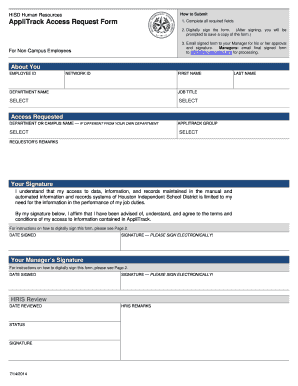
Filling out the TX HISD AppliTrack Access Request Form online is a straightforward process that ensures you can request the necessary access to the information required for your job duties. This guide will provide comprehensive instructions on how to complete the form effectively.

Follow the steps to complete your request form efficiently.

  1. Press the ‘Get Form’ button to access the form and open it for completion.
  2. Fill in all required fields accurately, including your employee ID, network ID, first name, department name, and job title. Ensure all selections are made in the 'Select' dropdowns as needed.
  3. For the access requested section, specify the department or campus name if different from your own department. Choose the appropriate AppliTrack group from the dropdown menu.
  4. In the requestor’s remarks field, provide any additional information or context for your access request. This will assist in processing your application.
  5. Digitally sign the form by clicking the designated signature field. Follow the instructions provided to create or use your Digital ID.
  6. After signing, you will be prompted to save a copy of the signed form. Ensure you save it securely for your records.
  7. Email the signed form to your manager for their approval and additional signature. It is crucial to ensure that the manager is aware of the request to avoid processing delays.
  8. Once the manager has signed the form, they should email the final signed copy to HRIS@houstonisd.org for processing.
  9. After submission, monitor the status of your request and follow up if necessary.

Start your process of filling out the TX HISD AppliTrack Access Request Form online today!

Get form

Experience a faster way to fill out and sign forms on the web. Access the most extensive library of templates available.

Related content

Texas Can Academies (PDF)

username and password, you can access the application form and instructions. The username...

Learn more
selection, placement, induction, and development...

by DN Williams · 2023 — To access the consent form, please copy and paste the following...

Learn more
Questions & Answers

Get answers to your most pressing questions about US Legal Forms API.

Contact support

Is Houston ISD open enrollment?

Yes, Houston Independent School District does have open enrollment periods for families. During these times, parents can apply for their children to attend various schools within the district. This opportunity allows families to choose schools that best fit their needs. For easier management of your child's enrollment process, consider using the TX HISD AppliTrack Access Request Form.

To get your W-2 online, access your employer's payroll website or Employee Self-Service portal. You will typically need to log in with your credentials. Once logged in, look for the tax forms section to download your W-2 directly. This method is fast and efficient, and utilizing the TX HISD AppliTrack Access Request Form makes the entire employment process more convenient.

Escrow in the context of HISD refers to a financial tool used for managing funds during the hiring process, among other functions. It helps in holding funds securely until certain conditions are met. This system ensures that all parties involved are protected during transactions. Understanding how this works can be beneficial as you complete the TX HISD AppliTrack Access Request Form, ensuring a smooth administrative process.

To obtain your HISD W-2, you should first check if it is available online through the Employee Self-Service portal. If you cannot find it there, reach out to the HISD payroll department for assistance. They can provide you with any missing forms. The TX HISD AppliTrack Access Request Form can help you streamline your re-employment process, ensuring you get the documents you need.

If you need your W-2 after termination, your former employer is required to send it to you by January 31st. You can also contact the HR department for assistance. If you did not receive it, be sure to verify that they have your correct address. Utilizing the TX HISD AppliTrack Access Request Form may also help if you are seeking employment documentation.

To login to the Houston Independent School District (HISD) portal, visit the HISD website and click on the login option. Enter your username and password in the respective fields. If you are a new user or have forgotten your login details, the system provides guidance on resetting your password or creating a new account. Having access through the TX HISD AppliTrack Access Request Form simplifies the application process.

Get This Form Now!

Use professional pre-built templates to fill in and sign documents online faster. Get access to thousands of forms.

If you believe that this page should be taken down, please follow our DMCA take down process here.

Get TX HISD AppliTrack Access Request Form