Loading
Get Fl Oxford Adoption Foundation Borrower's Consent Form A And Form B
How it works
-

Open form follow the instructions
-

Easily sign the form with your finger
-

Send filled & signed form or save
How to fill out the FL Oxford Adoption Foundation Borrower's Consent Form A And Form B online
Filling out the FL Oxford Adoption Foundation Borrower's Consent Form A And Form B online is an essential step in your adoption process. This guide will provide a detailed walkthrough for completing these forms accurately and efficiently.
Follow the steps to successfully complete the consent forms.
- Click ‘Get Form’ button to access the forms and open them in your document editor.
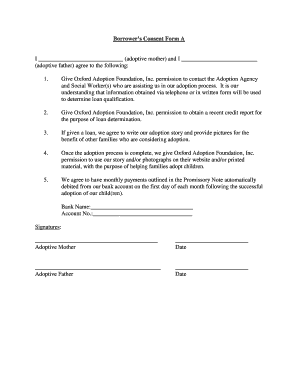
- For Form A, begin by entering the names of the adoptive mother and adoptive father in the designated fields. Ensure the names are spelled correctly.
- In the first agreement statement, confirm your permission to allow Oxford Adoption Foundation, Inc. to contact the Adoption Agency and Social Worker(s) by ticking or marking the appropriate box.
- In the second agreement statement, indicate your consent for Oxford Adoption Foundation, Inc. to obtain a recent credit report for loan determination purposes. This may also require a signature or initial.
- In the third section, commit to writing your adoption story and supplying pictures for the benefit of future families considering adoption. This is a meaningful way to contribute to the adoption community.
- In the fourth section, authorize Oxford Adoption Foundation, Inc. to utilize your story and photographs on their website and printed materials once your adoption process is complete.
- You will need to provide your bank name and account number for the automatic debit of monthly payments as outlined in the Promissory Note. Fill in this information clearly.
- Both adoptive parents must sign and date Form A in the designated signature area, ensuring to use the correct dates.
- For Form B, start by filling in your name in the appropriate field and grant permission to obtain a recent credit report for loan co-signing purposes.
- Provide the names of the adoptive mother and father you are co-signing for in the specific fields.
- Complete your Social Security number and license number accurately to avoid delays.
- Sign and date Form B in the designated sections.
- Review both forms thoroughly for accuracy. Once you are satisfied with the information provided, save your changes. You can then download, print, or share the forms as needed.
Begin completing your forms online today to move forward in your adoption journey.
Find and submit required legal forms. Typically, you will need to provide some proof of this information, such as a child's birth certificate, a marriage license, and a copy of the noncustodial parent's consent. If you hire a lawyer, he or she will take care of this step for you.