We use cookies to improve security, personalize the user experience, enhance our marketing activities (including cooperating with our marketing partners) and for other business use.
Click "here" to read our Cookie Policy. By clicking "Accept" you agree to the use of cookies. Read less
Read more
Accept
Loading
Form preview
  • US Legal Forms
  • Form Library
  • Industry Forms
  • Industry Academic Forms
  • Rutgers University New Brunswick Undergraduate/graduate Diploma Application 2012

Get Rutgers University New Brunswick Undergraduate/graduate Diploma Application 2012-2025

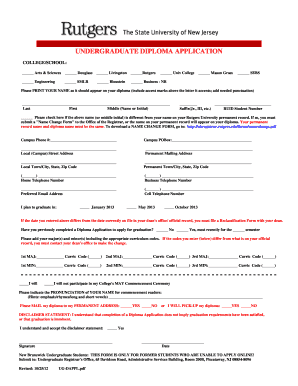
T marks above the letter it accents; add needed punctuation) Last First Middle (Name or Initial) Suffix(Jr., III, etc.) RUID Student Number Please check here if the above name (or middle initial) is different from your name on your Rutgers University permanent record. If so, you must submit a "Name Change Form" to the Office of the Registrar, or the name on your permanen.

How it works

  1. Open form

    Open form follow the instructions

  2. Easily sign form

    Easily sign the form with your finger

  3. Share form

    Send filled & signed form or save

How to fill out the Rutgers University New Brunswick Undergraduate/Graduate Diploma Application online

This guide provides clear and comprehensive instructions for completing the Rutgers University New Brunswick Undergraduate/Graduate Diploma Application online. Follow these steps to ensure that your application information is filled out accurately and submitted correctly.

Follow the steps to complete your diploma application.

  1. Click 'Get Form' button to obtain the form and open it for editing.
  2. Begin by selecting the college or school from which you are graduating. Options include Arts & Sciences, Engineering, Business - NB, and others. Make sure to select the correct option to reflect your academic journey.
  3. Print your name as you would like it to appear on your diploma. This should include any necessary accent marks or punctuation. You will also need to provide your last name, first name, middle initial, and suffix if applicable.
  4. If your name or middle initial is different from what is on your permanent Rutgers University record, check the corresponding box. You will need to submit a 'Name Change Form' to the Office of the Registrar to ensure your diploma reflects the correct name.
  5. Fill in your Campus Phone Number, PO Box, local street address, and both the local and permanent town/city, state, and zip code.
  6. Provide your home, business, and cell telephone numbers, as well as your preferred email address for further communication regarding your diploma.
  7. Indicate your intended graduation date by checking the corresponding box for January, May, or October of the specified year.
  8. Specify whether you have previously completed a Diploma Application for graduation and, if so, for which semester.
  9. List your major(s) and minor(s), along with their corresponding curriculum codes. If these do not match what is on your official record, you must contact your dean's office for any updates.
  10. Indicate your participation in your College's May Commencement Ceremony by checking the relevant box.
  11. Provide the pronunciation of your name to assist commencement readers in addressing you correctly.
  12. Specify how you would like to receive your diploma by checking 'Yes' or 'No' for mailing to your permanent address or for picking it up.
  13. Review the disclaimer statement to understand that completing this application does not guarantee graduation. Confirm that you accept this disclaimer by checking 'Yes.'
  14. Finally, provide your signature and the date to complete the application process.
  15. Once you have filled out all sections, save your changes and choose to download, print, or share the completed form, as necessary.

Take the necessary steps to complete and submit your diploma application online today!

Get form

Experience a faster way to fill out and sign forms on the web. Access the most extensive library of templates available.
Get form

Related content

Rutgers University-New Brunswick - IPEDS
Does your institution have an open admission policy for all or most entering first-time...
Learn more
Graduation and Diploma Applications - Scarlet Hub
Graduation and Diploma Applications · Graduation Dates for the 2025-2026 Academic Year ·...
Learn more
Rutgers University - NamuWiki
Sep 28, 2025 — USA New Brunswick, Newark, Newark, and Camden, New Jersey , have...
Learn more

Related links form

AT&T Nevada Lifeline Application AT&T Louisiana Lifeline Application Application For Lifeline Lifeline ... 1 AT&T Tennessee Lifeline Application Application For Lifeline ... AT&T Wholesale Agreement

Questions & Answers

Get answers to your most pressing questions about US Legal Forms API.

Contact support

After graduation, it usually takes about six to eight weeks to receive your diploma at Rutgers University New Brunswick. Processing times may vary due to factors such as administrative processing and peak graduation periods. Keeping track of your diploma's status can help you stay informed once you submit your Rutgers University New Brunswick Undergraduate/Graduate Diploma Application.

Yes, you can have your diploma mailed directly to you after completing the Rutgers University New Brunswick Undergraduate/Graduate Diploma Application process. Ensure that your mailing address is updated in the system to avoid delivery issues. This option is convenient for those who may not be able to attend the graduation ceremony in person.

The average graduating GPA at Rutgers University New Brunswick varies by program, but generally, a GPA of 2.0 is considered the minimum for graduation. Many programs encourage a higher GPA to ensure students meet their professional and academic goals. Always check with your specific department for detailed requirements related to your field of study.

Rutgers University New Brunswick usually holds its graduation ceremonies in May for the spring semester and occasionally in January for winter graduates. This timing allows students to celebrate their accomplishments surrounded by family and friends. Planning ahead ensures you can make travel arrangements to attend the festivities.

Graduation ceremonies for Rutgers New Brunswick typically take place on campus, specifically at the Rutgers Athletic Center or various outdoor venues, depending on the weather and number of graduates. Families and friends gather to celebrate the achievements of the graduating class. For more detailed information, check the official Rutgers graduation webpage closer to the ceremony date.

To graduate from Rutgers University New Brunswick, you need to complete all required coursework, meet your credit requirements, and submit any necessary documentation through the Undergraduate/Graduate Diploma Application. It’s crucial to consult your academic advisor to ensure you are on track with your graduation planning.

Generally, you can expect your diploma to be mailed within four to six weeks after the graduation ceremony at Rutgers University New Brunswick. This timeline allows for the processing of your Undergraduate/Graduate Diploma Application and ensures all requirements are confirmed. Keep in touch with the administration if you have any concerns about the delivery process.

The requirements for admission to Rutgers University New Brunswick typically include a completed application, payment of application fees, academic transcripts, and standardized test scores. Specific programs may have additional prerequisites or criteria. Familiarizing yourself with these requirements will help you prepare a comprehensive Undergraduate/Graduate Diploma Application.

To apply to Rutgers University New Brunswick, a minimum GPA of 3.0 on a 4.0 scale is generally recommended for undergraduate applicants. Graduate programs may have higher GPA requirements, varying by field of study. It’s beneficial to verify specific program criteria when preparing your Diploma Application.

Admissions at Rutgers University New Brunswick can be competitive, particularly for certain programs. The acceptance rates vary by academic department, so prospective students should maintain strong grades and test scores. Additionally, a well-prepared Undergraduate/Graduate Diploma Application can enhance your chances for acceptance.

Get This Form Now!

Use professional pre-built templates to fill in and sign documents online faster. Get access to thousands of forms.
Get form
If you believe that this page should be taken down, please follow our DMCA take down processhere.

Industry-leading security and compliance

US Legal Forms protects your data by complying with industry-specific security standards.
  • In businnes since 1997
    25+ years providing professional legal documents.
  • Accredited business
    Guarantees that a business meets BBB accreditation standards in the US and Canada.
  • Secured by Braintree
    Validated Level 1 PCI DSS compliant payment gateway that accepts most major credit and debit card brands from across the globe.
Get Rutgers University New Brunswick Undergraduate/Graduate Diploma Application
Get form
Form Packages
Adoption
Bankruptcy
Contractors
Divorce
Home Sales
Employment
Identity Theft
Incorporation
Landlord Tenant
Living Trust
Name Change
Personal Planning
Small Business
Wills & Estates
Packages A-Z
Form Categories
Affidavits
Bankruptcy
Bill of Sale
Corporate - LLC
Divorce
Employment
Identity Theft
Internet Technology
Landlord Tenant
Living Wills
Name Change
Power of Attorney
Real Estate
Small Estates
Wills
All Forms
Forms A-Z
Form Library
Customer Service
Terms of Service
Privacy Notice
Legal Hub
Content Takedown Policy
Bug Bounty Program
About Us
Help Portal
Legal Resources
Blog
Affiliates
Contact Us
Delete My Account
Site Map
Industries
Forms in Spanish
Localized Forms
State-specific Forms
Forms Kit
Legal Guides
Real Estate Handbook
All Guides
Prepared for You
Notarize
Incorporation services
Our Customers
For Consumers
For Small Business
For Attorneys
Our Sites
US Legal Forms
USLegal
FormsPass
pdfFiller
signNow
airSlate WorkFlow
DocHub
Instapage
Social Media
Call us now toll free:
+1 833 426 79 33
As seen in:
  • USA Today logo picture
  • CBC News logo picture
  • LA Times logo picture
  • The Washington Post logo picture
  • AP logo picture
  • Forbes logo picture
© Copyright 1997-2025
airSlate Legal Forms, Inc.
3720 Flowood Dr, Flowood, Mississippi 39232
Form Packages
Adoption
Bankruptcy
Contractors
Divorce
Home Sales
Employment
Identity Theft
Incorporation
Landlord Tenant
Living Trust
Name Change
Personal Planning
Small Business
Wills & Estates
Packages A-Z
Form Categories
Affidavits
Bankruptcy
Bill of Sale
Corporate - LLC
Divorce
Employment
Identity Theft
Internet Technology
Landlord Tenant
Living Wills
Name Change
Power of Attorney
Real Estate
Small Estates
Wills
All Forms
Forms A-Z
Form Library
Customer Service
Terms of Service
Privacy Notice
Legal Hub
Content Takedown Policy
Bug Bounty Program
About Us
Help Portal
Legal Resources
Blog
Affiliates
Contact Us
Delete My Account
Site Map
Industries
Forms in Spanish
Localized Forms
State-specific Forms
Forms Kit
Legal Guides
Real Estate Handbook
All Guides
Prepared for You
Notarize
Incorporation services
Our Customers
For Consumers
For Small Business
For Attorneys
Our Sites
US Legal Forms
USLegal
FormsPass
pdfFiller
signNow
airSlate WorkFlow
DocHub
Instapage
Social Media
Call us now toll free:
+1 833 426 79 33
As seen in:
  • USA Today logo picture
  • CBC News logo picture
  • LA Times logo picture
  • The Washington Post logo picture
  • AP logo picture
  • Forbes logo picture
© Copyright 1997-2025
airSlate Legal Forms, Inc.
3720 Flowood Dr, Flowood, Mississippi 39232